
If you use a ResMed AirSense 11, you know how important it is to keep your machine working smoothly every night. But what do you do when it starts acting up or won’t respond the way it should?
Knowing how to reset your AirSense 11 can save you time, frustration, and even a trip to the repair shop. In this guide, you’ll learn simple, step-by-step methods to reset your machine safely and effectively. Whether you’re dealing with a frozen screen, pressure issues, or just want to refresh your device, this article will give you the confidence to fix it yourself.
Keep reading to get your AirSense 11 back on track and enjoy a better night’s sleep.

Initial Power Checks
Before attempting any reset on your ResMed AirSense 11, start with the initial power checks. These steps help identify basic issues that might stop your device from turning on. Simple power problems can often be fixed quickly without needing advanced troubleshooting.
Checking the power supply ensures your machine receives the necessary electricity to function. This process involves verifying connections, inspecting the power cord for damage, and testing the power button response. These checks are essential for safe and proper device operation.
Verify Power Connection
Confirm that the power cord is securely plugged into the AirSense 11. Check the connection at the wall outlet or power strip as well. Test the outlet by plugging in another device to ensure it works. Loose connections or faulty outlets are common causes of power issues.
Inspect Power Cord
Examine the entire power cord carefully. Look for cuts, frays, or exposed wires that could interrupt power flow. Replace the cord immediately if you see any damage. Using a damaged cord can be unsafe and may harm your device.
Press Power Button
Press the power button firmly and observe the screen. A quick response usually means the device is receiving power. If the screen stays blank or the machine does not start, it might indicate a hardware problem. Try pressing the button a few times to confirm.
Soft Reset Steps
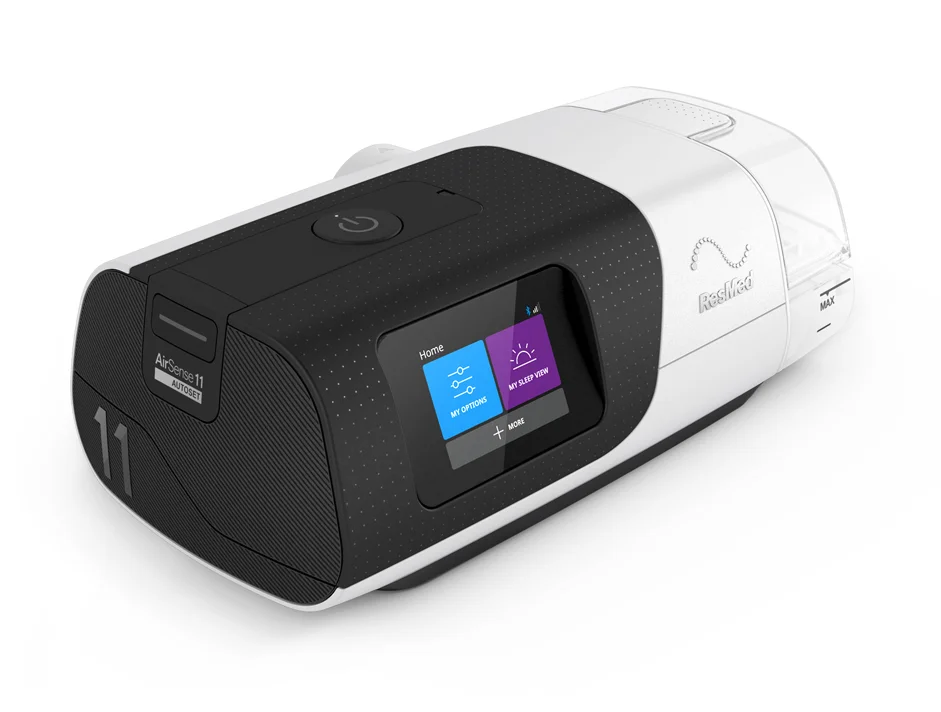
Performing a soft reset on your ResMed AirSense 11 can resolve minor issues quickly. This simple process refreshes the device without erasing settings or data. Follow these soft reset steps carefully to get your machine back to normal operation.
Unplug And Wait
First, unplug the power cord from the device. Leave it disconnected for at least 30 seconds. This pause allows the machine’s internal system to clear temporary errors. After waiting, plug the power cord back in firmly.
Tap Screen To Wake
Next, gently tap the screen to wake the device. The screen should light up and show the main menu. If the screen stays blank, try tapping a few more times or press the power button once. This action restarts the device’s interface.
Drain Water From Humidifier
Check the humidifier chamber for any water inside. Remove the chamber and pour out any water collected. Emptying the water helps prevent sensor errors caused by excess moisture. After draining, securely reattach the chamber to the machine.
Hard Reset Method
The hard reset method restores the ResMed AirSense 11 to its original factory settings.
This method clears all user data and custom settings saved on the device.
It is useful for troubleshooting serious errors or preparing the device for a new user.
Prepare The Device
Switch off the AirSense 11 by pressing the power button.
Unplug the power cord from the wall outlet and the device.
Wait at least 30 seconds before reconnecting to power.
Initiate The Hard Reset
Press and hold the power button and the home button simultaneously.
Keep holding both buttons for about 10 seconds until the screen turns off.
Release the buttons and wait for the device to restart automatically.
Confirm The Reset
Once the device restarts, it shows the welcome screen.
Check that all previous settings are erased.
The AirSense 11 is now back to factory defaults and ready to set up again.
Common Error Codes
Understanding common error codes on your ResMed AirSense 11 helps diagnose issues fast. These codes appear on the screen and indicate specific problems. Knowing their meaning guides you to the right solution. This saves time and avoids unnecessary repairs. Below are common error codes related to key components of the device.
Blower Motor Issues
Blower motor errors show when the device struggles to move air. The motor might be blocked or worn out. Dust or debris can cause the motor to overheat. The machine may stop working or lose pressure. Check for unusual noises or vibrations. Cleaning or replacing the motor often fixes this error.
Pressure Sensor Failures
Pressure sensor errors occur if the sensor sends wrong data to the machine. This sensor controls the air pressure delivered during therapy. Faulty readings affect therapy quality. Causes include sensor damage, loose connections, or moisture. Resetting the device may clear the error temporarily. Persistent errors require sensor inspection or replacement.
Mainboard Errors
Mainboard errors point to problems with the device’s main circuit board. This board controls all functions of the machine. Errors may cause the device to freeze or shut down unexpectedly. Electrical faults or water damage can trigger these errors. Professional repair or board replacement is usually needed. Avoid opening the device yourself to prevent more damage.
Troubleshooting Tips
Troubleshooting your ResMed AirSense 11 can solve many common issues without needing expert help. Follow simple steps to identify and fix problems quickly. These tips focus on power and connectivity, two common trouble spots. Try these methods before calling support to save time and effort.
Try Different Power Adapter
Use another compatible power adapter to check if the original one is faulty. Power issues often cause the device to stop working or reset incorrectly. A different adapter can reveal if power supply is the problem. Avoid using adapters not made for the AirSense 11 to prevent damage.
Check For Internal Damage
Inspect the device carefully for any signs of physical damage. Cracks, dents, or loose parts inside can affect performance. Open the device only if you have experience or guidance to avoid voiding the warranty. Internal damage often needs professional repair or replacement.
Disable Airplane Mode
The AirSense 11 has an airplane mode that turns off wireless features. Make sure it is disabled to allow normal device communication. Wireless connection problems can cause errors or prevent data syncing. Disabling airplane mode can restore full functionality quickly.
When To Contact Support
Knowing when to contact support for your ResMed AirSense 11 is important. Some problems need expert help beyond simple resets. Recognizing the signs can save time and avoid frustration. Below are key situations when reaching out to support is the best step.
Persistent Power Issues
Power problems may cause your device not to turn on or shut off unexpectedly. Check the power cord and outlet first. If the issue continues, the device might have an internal fault. Persistent power failures need professional diagnosis to prevent damage or therapy interruption.
Unresponsive Buttons
Buttons that do not respond can affect your ability to operate the machine. This may happen after resets or power cycles. If the buttons remain unresponsive, internal hardware or software could be the cause. Support can guide you through troubleshooting or arrange repairs if needed.
Warranty And Repairs
Your ResMed AirSense 11 comes with a warranty that covers many faults. Contact support to check if your device qualifies for repair or replacement. Attempting repairs yourself may void the warranty. Use authorized service centers to keep your coverage intact and ensure proper care.

Frequently Asked Questions
Does Resmed Have A Reset Button?
ResMed devices do not have a dedicated reset button. Restart the machine by powering it off, then on. For issues, unplug and reconnect the power. Contact support if problems persist.
Does Resmed Airsense 11 Automatically Adjust Pressure?
The ResMed AirSense 11 uses AutoSet technology to automatically adjust pressure based on your breathing needs throughout the night. It increases pressure only when necessary to keep your airway open, ensuring personalized and comfortable therapy. Features like AutoRamp enhance comfort by starting at a lower pressure.
Why Is My Resmed Airsense 11 Not Turning On?
Check that the power cord and adapter are securely connected and the outlet works. Press the power button firmly. Inspect for cord damage or water inside. Try a different adapter if available. Persistent issues may indicate internal hardware problems needing professional repair.
What Are Common Airsense 11 Error Codes?
Common AirSense 11 error codes include power failures, humidifier issues, mask leaks, data transfer errors, and sensor malfunctions. Check connections and water chamber to resolve them.
How Do I Reset The Resmed Airsense 11 Device?
Press and hold the dial button for 10 seconds until the screen goes blank. Release to restart.
Conclusion
Resetting your ResMed AirSense 11 can solve many common issues quickly. Follow the steps carefully for a smooth reset experience. Regular resets help keep your device working properly. Always check connections and power before resetting. If problems continue, contact support for help.
Taking simple actions can improve your therapy and comfort. Keep your device clean and maintained for best results. A quick reset is often all your AirSense 11 needs.