
If you’ve ever seen that stubborn tire pressure warning light flicker on your Honda Civic’s dashboard, you know how distracting—and sometimes confusing—it can be. But here’s the good news: resetting your Civic’s TPMS (Tire Pressure Monitoring System) is easier than you think.
Whether you just inflated your tires or rotated them, knowing how to reset your TPMS will save you time, avoid unnecessary trips to the mechanic, and keep your drive smooth and safe. In this guide, you’ll learn simple, step-by-step methods to reset your Honda Civic TPMS using your car’s infotainment system or the manual reset button.
Keep reading, and you’ll have that warning light off in no time.
Tpms Basics
The Tire Pressure Monitoring System (TPMS) plays a vital role in your Honda Civic. It helps keep your tires at the right pressure for safe driving. Understanding TPMS basics makes it easier to maintain your car and avoid issues.
TPMS alerts inform you about tire pressure problems early. This system improves safety and fuel efficiency. Knowing how TPMS works helps you respond quickly to warnings.
What Tpms Does
TPMS monitors the air pressure inside your tires. It uses sensors mounted on each wheel. These sensors send pressure data to your car’s computer. If the pressure falls below a set level, TPMS triggers a warning light on the dashboard.
Maintaining proper tire pressure extends tire life. It also improves fuel economy and vehicle handling. TPMS helps prevent accidents caused by under-inflated tires.
Common Tpms Alerts
The most common TPMS alert is the low tire pressure light. It appears when one or more tires need air. Another alert may signal a sensor malfunction. This happens if a sensor battery dies or loses connection.
Some alerts warn of rapid pressure loss. This could mean a flat tire or leak. Ignoring TPMS warnings can cause tire damage or unsafe driving conditions. Always check your tires promptly when a TPMS alert appears.

Check Tire Pressure
Checking tire pressure is the first step to reset the Honda Civic TPMS.
Proper tire inflation keeps your vehicle safe and the TPMS working well.
Low or uneven pressure can cause the TPMS warning light to stay on.
Find Recommended Psi
Look inside the driver’s door jamb for the recommended PSI.
This number shows the correct air pressure for your tires.
Use this PSI value to avoid over or under-inflation.
Inflate All Tires
Use an air pump to inflate each tire to the recommended PSI.
Check the pressure with a reliable tire gauge after inflating.
Adjust the air until each tire matches the recommended PSI exactly.
Include Spare Tire
Don’t forget to check the spare tire’s pressure too.
Many drivers overlook the spare, but it needs proper inflation.
Inflate the spare to its specified PSI for safety and TPMS accuracy.
Reset Using Infotainment
Resetting the Tire Pressure Monitoring System (TPMS) on a Honda Civic using the infotainment system is quick and simple. This method works for most newer models with a touchscreen. Start by making sure all tires have the right pressure. The correct PSI is on the driver’s door frame. Then, you can easily reset TPMS through the vehicle’s settings. Follow the steps below for a smooth reset process.
Access Vehicle Settings
Turn on the ignition without starting the engine. On the touchscreen, tap the “Settings” icon. Scroll down and select “Vehicle.” This menu controls various car systems including TPMS. Take your time to find the correct option.
Select Tpms Calibration
Inside the Vehicle menu, look for “TPMS Calibration.” Tap it to open. This option lets you start the reset process. If you do not see this, check your car manual for the exact location. The system may name it slightly differently.
Start Calibration Process
Tap “Calibrate” or “Initialize” to begin. The screen will confirm the reset has started. Do not turn off the car now. The system needs a few minutes to learn the new tire pressures. Wait for the confirmation message on the screen.
Drive To Complete Reset
Drive your Honda Civic for about 10 minutes at speeds over 20 mph. This helps the TPMS sensors adjust and register the new tire pressures. After driving, the TPMS light should turn off. If it stays on, check the tire pressures again or repeat the reset steps.

Reset Using Steering Wheel
Resetting the Honda Civic TPMS using the steering wheel is simple and quick. This method lets you recalibrate the tire pressure monitoring system right from your driver’s seat. Follow these easy steps to reset and update your TPMS without extra tools or visits to the shop.
Open Customize Settings
Start by turning the ignition to the ON position. Use the steering wheel buttons to access the main menu. Scroll to find the “Customize Settings” option and select it. This menu holds the vehicle’s system settings you can adjust.
Find Tpms Calibration
Inside Customize Settings, look for “TPMS Calibration.” This option controls the tire pressure system reset. Highlight it using the steering wheel controls and press the select button. It prepares the system for resetting.
Initialize Reset
Choose the “Initialize” option to start the reset process. Confirm your selection when prompted. This command clears old tire pressure data and sets the system to learn new tire pressures.
Drive To Update System
After initializing, drive your Honda Civic at a moderate speed for about 10 minutes. The TPMS system will update and recalibrate during this drive. The warning light should turn off once the system completes the update.
Manual Tpms Reset Button
The manual TPMS reset button offers a simple way to reset the tire pressure monitoring system on your Honda Civic. This method works well for older models without touchscreen controls. Using the reset button helps clear the warning light after you inflate your tires to the right pressure. Follow the steps below carefully to reset the system manually.
Locate Reset Button
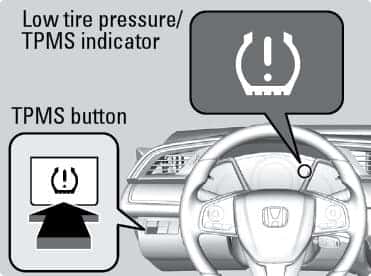
Find the TPMS reset button inside your Honda Civic. It is usually under the steering wheel or near the glove box. Check the owner’s manual if you cannot spot it quickly. The button is small and may be labeled “TPMS” or “Reset.”
Turn Ignition On
Turn the ignition key to the ON position without starting the engine. This powers the car’s electronics and allows the reset process to begin. Keep the car in park during this step for safety.
Press And Hold Button
Press and hold the reset button for about 3 to 5 seconds. You should feel a slight click or see a light blink. Holding the button activates the TPMS sensor reset sequence. Release the button once you see the signal.
Confirm Light Blinks
Watch the TPMS warning light on the dashboard. It will blink slowly for a few seconds. This blinking means the system is resetting and relearning the tire pressures. If the light does not blink, repeat the pressing step.
Drive To Finalize
Drive your Honda Civic for at least 10 minutes at a speed above 30 mph. This allows the system to fully recalibrate and detect the correct tire pressures. The TPMS light should turn off after driving if the reset was successful.
Hard Reset Method
The hard reset method is a reliable way to fix the TPMS light on a Honda Civic. It clears the system by cutting power and restarting the sensors. This method works when normal reset options fail. Follow the steps carefully to ensure a full reset and accurate tire pressure readings.
Park And Power Off
Park your Honda Civic in a safe, flat area. Turn off the engine completely. Remove the key and make sure all lights and electronics are off. This step prevents any power flow during the reset process.
Disconnect Battery
Open the hood and locate the car battery. Use a wrench to disconnect the negative battery terminal first. Wait for about 15 minutes to let the car’s computer fully shut down. This pause clears stored data in the TPMS system.
Reconnect Battery
Reconnect the negative battery terminal securely. Tighten the connection with the wrench to prevent loose contact. Close the hood and enter the car. Turn the ignition to the “On” position without starting the engine. This action powers up the system fresh.
Reinflate Tires
Check each tire’s pressure using a reliable gauge. Inflate all tires to the recommended PSI found on the driver’s door jamb. Correct tire pressure is key to resetting the TPMS sensor properly. Drive the car for a short distance to allow sensors to recalibrate.
Troubleshooting Tips
Troubleshooting your Honda Civic TPMS can save time and avoid unnecessary repairs. Some common issues cause the TPMS light to stay on. Simple checks and fixes often resolve these problems. Follow the tips below to diagnose and fix TPMS errors effectively.
Check For Sensor Damage
Inspect each tire’s TPMS sensor carefully. Sensors can get damaged from road debris or rough tire changes. Look for cracks or corrosion on the sensor. Damaged sensors may not send signals to your car’s computer. Replace any faulty sensor to restore proper function.
Replace Dead Batteries
TPMS sensors use small batteries that lose power over time. Dead batteries stop sensors from working correctly. Battery life usually lasts 5 to 10 years. If the TPMS light stays on, a sensor battery might be dead. Replace the battery or the entire sensor to fix the issue.
Visit A Professional
Some TPMS problems require special tools and expertise. A professional mechanic can diagnose sensor faults and system errors. They have the equipment to reset the TPMS accurately. Visit a certified shop if basic troubleshooting does not work. This ensures safety and proper repair.
Frequently Asked Questions
How Do I Reset The Tpms On My Honda Civic?
Inflate all tires to the recommended PSI. Turn ignition on without starting. Use infotainment: Settings > Vehicle > TPMS Calibration > Calibrate, or steering wheel: Menu > Customize Settings > TPMS Calibration > Initialize. Drive a few minutes to complete reset and turn off the TPMS light.
How Do You Manually Reset Tpms?
Inflate all tires to the recommended PSI. Turn ignition to “On” without starting the engine. Press and hold the TPMS reset button until the light blinks three times, then release. Drive the vehicle for several minutes to complete the reset and turn off the TPMS warning light.
Where Is The Tpms Reset Button Located On A Honda?
The TPMS reset button on a Honda is usually located under the steering wheel, inside the glove box, or in the center console. Press and hold it until the TPMS light blinks three times, then release. Inflate tires to the correct PSI before resetting.
How To Reset Tpms On A 2013 Honda Civic?
Inflate all tires to the recommended PSI. Turn ignition on without starting. Use the infotainment screen or steering wheel menu to select TPMS calibration and reset. Drive for several minutes to complete recalibration and turn off the TPMS light.
How Do I Reset The Tpms On My Honda Civic?
Inflate all tires to the correct PSI, then use the infotainment or steering wheel menu to calibrate TPMS.
Conclusion
Resetting the Honda Civic TPMS is simple and quick. Always check tire pressure first. Use the infotainment screen or steering wheel buttons to reset. After resetting, drive a short distance to let the system recalibrate. This keeps your tires safe and your warning light off.
Regular TPMS checks help avoid tire problems and improve car safety. Follow these easy steps to maintain your Honda Civic’s tire pressure system.