
If you use a ResMed AirSense 10, you know how important it is to keep it running smoothly for a good night’s sleep. But what do you do when your machine acts up or needs a fresh start?
Resetting your AirSense 10 can fix common glitches, refresh settings, and help your therapy stay on track. In this guide, you’ll learn exactly how to reset your device step-by-step—whether it’s a simple power cycle or a full factory reset. Keep reading, and you’ll be able to troubleshoot your machine confidently, so nothing stands between you and restful sleep.
Reset Basics
Resetting your Resmed Airsense 10 is a simple process that helps fix common issues. It clears minor glitches and restores normal function. Knowing the reset basics ensures smooth device operation.
There are two main types of resets: power cycle reset and factory reset. Each serves different purposes. Choose the right reset type based on the problem you face.
Power Cycle Reset
This reset solves minor problems like screen freezes or connectivity errors. First, unplug the power cord from the machine and the wall outlet. Wait for about 30 seconds. Then, reconnect the power cord and turn the machine back on. This simple step refreshes the device without deleting your settings or data.
Factory Reset Steps
A factory reset erases all your settings and stored data. Use this only if the power cycle reset does not fix the issue. To perform a factory reset, go to the Settings menu on your device. Scroll to the option labeled “Factory Reset” or “Reset Device.” Select it and confirm your choice. The device will reboot and return to its original factory settings. You must re-enter date, time, and therapy preferences after this reset.
When To Reset
Reset your Airsense 10 if it behaves unusually or stops responding. Use the power cycle reset for minor glitches or slow performance. Try the factory reset if problems continue after power cycling. A factory reset helps when software errors block normal use. Avoid frequent resets to protect your settings and data. Regular maintenance and proper use reduce the need for resets.
Accessing Settings
Accessing the settings on your Resmed Airsense 10 is the first step to customizing your therapy or performing a reset. The machine’s menus provide various options, from comfort features to clinical adjustments. Understanding how to navigate these menus helps you manage your device effectively.
Navigating Menus
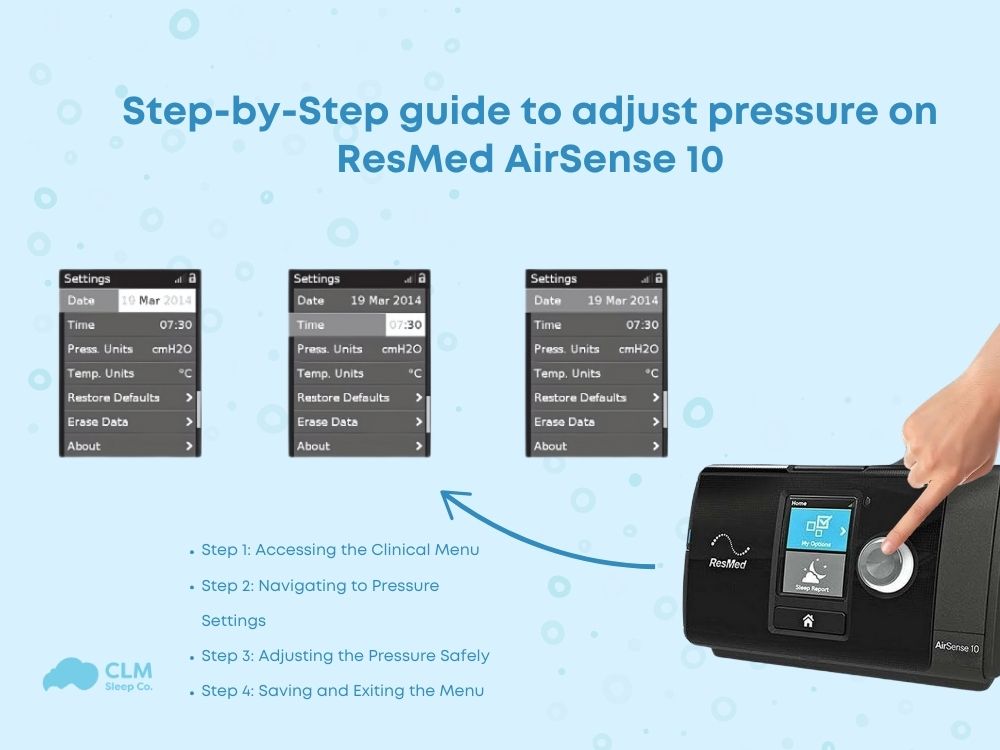
The Airsense 10 uses a simple dial and screen system. Turn the dial to scroll through options. Press the dial to select a menu or setting. Use this method to move between screens and adjust settings easily.
The main screen shows your therapy status. From there, access different menus for more options. Navigation is intuitive, designed for quick access to important features.
My Options Menu
This menu contains user-adjustable comfort settings. From the Home screen, press the dial to open “My Options.” Here, you can change Ramp Time, Humidity Level, and Tube Temperature.
If you have a heated tube, select “Climate Ctrl” to adjust humidity and temperature manually. These settings improve comfort during therapy and help reduce dryness.
Clinical Menu Access
The clinical menu holds advanced settings for therapy adjustments. Accessing it requires entering a secret code. To open it, go to “Settings” using the dial, then press and hold the dial for several seconds.
Inside this menu, you can change therapy mode, pressure settings, and mask type. Only adjust these if you understand their effects. Incorrect changes may reduce therapy effectiveness or cause discomfort.
Adjusting Pressure
The Comfort Settings on your Resmed Airsense 10 enhance your therapy experience. These settings let you adjust features that improve your sleep. You can control the ramp time, humidity, and tube temperature. Each setting helps you feel more comfortable during the night.
Ramp Time Adjustments
Ramp time lets the pressure rise slowly when you start therapy. This helps you fall asleep easier. You can set the ramp time from 0 to 45 minutes. Adjust it by turning the dial on the Home screen. Choose a longer ramp if you need a gentler start.
Humidity Level Control
Humidity level controls the amount of moisture in the air you breathe. Higher humidity stops dryness in your nose and throat. You can change the humidity from 0 (off) to 8 (highest). Set it based on the room temperature and your comfort.
Tube Temperature Settings
Tube temperature controls the warmth of the air in the tubing. It prevents condensation, also called rainout, in the tube. Adjust this setting if your tube feels too cold or wet. You can set the temperature from 1 to 5, with 5 being the warmest.

Comfort Settings
Mid-therapy shutdowns with the ResMed AirSense 10 can interrupt your sleep and affect therapy effectiveness. Understanding key factors helps reduce these interruptions. Small adjustments make a big difference in preventing shutdowns and improving comfort.
This section covers essential tips to handle mid-therapy shutdowns and keep your device running smoothly.
Humidifier Placement
Place the humidifier on a flat, stable surface. Avoid tilting or moving it during therapy. A steady position prevents water spills and sensor errors. Ensure the water chamber is filled correctly and not overfilled. Proper placement helps maintain consistent humidification and device function.
Smartstart Settings
SmartStart turns the device on and off automatically with your breath. Check if this feature is enabled in your settings. Sometimes, adjusting SmartStart sensitivity stops unexpected shutdowns. A balanced setting allows smooth therapy starts and ends without errors.
Filter Maintenance
Clean or replace the air filter regularly. A dirty filter blocks airflow and strains the machine. Check the filter every week for dust or debris. Replace it at least every six months or sooner if needed. Proper filter care keeps the machine running well and avoids shutdowns.
Mask Fit Check
A poor mask fit can cause leaks, which may trigger machine shutdowns. Ensure the mask seals well without being too tight. Adjust straps and cushions for comfort and effectiveness. Perform a quick mask fit check before therapy to reduce leaks and device errors.
Troubleshooting Power Issues
Knowing when to seek help with your Resmed Airsense 10 is vital. Some issues need more than a simple reset. Ignoring signs can worsen problems. Timely professional support keeps therapy safe and effective.
Power Supply Failures
Power problems often cause machine failures. Check power cords for damage or loose plugs. If the machine does not turn on after resetting, seek help. Faulty power supplies can harm the device or stop therapy.
Machine Age Concerns
Older machines may show wear and tear. Parts can fail or become less reliable over time. If your Airsense 10 is several years old and resets do not fix issues, consider professional inspection. Replacing old machines ensures consistent therapy quality.
Persistent Problems
Repeated errors or alarms after resets indicate deeper issues. Problems like pressure errors or sensor faults need expert diagnosis. Avoid using the machine if problems persist. Contact your supplier or healthcare provider for support.

Frequently Asked Questions
How Do I Manually Set My Resmed Airsense 10?
To manually set your ResMed AirSense 10, press the dial from the Home screen. Select “My Options” to adjust humidity, ramp time, and tube temperature. For pressure settings, enter the Clinical Menu via Settings. Adjust therapy mode and pressure carefully to avoid discomfort or ineffective therapy.
How To Restart Resmed Machine?
Unplug the ResMed machine from power. Wait 30 seconds, then plug it back in. Press the power button to restart.
Why Did My Airsense 10 Stop Working?
Your AirSense 10 may stop working due to power issues, loose connections, or faulty power supply. Check all connections and power source. Try unplugging and restarting the device. Inspect the humidifier and settings for errors. Contact support if problems persist.
What Is The Life Expectancy Of A Resmed Airsense 10?
The ResMed AirSense 10 typically lasts 3 to 5 years with proper care and regular maintenance. Regular cleaning extends its lifespan.
How Do I Reset My Resmed Airsense 10 Device?
Unplug the power cord, wait 30 seconds, then plug it back in to reset the device.
Conclusion
Resetting your ResMed AirSense 10 can solve many common issues quickly. Remember to follow each step carefully to avoid errors. Simple resets fix minor glitches without losing your settings. For deeper resets, back up important data first. Keep your machine clean and check connections regularly.
Proper maintenance helps your therapy stay effective and comfortable. Stay calm and patient during the process; it’s usually straightforward. Your AirSense 10 will be ready to support restful sleep again.