
If your LiftMaster Remote 893Lm isn’t working the way it should, resetting it might be the quick fix you need. Whether your remote stopped responding or you want to sync it with a new garage door opener, learning how to reset it is easier than you think.
In this guide, you’ll discover simple, step-by-step instructions to reset your LiftMaster Remote 893Lm so it works perfectly every time. Stick with us, and you’ll have your remote programmed and ready to go in no time—no frustration, no guesswork. Ready to take control of your garage door again?
Let’s get started!
Locate The Learn Button
Locating the Learn button on your LiftMaster remote 893LM is the first step in resetting or programming your device. This button allows the garage door opener to recognize and sync with your remote. Knowing exactly where to find it helps you avoid confusion and speeds up the process.
Find The Motor Unit
The Learn button is on the garage door opener’s motor unit. This unit hangs from the ceiling inside your garage. Look for a rectangular box attached to the ceiling. It is usually near the garage door’s track. The motor unit powers the door and controls the remote signals.
Identify Button Color And Antenna
The Learn button is small and colored. Common colors are yellow, green, orange, red, or purple. It often sits near a thin antenna wire. The antenna looks like a short wire hanging from the motor unit. The button’s color helps you spot it quickly. The antenna wire sends and receives remote signals.
Activate Learn Mode
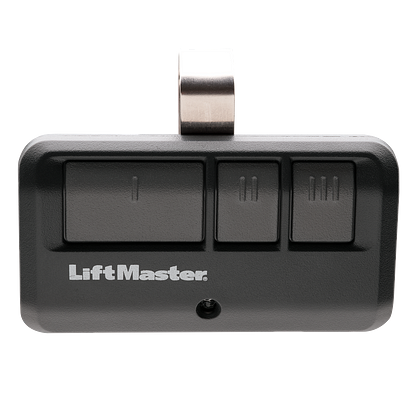
Activating Learn Mode is the first step in resetting your LiftMaster Remote 893Lm. This mode allows the garage door opener to recognize and sync with your remote. Without entering Learn Mode, the remote cannot pair with the opener. Follow simple steps to activate it and prepare your remote for programming.
Press And Release The Learn Button
Locate the Learn button on your garage door opener motor. This button is usually on the back or side of the unit. Press it once and release it quickly. Do not hold it down. Pressing the button activates the Learn Mode, allowing the opener to receive new remote signals.
Observe Led Indicator
After pressing the Learn button, watch the LED light near it. The light will turn on or start blinking. This signals that the opener is in Learn Mode. The light usually stays on for about 30 seconds. Within this time, you must press the button on your remote to complete pairing.
Program The Remote
Programming your LiftMaster Remote 893LM ensures it communicates properly with your garage door opener. This process pairs the remote with the opener’s receiver. Follow these simple steps to program your remote effectively. The pairing process is quick and requires no special tools.
Press Remote Button To Pair
Locate the “Learn” button on your garage door opener motor. It usually has a colored cap and sits near the antenna wire. Press and release the “Learn” button. Within 30 seconds, press and hold the button on your remote. Hold it until the garage door opener light blinks or you hear a click. This signals the remote is paired successfully.
Confirm Pairing With Light Or Sound
Watch for the garage door opener’s light to blink after pressing the remote button. Some models emit a clicking sound to confirm pairing. This feedback means your remote is now linked to the opener. Test the remote by pressing its button again. The door should respond by opening or closing. If not, repeat the steps to ensure proper pairing.

Clear All Remote Codes
Clearing all remote codes from your LiftMaster remote 893LM resets the device to factory settings. This step removes all programmed remotes linked to your garage door opener. It is useful when you want to secure your garage or when remotes stop working properly. Clearing codes ensures only authorized remotes can control your garage door.
Follow simple steps to erase all stored codes safely. This process requires access to the garage door opener’s motor unit. After clearing, you must reprogram your remotes to regain control.
Locate And Press Learn Button To Erase
Find the Learn button on the garage door opener motor unit. It is usually on the back or side and may be yellow, green, orange, red, or purple. Press and hold the Learn button for about 6 seconds. The LED light next to it will turn off, signaling all remote codes are erased. Release the button after the light goes out.
Reprogram Remotes After Clearing
After clearing codes, each remote must be reprogrammed. Press the Learn button once briefly; the LED will light up. Within 30 seconds, press and hold a button on your remote. The garage door opener’s lights will blink or you will hear a click. This confirms successful programming. Repeat this for every remote you want to use with your garage door.
Reprogram A Single Remote
Reprogramming a single LiftMaster remote 893LM is simple and quick. This process helps fix issues or add a new remote without affecting others. Follow clear steps to reset your remote and restore its connection to the garage door opener.
Activate Learn Mode Again
Find the Learn button on your LiftMaster garage door opener. It is usually near the antenna wire on the motor unit. Press and release the Learn button once. The LED light next to it will turn on. This means the opener is ready to accept a new remote signal.
Pair Desired Remote
Press the button on the remote you want to program. Hold it until the opener’s lights blink or you hear a click. This confirms the remote has paired successfully. Test the remote by pressing its button to open or close the door. Your remote is now reprogrammed and ready to use.
Reset Myq Or Smart Systems
Resetting the MyQ or Smart Systems on your LiftMaster Remote 893LM helps restore connection and fix issues. This reset clears old data and allows fresh programming with your garage door opener. The process is straightforward and mostly done through the control panel. Follow simple steps to reset and sync your remote with the system.
Use Panel Menu For Programming
Start by locating the MyQ or Smart panel inside your garage. Press the menu button on the panel to access settings. Scroll through the options until you find “Program Remote” or a similar choice. Select this option to begin the reset process. The panel will prepare to erase old codes and accept new ones. This step ensures your remote and opener communicate properly.
Follow On-screen Prompts
After selecting “Program Remote,” watch the panel screen closely. It shows clear instructions to guide you. Press the remote button you want to program when asked. The panel confirms the new code by blinking lights or a beep. Complete all prompts until the screen returns to the main menu. Test the remote by pressing its button to open or close the door.
Battery Replacement
Battery replacement is a key step to keep your LiftMaster Remote 893LM working well. A weak or dead battery can stop the remote from sending signals to the garage door opener. Changing the battery is simple and saves time and money compared to buying a new remote.
Follow clear steps to check and replace the battery safely. This helps avoid errors and ensures your remote works smoothly again.
Check Remote Battery
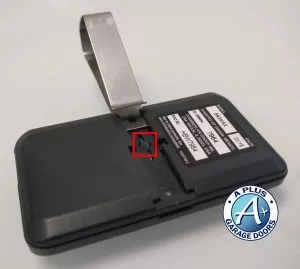
Start by testing the current battery in your remote. Open the battery compartment by sliding the cover off. Look for corrosion or damage on the battery and contacts. Use a battery tester or a multimeter to check the battery voltage. If the voltage is low or the remote does not work well, the battery needs replacement.
Replace With Fresh Batteries
Buy the correct battery type for your LiftMaster Remote 893LM, usually a CR2032 coin cell. Insert the new battery with the positive side facing up. Close the battery compartment securely. Test the remote by pressing any button. The garage door should respond immediately. Dispose of the old battery properly to protect the environment.
Troubleshooting Tips
Troubleshooting your LiftMaster Remote 893LM can save time and effort. Many common issues have simple fixes. Follow these tips to identify and solve problems quickly. Clear steps help ensure your remote works properly again.
Avoid Signal Interference
Signal interference often blocks the remote’s connection. Keep other electronic devices away from the garage opener. Wireless routers, cordless phones, and LED lights can cause problems. Move these devices or turn them off temporarily. Test the remote after removing possible interference.
Use Correct Buttons
Press the right buttons during programming and use. The Learn button on the motor unit starts the reset process. Hold the remote button firmly until the signal is accepted. Avoid quick or light presses that may not register. Follow the exact steps in the manual for best results.
Test With Different Remote
Try another remote to check if the problem is the device. If the second remote works, the first may need new batteries or reprogramming. If neither works, the issue could be the garage door opener. Testing with multiple remotes narrows down the cause quickly.
Additional Resources
Additional resources help you understand and reset your LiftMaster Remote 893LM easily. These tools provide clear guidance beyond basic instructions. They support all skill levels and ensure success in programming your remote.
Using these resources saves time and avoids common mistakes. They offer step-by-step help and visual aids to make the process clear. Explore manuals and videos for detailed, user-friendly support.
Access Online Manuals
Online manuals provide official, detailed instructions for your remote. They include diagrams and troubleshooting tips. You can download or view them anytime. Manuals explain button functions, reset steps, and safety information. These guides help you program your remote without guesswork.
Watch Instructional Videos
Instructional videos show the reset process in action. They walk you through each step visually and clearly. Videos often include tips to avoid errors. Watching a video can boost your confidence before you start. Look for videos from trusted sources and LiftMaster support channels.
Frequently Asked Questions
How Do I Reprogram My Liftmaster 893lm Remote?
Press and release the Learn button on the motor unit. Within 30 seconds, press your remote button. The opener lights blink to confirm programming. Test the remote to ensure it works.
How Do You Reset Your Liftmaster Remote?
Press and release the Learn button on the garage opener motor. Within 30 seconds, press the remote button to reset and reprogram it. Test the remote to confirm it operates the door.
Why Is My Liftmaster Not Responding To Remote?
Your LiftMaster may not respond due to dead batteries, out-of-range signal, or needing reprogramming. Check batteries, reset remote, and re-sync with the opener’s Learn button.
How Do I Reconnect My Liftmaster Garage Door Opener Remote?
Press and release the Learn button on the opener motor. Press your remote button within 30 seconds. The opener lights blink, confirming reconnection. Test the remote to ensure it works.
How Do I Reset My Liftmaster Remote 893lm?
Press and hold the remote’s button until the LED blinks, then release to reset.
Conclusion
Resetting your LiftMaster Remote 893Lm is simple and quick. Follow the steps carefully to avoid mistakes. Make sure the remote battery is fresh for best results. Test the remote after programming to confirm it works well. Keep your garage secure by resetting remotes when needed.
Regular checks help maintain smooth garage door operation. You can handle this task yourself without extra help. Stay safe and enjoy the convenience of your LiftMaster remote.