
Is your Thermador oven acting up or refusing to turn on? Before you call for expensive repairs, there’s a simple step you might have overlooked: resetting your oven.
Knowing how to reset your Thermador oven can save you time, frustration, and money. Whether your oven’s control panel is frozen, the display is blank, or it’s just not responding, a quick reset often brings it back to life. In this guide, you’ll discover easy, step-by-step instructions to reset your Thermador oven safely and effectively.
Ready to get your oven working like new again? Let’s dive in and solve this together.

Quick Power Reset
A quick power reset can fix many common Thermador oven issues fast. It clears minor errors and refreshes the control board. This simple process often restores normal function without needing a service call. Follow each step carefully for the best results.
Turn Off Circuit Breaker
Start by finding your home’s electrical panel. Flip the circuit breaker switch for the oven to the “OFF” position. This cuts power safely. Avoid touching any wires or metal parts inside the panel.
Unplug The Oven
Next, unplug the oven from the wall outlet. If your oven is built-in, gently pull it out to access the plug. Disconnecting the power helps reset the internal electronics fully.
Wait Before Powering On
Wait at least one minute before restoring power. This pause allows the oven’s system to clear errors. Do not rush this step. Patience helps ensure a full reset.
Restore Power And Check Controls
Plug the oven back in or turn the circuit breaker on again. Watch the control panel as it powers up. The display may blink or reset to default. Set the clock and test the oven functions to confirm the reset worked.
Using Oven Reset Button
Using the oven reset button is a simple way to fix common errors on your Thermador oven. This button helps clear error messages and restarts the oven’s control system. It can solve minor glitches without calling for repair service. Follow the steps below to use the reset button properly and get your oven working again.
Locate Reset Or Clear Button
First, find the reset or clear button on your oven’s control panel. It is usually labeled as “Reset” or “Clear”. The button may be near the timer or settings keys. Check your oven’s user manual for the exact location if you do not see it right away. Knowing where the button is saves time during the reset process.
Press And Hold To Reset
Press and hold the reset or clear button for about three to five seconds. This action clears any error codes stored in the oven’s system. Release the button after holding it long enough. The oven should restart its control board and return to normal operation. If the oven does not reset, try pressing the button again or repeat the process.
Basic Troubleshooting
Basic troubleshooting helps fix simple Thermador oven issues fast. It saves time and avoids costly repairs. Start with easy checks before calling a technician. These steps often restore oven function quickly.
Check Power Supply
Make sure the oven is plugged in firmly. Check the circuit breaker for any tripped switches. A power outage or loose connection can stop the oven from working. Reset the breaker if needed. Confirm the outlet provides power with another device.
Verify Gas Knob Positions
Look at the gas knobs carefully. They should be in the correct position to allow gas flow. Turn knobs to “Off” then back to “Light” or “On” as the manual states. Improper knob settings prevent the oven from heating. Never force the knobs.
Disable Child Lock
Thermador ovens have a child lock to prevent accidental use. Check if the lock is active. Press and hold the lock button for several seconds to disable it. The control panel should respond normally afterward. This unlocks all oven functions safely.
Gas Oven Ignition Fixes
Gas ovens sometimes fail to ignite properly. This issue can disrupt cooking and cause frustration. Fixing the ignition helps restore your oven’s function quickly. Focus on key parts like the igniter and gas valve. Checking these components can solve most ignition problems without professional help.
Inspect Igniter Condition
Start by examining the igniter closely. Look for cracks, burn marks, or damage. A worn igniter may not glow or spark well. Clean any dirt or debris gently with a soft brush. Replace the igniter if it looks weak or broken. A strong, glowing igniter is essential for lighting the gas.
Test Gas Valve Function
The gas valve controls fuel flow to the oven burner. It must open correctly for ignition to occur. Listen for a clicking sound when the oven tries to ignite. No sound may mean the valve is faulty. Use a multimeter to check valve continuity if possible. Replace the valve if it fails the test. Proper gas flow ensures safe and reliable oven ignition.
Electric Oven Control Issues
Electric oven control issues can disrupt your cooking plans. These problems often cause unresponsive touchpads or error codes. Understanding the common causes helps you fix the oven quickly. Below are key steps to troubleshoot and reset your Thermador oven controls.
Check Thermal Fuse
The thermal fuse protects the oven from overheating. A blown fuse stops the control board from working properly. Locate the thermal fuse behind the oven’s back panel. Use a multimeter to test it for continuity. If it shows no continuity, replace the fuse with a new one. This simple check often restores control functions and oven operation.
Assess Control Board And Touchpad
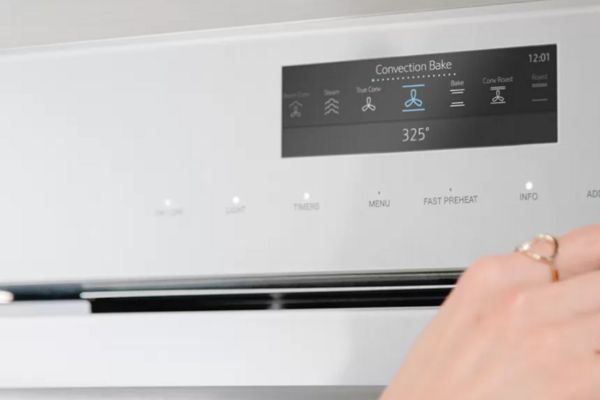
The control board acts as the oven’s brain. Faulty boards cause random errors or no response on the touchpad. Inspect the control board for burn marks or loose wires. Test the touchpad for stuck or unresponsive buttons. Replace the control board or touchpad if damaged. Resetting the control board by power cycling may also help restore normal function.
When Reset Fails
Sometimes, resetting your Thermador oven does not solve the problem. The oven may still not respond or show errors. In these cases, extra steps are needed to fix the issue. Follow these tips to troubleshoot when a reset fails.
Consult User Manual
Start by reading the user manual carefully. It contains model-specific reset instructions and error codes. The manual may also suggest safety tips and troubleshooting steps. Keep the manual handy for quick reference during repairs.
Inspect Wiring And Control Board
Check the oven’s wiring for loose or damaged connections. A faulty wire can stop the oven from resetting properly. Also, examine the control board for burns or cracks. Replace any damaged parts to restore proper function. Always disconnect power before inspecting electrical parts.
Consider Component Replacement
Some parts may wear out and stop working. If the reset still fails, think about replacing key components. Common parts to replace include the control board, thermal fuse, or heating element. Use genuine Thermador parts for best results and safety.
Safety Tips And Precautions
Resetting a Thermador oven requires careful attention to safety. Following proper precautions protects you and your appliance. Electrical and gas components need special care. Always prioritize safety before starting any reset process.
Handle Electrical Parts Safely
Turn off the oven’s power at the circuit breaker first. Never touch electrical parts with wet hands. Use insulated tools to avoid shocks. Avoid pulling or damaging wires when unplugging the oven. Keep children and pets away from the work area. If unsure, call a professional electrician for help.
Avoid Gas Leak Risks
Shut off the gas supply valve before working on the oven. Check for any smell of gas before starting. Do not use open flames or sparks near the oven. Ensure proper ventilation in the kitchen area. If you detect gas, leave the house immediately and call emergency services. Do not attempt repairs if you suspect a gas leak.
Frequently Asked Questions
How To Hard Reset Thermador Oven?
To hard reset a Thermador oven, turn off the circuit breaker or unplug the oven. Wait one minute, then restore power. The control panel will reset automatically. Check and reset the clock or settings if needed. Refer to your manual for model-specific steps.
How To Reset Oven Control Board?
To reset your oven control board, turn off the circuit breaker or unplug the oven. Wait one minute, then restore power. The control board will reboot, and you may need to reset the clock or settings. Consult your manual for model-specific instructions.
Why Is My Thermador Oven Not Turning On?
Check the oven’s power supply, including plugs and circuit breakers. Ensure gas knobs are fully off. Verify child lock is disabled. Faulty igniters or gas valves can also prevent startup. Perform a soft reset by unplugging the oven, waiting, and reconnecting power.
Consult the manual for model-specific issues.
How Do I Reboot An Oven?
To reboot an oven, turn off its power at the circuit breaker or unplug it. Wait 1-2 minutes, then restore power. Check the control panel to ensure it resets. Some models have a reset button; press and hold it if available.
Consult your manual for model-specific steps.
How Do I Reset A Thermador Oven Control Board?
Turn off power at the circuit breaker for 1 minute, then turn it back on to reset.
Conclusion
Resetting your Thermador oven is simple with these clear steps. Always start by cutting the power to avoid any risk. Wait a few minutes before restoring power to let the system refresh. After turning the oven back on, check the controls and reset the clock if needed.
If problems continue, consult your oven’s manual for model-specific advice. Inspect for any visible damage or loose connections. Sometimes, a faulty part may need professional help. Following these tips can save time and keep your oven working properly.