
You’ve just taken care of your Toyota Tundra’s maintenance, but that persistent maintenance light is still on. It’s not just annoying—it can make you wonder if there’s a bigger issue.
The good news? Resetting that maintenance light is easier than you think, and you don’t need to visit a mechanic or spend a dime. In this guide, you’ll learn exactly how to reset your Tundra’s maintenance light quickly and confidently, so you can get back on the road without that nagging reminder.
Keep reading, and take control of your truck’s dashboard today.
Maintenance Light Basics
The maintenance light on your Toyota Tundra is a helpful reminder for regular vehicle care. Understanding this light can save you time and prevent costly repairs. This section explains the basics of the maintenance light and why it matters.
Knowing when and why the light appears helps you keep your truck in good shape. It also guides you on when to reset the light after service.
Purpose Of The Maintenance Light
The maintenance light alerts you when it is time for routine service. This includes oil changes, filter replacements, and other scheduled checks. It helps maintain your truck’s performance and safety. The light ensures you do not miss important maintenance tasks.
When It Usually Appears
The light typically turns on after a set number of miles driven. This number is based on Toyota’s recommended service intervals. It may also appear if the system detects a minor issue. Once you complete the required service, the light should be reset to turn off.
Reset Methods By Model
Resetting the maintenance light on a Toyota Tundra varies by model year. Different models use different controls and displays. Knowing the right method for your Tundra saves time and avoids confusion. Below are the common reset methods sorted by newer and older models.
Newer Models With Steering Wheel Controls
Newer Toyota Tundras come with a multi-information display (MID) and steering wheel buttons. This setup makes resetting the maintenance light simple and quick.
- Turn the ignition on without starting the engine.
- Use the arrow buttons on the steering wheel to find the gear or settings icon on the MID.
- Select “Vehicle Settings” or “Settings” from the menu.
- Scroll to “Scheduled Maintenance” and choose it.
- Confirm the reset by selecting “Yes” or “Reset.”
The maintenance light will turn off after these steps. This method works on most Tundras from recent years with digital displays.
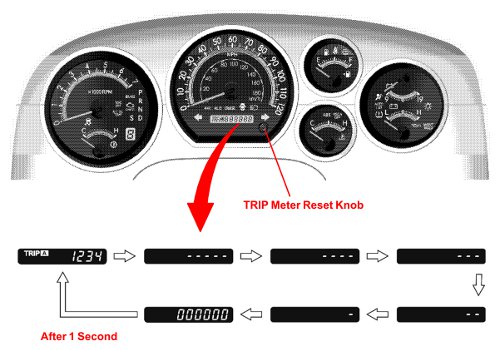
Older Models Using Trip Odometer Button
Older Tundra models use a simpler system without digital menus. The trip odometer button is the key to reset the maintenance light.
- Turn the ignition key to the “On” position, but do not start the engine.
- Press the trip odometer button until “Trip A” shows on the display.
- Turn the ignition off.
- Press and hold the trip odometer button.
- While holding the button, turn the ignition back to “On.”
- Keep holding the button until the maintenance light blinks and then goes off.
This method clears the maintenance reminder on older Tundras without steering wheel controls.
Reset Steps For Newer Models
Resetting the maintenance light on newer Toyota Tundra models is simple. The process uses the vehicle’s multi-information display (MID) and steering wheel controls. This method avoids manual button presses under the dashboard. It suits most models made in recent years.
Follow these clear steps to reset the maintenance light quickly. Each step ensures you navigate the system correctly. This helps maintain your vehicle’s health alerts.
Turning Ignition On
Press the Start button twice without pressing the brake. This action turns the ignition on without starting the engine. For key models, turn the key to the “On” position. Do not start the engine yet.
Navigating The Multi-information Display
Use the arrow buttons on the steering wheel to access the MID. Look for the gear or settings icon on the display. Scroll through the menu until you find “Vehicle Settings” or just “Settings.”
Selecting Scheduled Maintenance
Within the settings menu, select “Scheduled Maintenance.” This option shows the maintenance data and reset options. Use the steering wheel controls to highlight this choice.
Confirming The Reset
After selecting “Scheduled Maintenance,” choose the reset option. Confirm by selecting “Yes” on the display. The maintenance light will turn off after confirmation. Turn off the ignition and start the engine to check.

Reset Steps For Older Models
Resetting the maintenance light on older Toyota Tundra models is a simple process. It helps clear the reminder after an oil change or scheduled service. The steps mainly involve using the ignition key and trip meter button. Follow these clear instructions to reset the light quickly and safely.
Turning Key To On Position
Insert the key into the ignition. Turn the key to the “On” position. Do not start the engine. The dashboard lights will come on. This step powers the vehicle’s electrical system. It prepares the system for the reset process.
Displaying Trip A
Locate the trip meter button on the dashboard. Press the button repeatedly until “Trip A” appears on the odometer display. “Trip A” shows the mileage since the last reset. This display is necessary for the maintenance light reset.
Holding Trip Meter Button
Press and hold the trip meter button. Keep holding it for about 10 seconds. Watch the odometer numbers. They will start to blink or count down. This action signals the system to reset the maintenance light.
Completing The Reset
Release the trip meter button once the numbers stop blinking. Turn the key to the “Off” position. Wait a few seconds. Start the engine to check if the maintenance light is off. The reset is complete if the light stays off.
Verifying The Reset
After resetting the maintenance light on your Toyota Tundra, verifying the reset is crucial. This step confirms the light no longer shows, indicating the reset was successful. Proper verification avoids confusion about upcoming maintenance needs.
Turning Off And Restarting The Engine
First, turn off the engine completely. Remove your foot from the brake pedal. Wait for a few seconds to let the system reset. Next, restart the engine as usual. This helps the vehicle’s computer update the maintenance status.
Ensuring The Light Is Off
Check the dashboard carefully. The maintenance light should be off after restarting the engine. If the light remains on, the reset did not work. Repeat the reset process or check for any issues. A clear dashboard means your Tundra is ready for the road.

Common Issues And Tips
Resetting the Tundra maintenance light can sometimes come with challenges. This section covers common problems and useful tips to help you manage the reset process smoothly. Understanding these issues saves time and avoids frustration.
When The Light Doesn’t Reset
The maintenance light may stay on despite following reset steps. This often happens if the ignition is not turned on properly. Make sure the key is in the “On” position without starting the engine. Sometimes, the system needs a few seconds to register the reset command.
Another reason is a faulty sensor or electrical issue. If the light remains after multiple attempts, check the oil level and quality. Low oil or dirty oil can prevent the light from turning off. A visit to a mechanic might be necessary if the problem persists.
Avoiding False Resets
Resetting the maintenance light without performing actual service can cause problems. The light is a reminder for scheduled maintenance tasks like oil changes. Ignoring these tasks can harm your engine over time.
Always complete the necessary maintenance before resetting the light. Double-check the oil filter and fluid levels. Use the correct reset method for your Tundra model. This prevents false resets and keeps your truck running smoothly.
Additional Resources
Finding the right guidance can make resetting your Tundra maintenance light easier. Various resources provide clear, step-by-step instructions. These tools help you follow the process without confusion. Explore these options to gain confidence and complete the reset quickly.
Youtube Tutorials
Video tutorials offer visual aid to understand the reset process. Watching someone perform the reset helps grasp each step clearly. Many channels provide short, focused clips specifically for the Tundra maintenance light. These videos often show button presses and dashboard displays closely. Look for recent uploads to match your Tundra model year. YouTube allows pausing and replaying, which aids learning at your own pace.
Manufacturer Manuals
The official Toyota manual is a trusted source for accurate instructions. It includes detailed steps tailored to your Tundra’s model year. Manuals explain the maintenance light reset with precise language and diagrams. You can find digital copies on Toyota’s website or in your vehicle’s glove box. Using the manual ensures you follow recommended procedures. It also provides extra tips about vehicle care and warnings.
Frequently Asked Questions
How Do I Clear My Toyota Maintenance Required Notification?
Turn the ignition to “On” without starting the engine. Use steering wheel buttons to access the settings menu on the multi-information display. Select “Scheduled Maintenance” and confirm reset. For older models, hold the trip meter button while turning the key to “On” until the light resets.
How To Reset Maintenance On 2015 Toyota Tundra?
Turn the ignition to “On” without starting. Press the trip meter button until “Trip A” shows. Turn ignition off. Hold the trip button and turn ignition on again. Release the button when the light resets. Start the engine to confirm the maintenance light is off.
How To Reset The Maintenance Light On A Toyota Tundra 2006?
Turn the ignition to “On” without starting the engine. Press the trip meter button until “Trip A” appears. Turn off the ignition. Hold the trip meter button and turn the ignition back to “On. ” Release the button when the maintenance light resets.
Start the engine to confirm.
How Do I Reset The Maintenance Light On A 2017 Toyota?
Turn the ignition to “On” without starting the engine. Press and hold the trip meter reset button. Turn ignition off, then back to “On” while holding the button. Release when the light resets. Confirm by restarting the vehicle.
How Do I Reset The Tundra Maintenance Light?
Turn the ignition on without starting the engine. Use steering wheel buttons to find “Scheduled Maintenance” and confirm reset.
Conclusion
Resetting the Tundra maintenance light keeps your truck running smoothly. Follow the steps carefully to avoid errors. This simple process saves time and avoids unnecessary service visits. Regular resets help track your vehicle’s maintenance accurately. Keep your Tundra in top shape by staying on schedule.
Now, you can reset the light with confidence and ease.