
Is your Jeep Compass screen frozen, unresponsive, or acting up when you need it most? You’re not alone, and the good news is that resetting the screen is often a quick fix you can do yourself.
Whether your infotainment system lags, fails to respond, or displays errors, knowing how to reset your Jeep Compass screen can save you time, frustration, and even a trip to the dealership. You’ll discover simple, step-by-step methods to reset your screen—ranging from soft reboots to factory resets—so you can get back on the road with confidence.
Keep reading to unlock easy solutions that will have your Jeep’s touchscreen working smoothly again in no time.
Soft Reset Steps
Performing a soft reset on your Jeep Compass screen can solve many common issues. This quick process clears minor glitches and refreshes the system without deleting your data. Soft reset steps are simple and do not require technical skills.
Below are three easy methods to soft reset your Jeep Compass screen. Try these to get your display working smoothly again.
Button Combination Method
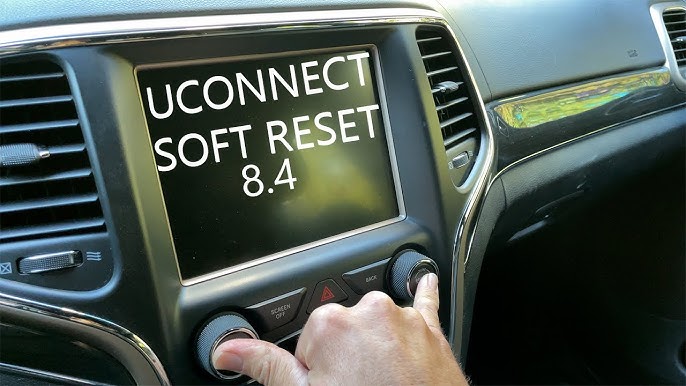
Press and hold the power button and the volume knob at the same time. Keep holding for about 10 seconds. The screen will go black and then restart. This method resets the system without affecting saved settings.
Using Power/volume Knob
Turn the ignition to the ON position without starting the engine. Press and hold the volume knob for 15 seconds. Release the knob once the screen turns off. The screen will reboot and load the interface fresh.
Reset Hole Technique
Locate the small reset hole near the screen or console. Use a paperclip or a similar thin tool. Gently press and hold inside the hole for 5 seconds. The screen will shut down and restart automatically.
Factory Reset Guide
Performing a factory reset on your Jeep Compass screen restores all settings to their original state. This process helps fix persistent issues like freezing or unresponsive screens. Follow this guide carefully to reset your system safely and efficiently.
Accessing Settings Menu
Start your Jeep and turn on the infotainment screen. Tap the “Settings” icon on the home screen. Scroll through the menu to find the “System” or “General” section. Select this option to access reset choices.
Erasing All Data
Within the system settings, look for “Factory Reset” or “Erase All Data.” This option deletes all personal settings and paired devices. Confirm your choice to proceed. The screen will warn you before erasing data.
Restoring Default Settings
After confirming, the system begins the reset process. Wait for the screen to turn off and restart. The Jeep Compass display returns to its original factory settings. Set up your preferences again if needed.
Hard Reset Approach
The hard reset approach for the Jeep Compass screen is a more thorough method. It works by cutting power completely to the system. This forces the system to restart fresh, often fixing deeper software issues.
This method is best used when soft resets and factory resets fail to solve the problem. It requires disconnecting the car battery, which needs careful handling.
Battery Disconnection Process
Start by turning off the vehicle and removing the key. Open the hood and locate the battery. Use a wrench to loosen the negative terminal clamp. Remove the negative cable from the battery. Wait for about 10 minutes to let the system reset fully. Reconnect the negative cable and tighten the clamp. Close the hood and start the car. The screen should reboot and work normally now.
Safety Precautions
Wear gloves and safety glasses to protect yourself. Avoid touching metal parts with bare hands. Make sure the car is off and keys are out of the ignition. Disconnect the negative terminal first to prevent short circuits. Keep metal tools away from the battery terminals. Do not touch both terminals at the same time. Follow all safety instructions to avoid injury or damage.
When To Use Hard Reset
Use hard reset if the screen stays frozen after soft reset. Try it when factory reset does not fix errors. Choose hard reset if the screen does not respond at all. Avoid this method if you are not comfortable handling the battery. Seek professional help if problems continue after a hard reset.
Common Screen Issues
The Jeep Compass screen can face several common issues. These problems affect how you use the vehicle’s infotainment system. Understanding these issues helps you know when a reset is needed. Below are some frequent screen troubles and their signs.
Screen Freezing
The screen may freeze and stop responding to commands. This can happen during navigation or media playback. Freezing usually means the system is overloaded or has a temporary glitch. A simple reset often resolves this issue quickly.
Unresponsive Touch
The touch screen may not register your taps or swipes. This makes it hard to select options or change settings. Dirt or moisture can cause this, but software errors also play a role. Resetting the screen can restore touch sensitivity in many cases.
Display Going Blank
Sometimes, the screen goes completely blank without warning. This leaves you without visual information. The cause might be a software crash or a power issue. Resetting the screen or the vehicle’s system can bring the display back to life.
Quick Fixes To Try
When your Jeep Compass screen acts up, quick fixes often solve the problem fast. These simple steps help avoid deeper issues and get your screen working smoothly again. Try these easy methods before moving to complex resets.
Checking Screen Off Button
Locate the screen off button on your Jeep Compass console. Sometimes, the screen turns off accidentally by pressing this button. Press it once to turn the screen back on. If the screen stays dark, press and hold the button for a few seconds. This may reset the display without losing your settings.
Cleaning Touchscreen Surface
Dirt and fingerprints can block the touchscreen’s response. Use a soft, dry cloth to gently clean the screen. Avoid harsh chemicals or sprays. Make sure your hands are clean and dry before touching the screen again. A clean screen often improves touch sensitivity and fixes minor glitches.
Disconnecting Bluetooth Devices
Bluetooth devices can cause screen lag or freezing. Turn off Bluetooth on your Jeep Compass or disconnect all paired devices. Wait a few seconds, then reconnect them one by one. This process refreshes the connection and can clear bugs affecting the screen’s performance.
Troubleshooting Tips
Troubleshooting your Jeep Compass screen can solve many common issues fast. Simple steps often fix freezes or unresponsive displays. Follow these tips to get your screen working smoothly again.
Updating Uconnect Software
Keeping the Uconnect software updated improves performance. Check for updates regularly using your vehicle’s Wi-Fi or a USB drive. New updates fix bugs and add features that prevent screen problems.
Go to the settings menu on the screen. Select “System Updates” and follow the prompts. Install any available updates and restart the system to apply changes.
Resetting After Software Update
After updating, the screen may need a reset to work properly. A reset clears temporary glitches caused by new software. Press and hold the power button for about 10 seconds until the screen turns off.
Release the button and wait for the system to reboot. This soft reset often restores normal function without deleting your settings or data.
Consulting Professional Help
If problems continue after updates and resets, seek expert help. Certified Jeep technicians have tools to diagnose deeper system issues. They can repair hardware or perform advanced resets safely.
A professional check ensures no damage to your vehicle’s electronics. Schedule a service appointment to prevent further complications and keep your Jeep running smoothly.

Frequently Asked Questions
How Do You Reset Your Jeep Compass Screen?
To reset your Jeep Compass screen, press and hold the power and volume knobs simultaneously for about 10 seconds. The screen will turn off and reboot. If issues persist, perform a factory reset via Settings > System > Factory Reset.
How To Reset Car Display Screen?
Press and hold the power or volume button and the seek button simultaneously for 10 seconds to soft reset the car display screen. If that fails, navigate to Settings > System > Factory Reset to erase all data. Disconnect the battery only as a last resort.
Why Is My Touch Screen In My Jeep Not Working?
Your Jeep touchscreen may stop working due to software glitches, accidental screen-off button press, or hardware issues. Try a soft reset first by holding the volume and tune knobs simultaneously until the screen restarts. If problems persist, seek professional service to check hardware components.
How To Reset Uconnect Touch Screen?
To reset the Uconnect touchscreen, press and hold the volume and tuner knobs simultaneously for about 10 seconds. The screen will go blank and reboot automatically. This soft reset fixes freezing or lagging issues without deleting your settings.
How Do I Reset The Jeep Compass Touchscreen?
Press and hold the power button for 10 seconds until the screen turns off and restarts.
Conclusion
Resetting your Jeep Compass screen is simple and quick. Try a soft reset first to fix common glitches. If problems continue, a factory reset might help, but it erases your settings. Avoid disconnecting the battery unless you feel confident. Persistent issues may need professional assistance.
Following these steps keeps your screen running smoothly and your drive stress-free. Remember, regular care prevents many screen problems.