

If you’ve just finished routine maintenance on your 2013 Toyota Camry, you might be wondering how to get that stubborn maintenance light to turn off. This little warning light can be distracting and even a bit frustrating when it stays on after a service.
But don’t worry—resetting it yourself is easier than you think. In this guide, you’ll learn step-by-step how to reset your maintenance light quickly, so you can get back on the road with confidence and peace of mind. Keep reading, and you’ll find out exactly what to do, no mechanic required.
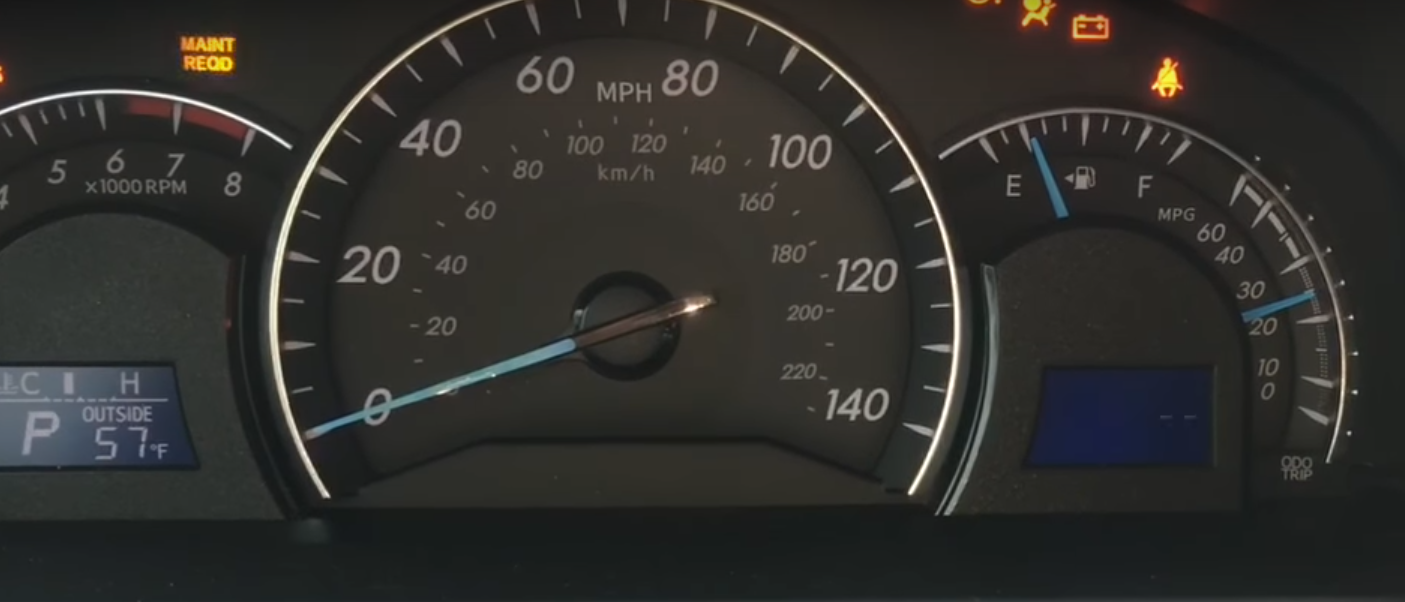
Camry Maintenance Light Basics
The maintenance light on a 2013 Toyota Camry signals when routine service is needed. Understanding this light helps keep the car running smoothly. This section explains what the light means and when to reset it.
What The Light Means
The maintenance light shows up after a set mileage or time interval. It reminds you to change the oil or check other parts. This light does not warn of an emergency. Instead, it helps you keep up with regular care.
Ignoring the light can reduce engine life and fuel efficiency. The Camry uses this alert to promote timely maintenance. It is part of the car’s system to protect your investment.
When To Reset
Reset the light after completing the recommended service. This action turns off the reminder until the next interval. Do not reset the light before the work is done. The light resets every 5,000 miles or as noted in the owner’s manual.
Resetting too soon may cause missed maintenance. Always check the odometer and service records. Proper timing ensures the car stays in top condition. Resetting the maintenance light is simple but important.

Reset Methods By Model Year
Resetting the maintenance light on a 2013 Toyota Camry varies by model year. Different methods suit older and newer models. Knowing the right reset process saves time and avoids confusion. Below are clear reset instructions split by model year for easy reference.
Older Models: Odometer Button Reset
Start with the vehicle off. Insert the key and turn it to the “On” position. Do not start the engine. Locate the odometer/trip button on the dashboard. Press the button until “Trip A” shows on the display. Turn the ignition off. Press and hold the odometer/trip button. While holding the button, turn the key back to “On” without starting the engine. The display will flash or show zeros. Release the button. Turn the ignition off and then start the engine. The maintenance light should now be off.
Newer Models: Steering Wheel Controls Reset
Turn the ignition to the “On” position. Use the steering wheel buttons to navigate the menu on the dashboard. Find the “Settings” or “Vehicle Settings” option. Scroll to “Maintenance” or “Maintenance Reset.” Select the maintenance light reset option. Confirm the reset when prompted. Turn off the ignition and start the engine. The maintenance light will be cleared from the dashboard.
Step-by-step Reset Guide
Resetting the maintenance light on your 2013 Toyota Camry is a simple process. Follow these clear steps to turn off the light after completing an oil change or routine service. This guide helps save time and avoids unnecessary trips to the mechanic. Use this easy method to keep your dashboard clean and up-to-date.
Turning Ignition On Without Starting
First, make sure the car is off. Insert the key into the ignition. Turn the key to the “On” position. Do not start the engine. The dashboard lights will come on. This step prepares the system for resetting the maintenance light.
Using The Odometer/trip Button
Locate the odometer or trip button on the dashboard. Press and hold this button firmly. Keep holding it while the display starts to blink or show zeros. This usually takes about 10 seconds. Once the numbers reset, release the button. This action clears the maintenance reminder.
Confirming The Reset
Turn the ignition off and then start the engine. Check the dashboard to see if the maintenance light is off. If the light stays off, the reset worked. If the light is still on, repeat the process. This confirmation ensures your Camry’s system is updated correctly.
Alternate Reset Procedures
Alternate reset procedures offer different ways to clear the maintenance light on your 2013 Toyota Camry. These methods use the vehicle’s settings menu and maintenance options. They suit drivers who prefer digital controls over manual button sequences.
Using these alternate methods can be easier and quicker. They also reduce the chance of errors during the reset process. Follow the steps below to reset the maintenance light using the car’s display and menu options.
Using Settings Menu On Display
Turn the ignition to the “On” position without starting the engine. Use the steering wheel buttons to navigate the display menu. Find the “Settings” or “Setup” option. Scroll to the “Maintenance” or “Vehicle Settings” section.
Select “Maintenance Light Reset” or a similar option. Confirm your choice by pressing the “OK” button. Wait a few seconds for the system to reset. Turn off the ignition and then start the car. Check if the maintenance light has turned off.
Resetting Via Maintenance Or Scheduled Maintenance Options
Access the main menu on your Camry’s display screen. Locate “Maintenance” or “Scheduled Maintenance” settings. Enter this menu to see reset options.
Choose the oil or maintenance light reset option. Confirm the reset by selecting “Yes” or “OK.” The system will clear the maintenance reminder. Turn off the ignition and start the engine. Verify the light is no longer on.
Troubleshooting Reset Issues
Resetting the maintenance light on a 2013 Toyota Camry usually works smoothly. Sometimes, the light may not reset as expected. Troubleshooting these reset issues helps avoid confusion and ensures your car stays well maintained. Follow simple checks to fix common problems with the maintenance light reset.
Light Stays On After Reset
The maintenance light may stay on due to a missed step during reset. Make sure the ignition is in the “On” position, but the engine is off. Hold the odometer button long enough until the display shows zeros or flashes. Release the button, then start the engine to check if the light is off.
Another cause could be a software glitch or sensor error. Turning the car off and on again sometimes clears this. If the light remains, try the reset process one more time carefully. Double-check the steps for your specific Camry model year, as some differ slightly.
When To Visit A Mechanic
If the maintenance light still stays on after multiple reset attempts, a mechanic’s help is needed. The light might signal an unresolved issue with your vehicle’s system. A professional can diagnose sensor problems or warning system faults.
Delaying a mechanic visit may risk further damage to your car. Maintenance lights are alerts for timely service. Trust the expert to inspect and fix any hidden problems.
Preventing Maintenance Light Activation
The maintenance light on your 2013 Toyota Camry signals the need for routine care. Preventing this light from activating keeps your car running smoothly. It also helps avoid unexpected repairs and costly downtime. Staying ahead with simple habits makes a big difference in your vehicle’s health.
Focus on regular checkups and watch for early signs of issues. These steps reduce the chance the maintenance light will turn on. A well-maintained car performs better and lasts longer. Here are key ways to prevent the maintenance light activation.
Regular Service Intervals
Follow Toyota’s recommended service schedule closely. This schedule lists when to change oil, filters, and other parts. Regular oil changes keep the engine clean and working well. Replace air filters to improve fuel efficiency and reduce wear.
Check brake pads and fluids as part of routine care. A timely service prevents problems that trigger the maintenance light. Use a trusted mechanic or dealer to keep records of each visit. Staying on schedule helps catch issues early and avoids light activation.
Monitoring Vehicle Health
Keep an eye on your Camry’s performance daily. Notice changes in noise, fuel use, or engine behavior. Check tire pressure and fluid levels regularly to avoid damage. Use the dashboard alerts as a guide, not just a warning sign.
Address small problems quickly before they grow. Cleaning the engine bay and checking belts can reveal hidden issues. Use simple tools like an OBD-II scanner for basic diagnostics. Monitoring your car’s health reduces surprises and keeps the maintenance light off.

Frequently Asked Questions
How Do You Turn Off The Maint Required On A 2013 Toyota?
Turn the key to “On” without starting. Press and hold the odometer button until it resets. Release and start the engine to confirm the maintenance light is off.
How To Reset Maintenance Light On Toyota Camry?
Turn the ignition to “On” without starting. Hold the Odometer/Trip button until zeros appear. Release and start the engine to confirm the light resets. Newer models may require using steering wheel settings to reset maintenance.
How Do You Reset The Check Engine Light On A 2013 Toyota Camry?
Turn the ignition to “On” without starting the engine. Press and hold the Odometer/Trip button until the display resets to zero. Release the button, turn the key off, then start the engine to confirm the check engine light is off.
How To Turn Off Maintenance Required Light On Toyota Camry 2012?
Turn the key to “On” without starting the engine. Press and hold the odometer button until zeros appear. Release and start the car to confirm the light is off.
How Do I Reset The Maintenance Light On A 2013 Toyota Camry?
Turn the ignition on without starting the engine. Hold the odometer button until zeros appear, then release.
Conclusion
Resetting the maintenance light on your 2013 Toyota Camry is simple. Follow the steps carefully to avoid mistakes. This small task keeps your vehicle’s alerts accurate. It helps you stay on top of regular care. Clear maintenance lights mean your car is ready to drive.
Remember to reset only after completing the required service. Stay safe and keep your Camry running smoothly. Regular checks and resets improve your car’s lifespan. Now, you can handle this task with confidence.