

Is your septic tank pump acting up or refusing to work? When your septic system’s pump stops pumping, it can quickly lead to backups, unpleasant odors, and costly repairs.
But before you panic or call in a professional, there’s a simple step you can try yourself—resetting your septic tank pump. In this guide, you’ll learn exactly how to reset your septic tank pump safely and effectively. By following easy, clear steps, you can often fix common problems like tripped breakers or stuck float switches and get your system running smoothly again.
Keep reading, and take control of your septic system with confidence!
Septic Pump Basics
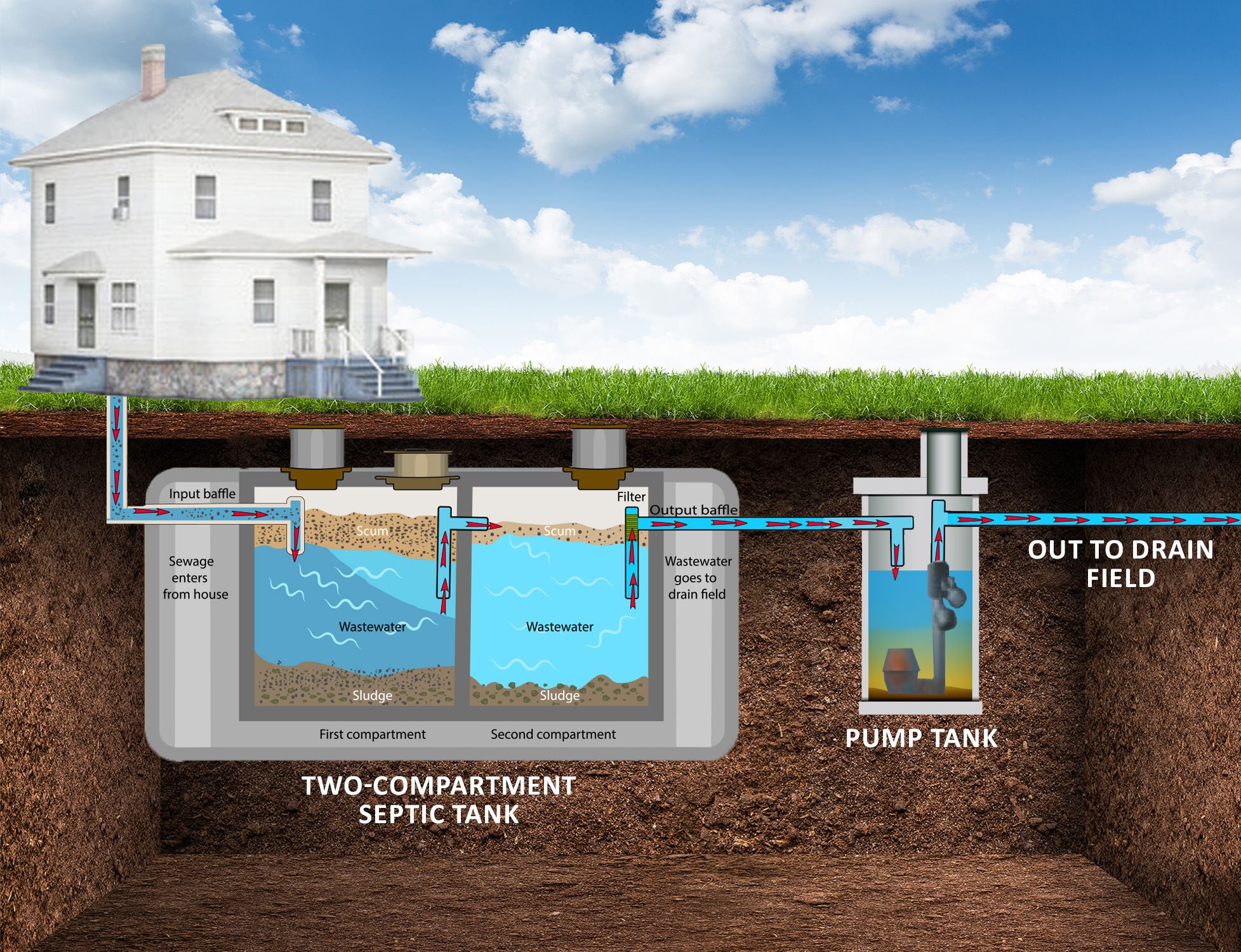
Understanding the basics of a septic pump is essential for maintaining your septic system. The pump moves wastewater from the septic tank to the drain field. It works automatically to prevent backups and keep your system running smoothly.
Knowing how septic pumps operate and the types available helps in troubleshooting and resetting the pump if needed. This knowledge saves time and reduces costly repairs.
How Septic Pumps Work
Septic pumps push liquid waste from the tank to the drain field. They activate when the wastewater reaches a certain level. A float switch inside the tank senses the liquid level.
When the float rises, it turns the pump on. The pump moves the waste through pipes to the drain field. After pumping, the float drops, and the pump turns off. This cycle repeats automatically.
The pump needs power to work. If the power is off, the pump will not run. A control panel manages the pump’s operation and may have alarms to alert problems.
Common Pump Types
There are two main types of septic pumps: effluent pumps and grinder pumps. Effluent pumps move liquid waste without solids. They work with tanks that separate solids first.
Grinder pumps break up solids before pumping. They handle thicker waste and are used in systems with smaller drain fields. Both types need regular checks to avoid clogs and damage.
Choosing the right pump depends on your septic system design. Proper maintenance ensures long pump life and prevents system failure.
Signs Your Pump Needs Resetting
Recognizing the signs that your septic tank pump needs resetting is crucial. Ignoring these warning signals can lead to system failure and costly repairs. Early detection helps maintain your septic system’s health and prevents backups. Watch for clear indicators that suggest the pump is not functioning properly.
Alarm Indicators
Septic systems have alarms to warn of problems. A loud or constant alarm means the pump may be stuck or overloaded. The control panel might show error codes or flashing lights. These signals tell you the system needs attention quickly. Do not ignore alarms, as they protect your home from sewage backup.
Pump Not Running
If the pump does not run when it should, it needs resetting. You might hear silence when the pump is expected to work. Check if the power is on and breakers are not tripped. A stopped pump can cause sewage to build up, leading to system damage and foul odors.
Unusual Noises
Strange sounds from the septic pump often indicate trouble. Grinding, buzzing, or humming noises mean the pump is struggling. These noises can signal blockages, motor issues, or electrical faults. Listen carefully and act fast to avoid further damage.
Safety Precautions
Resetting a septic tank pump requires careful attention to safety. The pump works with electricity and water, which can be dangerous. Taking safety steps protects you from injury and damage. Follow each safety precaution closely before starting the reset process.
Power Off Steps
Always turn off the power before touching the septic pump. Locate the circuit breaker and switch it off. This stops electricity flow to the pump. Confirm power is off by trying to run the pump. Never assume the power is off without checking.
Protective Gear
Wear protective gloves to avoid contact with harmful bacteria. Use safety goggles to protect your eyes from splashes. Waterproof boots help keep your feet dry and safe. Dress in long sleeves and pants to cover your skin fully. Proper gear reduces risks from contaminants and sharp objects.
Avoiding Electrical Hazards
Keep all electrical parts dry during the reset process. Do not touch electrical components with wet hands. Use insulated tools made for electrical work. Avoid standing in water while handling the pump. These steps prevent electric shocks and serious injury.
Locating The Control Panel
Locating the control panel is the first step to reset a septic tank pump. This panel controls the pump’s electrical system. It is usually near the septic tank or inside a utility area. Knowing where the control panel is helps you quickly check and fix issues. It also saves time and avoids unnecessary calls to a technician.
Finding The Pump Control Box
The pump control box is often mounted on a wall or post. It may be near the septic tank or inside a basement or garage. Look for a weatherproof, metal or plastic box with a cover. The box usually has labels or markings showing it controls the septic pump. Sometimes, it has a small light or indicator that shows the pump’s status.
If you cannot find it outside, check inside your home near the main electrical panel. The pump control box connects to your home’s power supply. It might be next to the circuit breakers or fuse box.
Identifying Reset Buttons And Breakers
Inside the control box, you will see breakers and reset buttons. The reset button is often red or black and may say “reset.” Press this button gently to restart the pump system.
There may also be a circuit breaker switch. This switch can be flipped off and on to reset the power. Look for switches labeled “pump,” “septic,” or “motor.” These controls stop the pump if there is an electrical fault.
Some boxes include a GFI (Ground Fault Interrupter) button. Pressing this button can restore power after a fault. Always check these buttons and breakers before calling for repairs.
Step-by-step Reset Process
Resetting your septic tank pump can solve many common issues quickly. A clear reset process helps avoid costly repairs. Follow these simple steps to reset your septic pump safely and effectively.
Check Electrical Breakers
Locate your home’s main electrical panel. Find the breaker labeled for the septic pump. Look for any tripped breakers that are in the off position. Flip the breaker fully off and then back on. This can restore power to the pump. If the breaker trips again, do not reset repeatedly. Call a professional for help.
Reset Gfi Outlets
Identify any GFI (Ground Fault Interrupter) outlets connected to the septic system. These outlets have a reset button in the center. Press the reset button firmly until you feel it click. This resets the outlet and restores power. GFI outlets often trip from moisture or electrical faults. Keep them dry and clean to reduce trips.
Reset Control Panel
Open the septic system control panel carefully. Look for a reset switch or button on the panel. Press and hold the reset button for a few seconds. Release the button and wait for the panel to restart. The control panel manages pump operation and alarms. Resetting it clears errors and restarts the system.
Test Manual Override
Locate the manual override switch on the control panel or near the pump. Switch it to the “on” position to run the pump manually. Listen for the pump motor starting and water moving. If the pump runs, the issue may be with the float switch or automatic controls. Switch the override back off after testing. Manual override helps check pump function before calling a technician.
Inspecting Float Switches
Inspecting float switches is a key step in resetting your septic tank pump. Float switches control the pump’s on and off actions by detecting liquid levels inside the tank. If these floats get stuck or dirty, the pump may not work properly. Regular inspection helps find issues early before they cause bigger problems. Check each float switch carefully for dirt, damage, or any signs of malfunction. Clean and adjust them as needed to keep your septic system running smoothly.
Cleaning Float Switches
Remove any dirt, grease, or debris from the float switches. Use a soft cloth or sponge with mild soap and water. Avoid harsh chemicals that can damage the plastic parts. Clean all sides of the floats and the surrounding area. This clears any buildup that may prevent the floats from moving freely. Dry the floats completely before reinstalling them to avoid electrical issues.
Freeing Stuck Floats
Floats can get stuck due to tangled wires or debris. Gently move each float up and down to test its motion. Clear any obstructions blocking the float’s path. Check the float arm and pivot points for rust or buildup. Lubricate these points lightly with a silicone spray if needed. Make sure the floats can float freely without resistance. This ensures the pump switches on and off at the right times.
Replacing Damaged Floats
Inspect floats for cracks, holes, or other damage. A damaged float can cause false readings and pump failure. Purchase a replacement float that matches your septic system model. Turn off the power before removing the old float switch. Install the new float carefully, securing all connections. Test the float’s movement and pump operation before closing the tank. Proper replacement avoids costly repairs and system backups.
Clearing Clogs And Blockages
Clearing clogs and blockages is a key step in resetting a septic tank pump. Blockages stop the pump from working well. They cause backups and bad smells. Fixing these clogs helps the pump run smoothly and avoids costly repairs. This section covers how to check the impeller and pipes, remove debris, and prevent future blockages.
Checking Impeller And Pipes
Start by turning off the power to the septic pump. Open the pump housing carefully. Look at the impeller, the small fan that pushes water. Check if it is stuck or covered with debris. Also, inspect the pipes for any blockages or damage. Use a flashlight for a clear view inside the pipes. Clear any visible clogs gently. Avoid forcing or breaking parts.
Removing Debris
Remove all debris from the impeller and pipe openings. Use gloves to protect your hands. Clear out hair, grease, or any solid waste. Flush the pipes with water to help push out small particles. Use a plumber’s snake if the clog is deep inside. Do not use harsh chemicals that can damage the system. Dispose of debris properly to keep the area clean.
Preventing Future Blockages
Keep the septic system healthy by avoiding flushing non-flushable items. Wipes, grease, and hair cause most blockages. Schedule regular inspections and cleanings for the pump and pipes. Use septic-safe cleaning products to protect bacteria that break down waste. Educate family members on proper septic use. These steps reduce blockages and extend pump life.
When To Call A Professional
Knowing when to call a professional is vital for septic tank pump issues. Some problems need expert care to avoid damage or costly repairs. Simple resets are fine for minor faults, but certain signs mean a specialist should step in. Understanding these signs helps protect your system and home.
Electrical Issues Beyond Reset
Sometimes, electrical problems go beyond a simple breaker reset. If the pump still does not run after resetting, the wiring may be faulty. Loose or corroded connections need a skilled electrician. Also, a malfunctioning control panel or GFI outlet requires professional inspection. Attempting repairs without knowledge can worsen the issue.
Severe Clogs Or Pump Removal
Minor blockages can clear with basic tools, but severe clogs need expert help. Large debris or hardened sludge may block the pump or pipes deeply. Professionals use special equipment to remove these safely. In some cases, the pump must be taken out to clean or repair. This job demands skill and proper tools.
Motor Failures
A pump motor that hums but does not start signals motor failure. Motors can burn out or seize after long use. Repairing or replacing a motor needs professional knowledge. Incorrect handling can cause electrical hazards or damage the pump further. Experts ensure safe and effective motor service.
Frozen Wastewater Concerns
In cold climates, wastewater can freeze, blocking the pump. Frozen waste may crack pipes or harm the pump mechanism. Professionals know how to thaw the system safely. They also check for damage caused by freezing. Trying to fix frozen wastewater alone can cause costly damage.
Maintenance Tips To Avoid Pump Failures
Proper maintenance keeps your septic pump working smoothly. Avoiding pump failures saves costly repairs and system damage. Simple steps help your pump last longer and function better. Follow these maintenance tips to protect your septic system and prevent breakdowns.
Regular Inspections
Check your septic pump regularly for signs of trouble. Look for unusual noises or odors around the tank area. Inspect electrical connections to ensure they are tight and corrosion-free. Test float switches by moving them gently to confirm they move freely. Schedule professional inspections yearly to catch hidden problems early.
Proper Waste Disposal
Only flush human waste and toilet paper down the drains. Avoid flushing wipes, grease, or chemicals that can clog or damage the pump. Use septic-safe cleaning products to protect bacteria essential for waste breakdown. Proper disposal reduces pump strain and prevents blockages that lead to failure.
Seasonal Care
Prepare your septic system for seasonal changes to avoid pump issues. In cold months, insulate pipes and pumps to prevent freezing. During heavy rains, check for excess water around the tank that can overload the system. Clear debris from lids and vents to maintain airflow and pump efficiency throughout the year.

Frequently Asked Questions
Why Is My Septic Pump Not Pumping?
Your septic pump may not pump due to power issues, stuck float switches, clogs in pipes or impellers, or a faulty control panel. Check breakers, reset GFI, clear debris around floats, and inspect for blockages. Call a professional if problems persist or for motor and control panel issues.
How Long Does It Take For A Septic Alarm To Reset?
A septic alarm typically resets within a few minutes after resolving the issue. Resetting power or fixing float switches speeds this. If it persists beyond 10-15 minutes, check for faults or call a professional to inspect the system.
Why Is My Septic Alarm Beeping?
Your septic alarm beeps to warn of high wastewater levels or pump failure. Check for power issues, float switch jams, or clogs. Addressing these quickly prevents system backups and damage.
What Does Flashing Red Light On A Septic Tank Mean?
A flashing red light on a septic tank signals a system alarm. It indicates pump failure, high water level, or electrical issues. Check power, float switches, and clogs immediately. Address problems quickly to avoid backups or damage. Contact a professional if the alarm persists.
What Is The First Step To Reset A Septic Tank Pump?
Start by checking the electrical panel for a tripped breaker or GFI switch. Reset any tripped breakers or buttons to restore power to the pump.
Conclusion
Resetting a septic tank pump can often solve minor issues quickly. Always start by checking the power supply and float switches. Clear any debris that may jam the floats or pump parts. Try manually running the pump if your system allows it.
Remember, electrical and plumbing parts can be dangerous to handle. Serious problems like motor failure or deep clogs need a professional’s help. Taking these steps can keep your septic system working smoothly and avoid costly repairs. Stay safe and act promptly when you notice pump problems.