
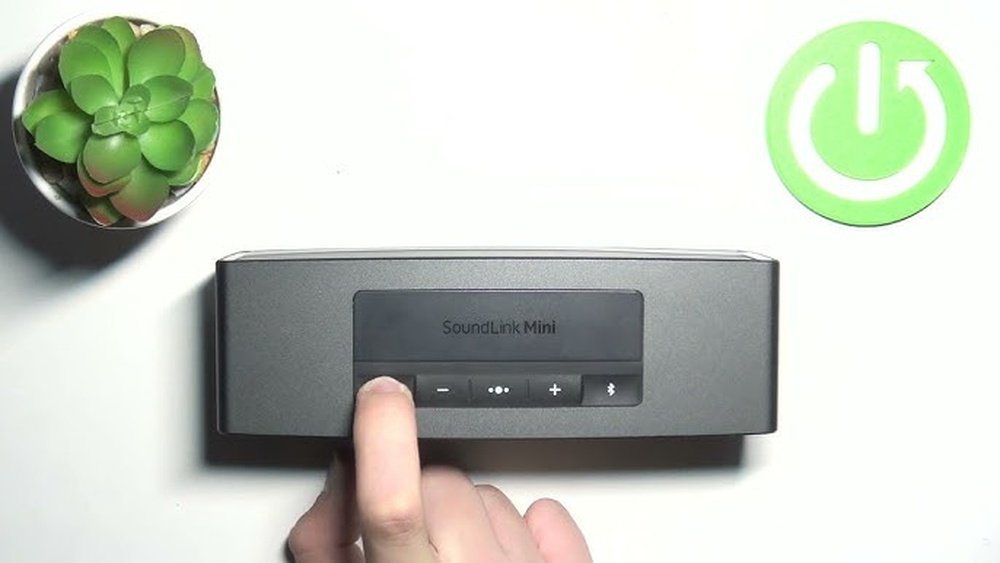
If your Bose SoundLink Mini 2 isn’t working quite right or won’t connect to your devices, a reset might be exactly what you need. Resetting your speaker can clear glitches, fix charging issues, and restore it to its original factory settings.
But how do you do it quickly and correctly without messing up your device? In this guide, you’ll learn step-by-step how to reset your Bose SoundLink Mini 2, whether you need a simple reboot or a full factory reset. Follow along and get your speaker back to perfect sound in no time!

Credit: www.youtube.com
Reset Types
Resetting your Bose SoundLink Mini 2 can solve various issues. It restores normal function when glitches or connection problems occur. There are two main reset types to know. Each serves a different purpose and fixes specific problems. Understanding these resets helps you maintain your speaker efficiently.
Quick Reset
The quick reset is the simplest way to fix minor glitches. It reboots the speaker without erasing your settings. Start by powering on the speaker.
- Press and hold the power button for about 10 seconds.
- The speaker will turn off, signaling the reset.
- Turn it back on; it will ask for language selection.
- Hold the Multi-function button to select English.
- The speaker enters pairing mode, ready for use.
This reset clears temporary errors and refreshes the connection. It is fast and easy, ideal for everyday issues.
Advanced Reset
The advanced reset helps when the speaker is unresponsive or has serious errors. It clears all settings and restores factory defaults.
- Try pressing all buttons to check for stuck keys.
- Connect the speaker to your computer with a USB cable.
- Visit the Bose Updater website at btu.bose.com.
- Use the updater tool to access hidden menus and clear errors.
- This method fixes charging, power, and deep software issues.
Advanced reset erases all paired devices. You must pair phones and tablets again. The speaker returns to its original factory state.
Performing Quick Reset
Performing a quick reset on your Bose SoundLink Mini 2 is a simple way to fix minor glitches or connection issues. This method does not erase all your settings but helps refresh the speaker’s system quickly. It is useful when the speaker freezes or stops responding properly. Follow the steps below to perform a quick reset and get your speaker back to normal.
Power On And Hold Buttons
First, turn on your Bose SoundLink Mini 2 by pressing the power button. Once it powers on, press and hold the Bluetooth and Volume Down buttons at the same time. Keep holding these buttons for about 10 seconds. The speaker will power off automatically. This action signals that the reset process is starting.
Speaker Response
After the speaker powers off, wait a few seconds. Then press the power button again to turn it back on. The speaker will make a short tone or beep sound. This confirms the quick reset is complete. Your speaker is now refreshed and ready to use. Minor issues should be resolved at this point.
Language Selection And Pairing Mode
When the speaker turns on after the reset, it will ask you to select a language. Press and hold the Multi-function button to choose English or another language. Next, the speaker will enter pairing mode automatically. You can now reconnect your phone or other Bluetooth devices. This step is essential to restore your wireless connection.
Using Bose Updater
Using the Bose Updater is a reliable method to reset your Bose SoundLink Mini 2. This tool helps fix software glitches and clear errors that affect performance. It connects the speaker to your computer and provides access to advanced reset options. Follow the simple steps below to use the Bose Updater effectively.
Connecting To Computer
First, power off your Bose SoundLink Mini 2. Use the USB cable to connect it to your computer. Make sure the connection is secure. Turn the speaker back on while connected. This lets the computer recognize the device for updating and resetting.
Accessing Hidden Menu
Open the Bose Updater website on your computer. The tool will detect your speaker automatically. You will see a hidden menu with advanced options. This menu allows you to perform deeper resets than usual. Select the option to clear errors or reset the device.
Clearing Errors
Choose the option to clear errors from the hidden menu. The updater will scan the speaker for issues. It removes any software glitches and corrupted data. This process can fix problems with charging or power. Wait until the updater confirms the reset is complete. Disconnect your speaker and test its performance.
Troubleshooting Steps
Troubleshooting your Bose SoundLink Mini 2 can solve many common issues quickly. Resetting the speaker often restores proper function. Follow simple steps to reset and update your device.
These troubleshooting steps help clear errors and improve performance. Use them whenever your speaker acts up or stops working.
Button Combinations
One easy way to reset your speaker is using button combinations. First, turn on the speaker.
Press and hold the Power button and the Volume Down button simultaneously for about 10 seconds. The speaker will turn off automatically. This action clears temporary glitches and resets some settings.
After the reset, turn the speaker back on. It will ask you to select a language and enter pairing mode. This quick reset often fixes connection and sound issues.
Firmware Update
Updating the firmware can fix deeper problems and improve device stability. Connect your Bose SoundLink Mini 2 to a computer using a USB cable.
Visit the official Bose Update website at btu.bose.com. Download and install the Bose Updater tool.
Run the updater and follow on-screen instructions. The software will check for the latest firmware and install it on your speaker. This process may take several minutes.
After updating, restart your speaker. Firmware updates clear hidden errors and can fix charging or power issues. Keep your device connected during the update to avoid problems.
After Reset Actions
After resetting your Bose SoundLink Mini 2, some important steps follow. These steps help you get your speaker back to normal. The reset clears old settings and paired devices. You need to set it up again for smooth use.
Re-pairing Devices
The reset removes all saved Bluetooth connections. You must pair your phone or tablet again. Turn on Bluetooth on your device. Find “Bose SoundLink Mini 2” in the list. Select it to reconnect. The speaker will enter pairing mode automatically after reset. This process ensures a fresh connection without old errors.
Default Settings Restored
Resetting returns the speaker to factory settings. All custom settings are erased. Volume, language, and preferences go back to original. The speaker will prompt you to choose a language. You can adjust settings again in the Bose app or on the speaker. This clean start often solves bugs and improves performance.

Credit: www.arloren.com

Credit: kdfoundation.org
Frequently Asked Questions
How Do I Reset My Bose Soundlink Mini Ii?
To reset your Bose SoundLink Mini II, power it on. Press and hold the Multi-function button for 10 seconds. The speaker powers off, completing the reset. Turn it on, select language, and re-pair your devices. Use Bose Updater for advanced issues.
How Do I Force My Bose Soundlink To Reboot?
To force reboot your Bose SoundLink, press and hold the Power button for 10 seconds. Release it when the speaker turns off. Turn it back on to complete the reboot. This resets temporary glitches without deleting your settings or paired devices.
How Do I Reset My Bose Soundlink Mini Not Charging?
To reset your Bose SoundLink Mini not charging, press and hold the Power button for 10 seconds. Release it when the speaker turns off. Turn it back on and check charging. Update the firmware via btu. bose. com if the issue persists.
How To Do A Hard Reset On A Bose?
To hard reset a Bose speaker, power it on. Press and hold the Power and Volume Down buttons for 10 seconds. The speaker will turn off and restart, clearing all settings and paired devices. Re-pair your devices after the reset.
How Do I Reset My Bose Soundlink Mini 2 Quickly?
Press and hold the Power button until the speaker turns off, then turn it back on.
Conclusion
Resetting your Bose SoundLink Mini 2 helps solve many common issues. The process clears old connections and restores default settings. After reset, pair your devices again for smooth use. Keep the steps simple and follow carefully for success. Regular resets can improve your speaker’s performance.
Enjoy clear sound and reliable Bluetooth every time.