
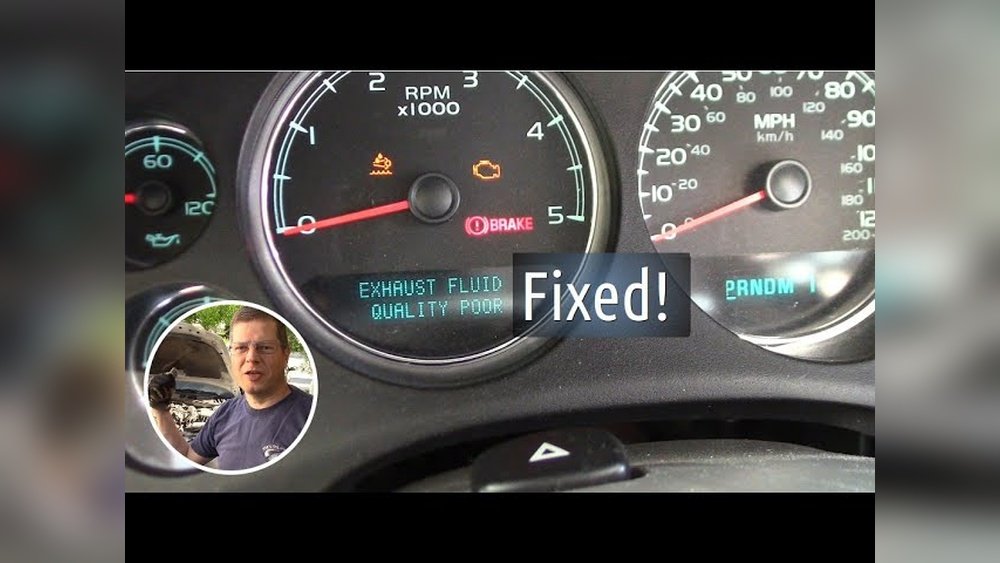
If you’re seeing the “Exhaust Fluid Quality Poor” warning on your vehicle, it’s more than just a minor nuisance. This alert means your Diesel Exhaust Fluid (DEF) isn’t meeting the standards your engine needs to run clean and efficiently.
Ignoring it can lead to engine power loss, costly repairs, and increased emissions. But don’t worry—you can fix this issue yourself by understanding what causes poor DEF quality and how to reset the system properly. In this guide, you’ll learn simple, step-by-step actions to get your DEF system back on track, avoid downtime, and keep your vehicle running smoothly.
Keep reading to take control and solve the problem before it affects your performance.
Exhaust Fluid Quality Poor Meaning
The term “Exhaust Fluid Quality Poor” appears on some diesel vehicle dashboards. It warns that the Diesel Exhaust Fluid (DEF) inside your tank is not good enough. DEF helps reduce harmful emissions by turning nitrogen oxides into harmless gases. When the fluid quality is poor, the system cannot clean emissions properly.
This warning means the DEF may be contaminated, old, or the wrong type. Poor fluid can cause the engine to lose power or fail emissions tests. The vehicle’s sensors detect this and alert you to fix the issue quickly.
What Causes Exhaust Fluid Quality Poor?
Contamination happens when water, fuel, or dirt mixes with DEF. Using dirty tools or funnels can cause this. Filling the tank with non-certified fluid also triggers the warning.
Sometimes, faulty sensors or damage in the emission system cause false alerts. The system may also detect tampering or improper fluid use.
How Does Poor Def Affect Your Vehicle?
Poor quality DEF stops the Selective Catalytic Reduction (SCR) system from working well. Harmful nitrogen oxides remain in the exhaust. This can lead to engine derating, which lowers engine power to protect emissions parts.
Ignoring this warning can cause bigger engine problems and higher pollution. The vehicle might not pass emission inspections.
Signs Of Poor Exhaust Fluid Quality
The warning light or message appears on the dashboard. You may notice reduced engine power or strange engine behavior. Some trucks may show error codes related to the DEF system.
Checking the fluid level alone is not enough. The quality of the fluid matters more.
Common Causes
The “Exhaust Fluid Quality Poor” warning often results from specific common issues. Understanding these causes helps solve the problem quickly. This section covers the main reasons your Diesel Exhaust Fluid (DEF) quality may be poor.
Contamination Issues
Contamination occurs when water, fuel, or dirt mixes with the DEF. Using dirty funnels or unclean containers can also cause this. Contaminated fluid damages the system and triggers warnings. Always use clean tools and store DEF properly.
Incorrect Fluid Use
Using the wrong fluid harms the DEF system. Only API-certified Diesel Exhaust Fluid works correctly. Other fluids may look similar but cause damage. Avoid cheap or uncertified products to keep the system safe.
Faulty Sensors
Bad sensors can send wrong signals about fluid quality. NOx sensors or DEF quality sensors may fail or get dirty. Faulty sensors confuse the system and cause error messages. Sensor checks and replacements fix this issue.
Scr Catalyst Problems
The Selective Catalytic Reduction (SCR) catalyst can wear out or get blocked. This affects how well the system cleans exhaust gases. Catalyst issues may mimic fluid quality problems. Professional inspection helps detect and repair catalyst faults.
Tampering Effects
Unauthorized changes to the DEF system cause errors. Tampering with fluid, sensors, or components triggers warning messages. The system protects itself from improper use. Avoid tampering to keep the DEF system working properly.

Checking And Refilling Def
Checking and refilling Diesel Exhaust Fluid (DEF) is key to fixing the “Exhaust Fluid Quality Poor” issue. The DEF helps lower harmful emissions by breaking down nitrogen oxides. Over time, the DEF can get contaminated or old, causing problems. Regular checks and proper refilling keep the system working well. Follow these steps to maintain your DEF tank and avoid errors.
Cleaning Fill Area
Start by cleaning the DEF fill area thoroughly. Dirt or dust can enter the tank and spoil the fluid. Use a clean cloth to wipe around the fill cap and opening. Avoid using tools that can scratch or damage the surface. A clean fill area helps keep the DEF pure and prevents sensor errors.
Using Genuine Def
Always use genuine, API-certified Diesel Exhaust Fluid. Cheap or incorrect fluids can cause the system to fail. Genuine DEF meets strict quality standards and protects your engine. Check the label and buy from trusted dealers. Using the right fluid helps avoid the “Exhaust Fluid Quality Poor” warning.
Draining Old Fluid
Remove old or contaminated DEF before refilling. The fluid can degrade over time, especially in hot weather. Drain the tank completely to avoid mixing old and new fluids. Follow your vehicle’s manual for the correct draining procedure. Proper draining prevents sensor faults and keeps the system clean.
Refilling Properly
Refill the DEF tank slowly and carefully. Use a clean funnel to avoid spills and contamination. Fill to the recommended level shown in your vehicle’s guide. Tighten the fill cap securely after refilling. Proper refilling ensures the system reads the fluid quality correctly and prevents warning messages.
Calibrating The System
Calibrating the system is a crucial step in resetting the “Exhaust Fluid Quality Poor” warning. This process ensures the sensors and controls correctly detect and use the Diesel Exhaust Fluid (DEF). Proper calibration helps the vehicle recognize fresh DEF and clears error codes. It also restores the system’s ability to manage emissions effectively.
Calibration often involves specific driving patterns or key cycles. These actions allow the system to reset sensor readings and confirm fluid quality. Following the correct procedure avoids unnecessary sensor replacements and saves time.
Driving For Sensor Reset
Driving the vehicle under certain conditions can trigger the sensor reset. Maintain steady speeds on highways or main roads. Avoid stop-and-go traffic during this process. Keep the engine temperature within normal range for accurate sensor readings.
Drive for at least 20 to 30 minutes without interruptions. This allows the system to monitor DEF quality continuously. The vehicle’s computer updates sensor status based on real-time data. After the drive, the warning should clear if the fluid is good.
Key Cycle Method
The key cycle method involves turning the ignition on and off in a sequence. This helps the system recalibrate sensors without driving. Start by turning the key to the “on” position without starting the engine. Hold it for about 10 seconds.
Next, turn the key off for 5 seconds. Repeat this cycle three to five times. This process signals the control module to reset sensor parameters. After completing the cycles, start the engine and check the warning light.
Cleaning Def Quality Sensors
Cleaning DEF quality sensors plays a key role in fixing the “Exhaust Fluid Quality Poor” warning. Dirt, crystals, and deposits can build up on the sensor over time. This buildup causes the sensor to send wrong signals to the engine computer. Cleaning the sensor helps restore accurate readings and proper system function. The process involves removing the sensor, soaking it in fresh DEF fluid, and reinstalling it carefully.
Sensor Removal
Start by locating the DEF quality sensor on your vehicle. It usually sits near the DEF tank or dosing module. Disconnect the electrical connector gently to avoid damage. Use the correct tool to unscrew and remove the sensor from its housing. Handle the sensor carefully; it is fragile and sensitive.
Overnight Def Soak
Fill a clean container with fresh, high-quality DEF fluid. Submerge the sensor’s tip fully in the fluid. Let it soak overnight, at least 8 to 12 hours. This soaking dissolves any salt crystals or deposits on the sensor. Avoid using water or other liquids, as they can damage the sensor.
Reinstallation Tips
After soaking, dry the sensor gently with a clean cloth. Inspect the sensor for any visible damage or corrosion. Reinstall it by screwing it back into place securely. Reconnect the electrical plug firmly. Use zip ties or rubber boots if needed to protect the sensor from dirt and moisture. Finally, reset the vehicle’s system to clear old error codes.
Diagnosing Sensor And Scr Issues
Diagnosing sensor and SCR issues is key to fixing the “Exhaust Fluid Quality Poor” alert. The system relies on sensors and the SCR catalyst to monitor and treat diesel exhaust. Faulty sensors or a damaged SCR can cause false warnings or poor performance. Careful testing helps find the exact problem. This saves time and avoids unnecessary repairs.
Testing Nox Sensors
NOx sensors measure nitrogen oxide levels in exhaust gases. Check sensor wiring and connections for damage or corrosion. Use a scan tool to read sensor data and error codes. Compare sensor readings to manufacturer specifications. Replace sensors showing abnormal values or slow response times. Clean sensors if dirt or deposits are visible. Proper sensor function ensures accurate DEF quality detection.
Checking Scr Catalyst
The SCR catalyst converts harmful NOx into harmless nitrogen and water. Inspect the catalyst for physical damage or clogging. Signs of damage include cracks, discoloration, or debris buildup. Measure backpressure in the exhaust to detect blockages. Use diagnostic tools to monitor catalyst efficiency. A worn or damaged catalyst reduces DEF effectiveness. Replace the catalyst if test results indicate poor performance.
Professional Diagnostics
Some issues require advanced diagnostic equipment. Professionals can perform detailed tests on sensors and the SCR system. They use specialized scan tools and software for accurate fault analysis. Professionals can reset system codes after repairs. They ensure the DEF system runs correctly and emissions meet standards. Consult a technician if basic checks do not fix the problem.
Preventing Future Def Problems
Preventing future Diesel Exhaust Fluid (DEF) problems helps keep your vehicle running smoothly. Proper care extends DEF life and avoids error messages. Simple habits protect the fluid quality and sensor function. Focus on equipment, storage, and system checks.
Using Dedicated Equipment
Use only dedicated tools for DEF handling. Avoid mixing DEF with other fluids. Funnels and containers must be clean and reserved for DEF only. This prevents contamination and sensor errors. Dedicated equipment reduces risk of fluid quality issues.
Proper Storage Of Def
Store DEF in a cool, dry place away from sunlight. High temperatures and direct sun damage the fluid. Keep containers sealed tightly to avoid dirt and moisture entry. Use DEF before its expiration date. Proper storage maintains fluid purity and effectiveness.
Regular System Checks
Inspect the DEF system regularly for leaks and sensor faults. Check for error messages on the dashboard promptly. Replace faulty sensors to avoid false warnings. Clean sensor components as recommended. Regular checks help catch problems early and ensure smooth operation.

Frequently Asked Questions
How Do I Clean My Def Quality Sensor?
Fill a container with clean, certified DEF fluid. Submerge the sensor tip overnight. Remove, reinstall the rubber boot, and secure with zip ties.
Why Does My Truck Say Exhaust Fluid Quality Poor?
Your truck shows “Exhaust Fluid Quality Poor” due to contaminated, degraded, or incorrect Diesel Exhaust Fluid (DEF). Replace with fresh, certified DEF and recalibrate the system. Faulty sensors or SCR system issues can also trigger this warning. Seek professional help if the message persists.
How Do You Reset The Def Warning Light?
Reset the DEF warning light by draining old DEF and refilling with fresh, certified fluid. Then, drive to recalibrate the system. If the light stays on, have a mechanic check sensors and emissions components.
How To Fix Low Quality Def?
Drain the DEF tank and refill with fresh, certified DEF fluid. Clean the fill area and use a dedicated funnel. Drive at steady speeds to recalibrate the system. If the warning persists, have a mechanic check sensors and the SCR system.
What Does “exhaust Fluid Quality Poor” Mean?
It means the Diesel Exhaust Fluid (DEF) is contaminated or degraded, causing engine emission issues.
Conclusion
Resetting the “Exhaust Fluid Quality Poor” message helps keep your truck running well. Always use clean, genuine DEF fluid and avoid contamination. Draining and refilling the tank often solves the problem. Driving the vehicle allows the system to recalibrate and test fluid quality.
If the warning stays, check sensors or get professional help. Regular maintenance prevents this issue and protects your engine. Simple steps keep your emissions system working correctly and avoid power loss. Stay attentive to fluid quality for smooth, efficient truck performance.