
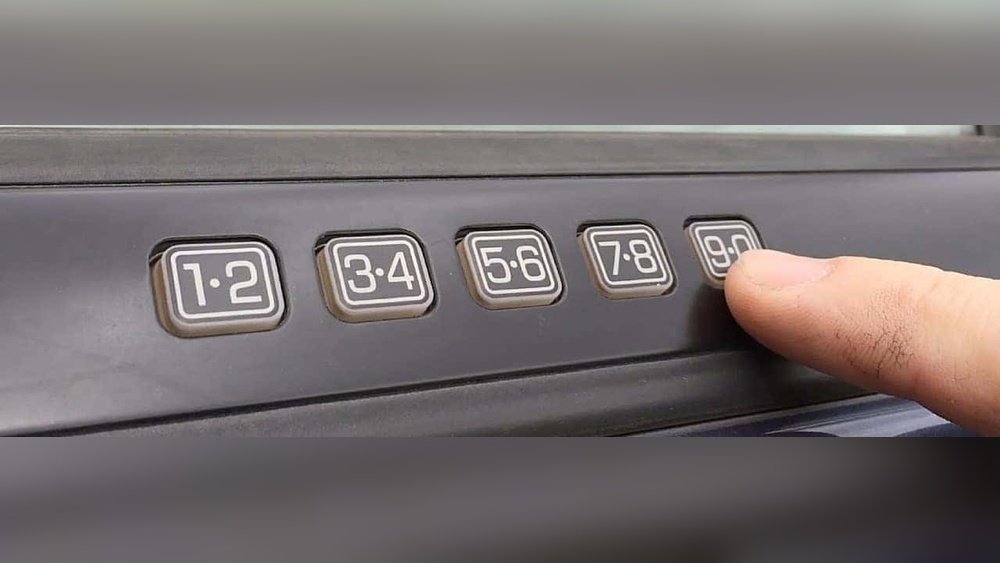
If you own a Ford F150, you know how handy the keyless entry door code can be. But what happens if you forget your code or want to change it for better security?
Resetting your Ford F150 door code might sound complicated, but it’s actually something you can do yourself with the right steps. In this guide, you’ll learn simple, clear methods to find your factory code and reset your door keypad quickly.
Whether you’ve lost the original code or just want to update it, stick with me to unlock easy solutions that will have you back in control of your truck’s security in no time.
Locate Factory Code
Locating the factory code is the first step to reset your Ford F150 door code. This code is unique to your truck. It is essential for programming a new door code. There are several places where you can find this factory code.
Knowing where to look saves time and hassle. It also avoids unnecessary costs for code retrieval.
Check Owner’s Manual Or Wallet Card
The factory code often comes with your vehicle documents. Look inside the owner’s manual. Sometimes, the code is printed on a wallet-sized card. This card is usually in the glove box or with your vehicle papers. Keep it safe for future use.
Find Sticker On Body Control Module
Another place to find the code is the Body Control Module (BCM). It is located inside the vehicle. Remove the passenger side kick panel near the footwell. On the BCM, there is a sticker with the factory code. Be careful when handling the module.
Use Two Programmed Keys For Newer Models
Newer Ford F150 models may not use a factory code. Instead, they use programmed keys. If you have two working keys, the system allows resetting the code. Follow the vehicle’s manual for the exact steps. This method works without the original factory code.
Contact Ford Dealer For Code Retrieval
If you cannot find the code yourself, visit a Ford dealer. They can retrieve the factory code using your vehicle identification number (VIN). Dealers may charge a fee for this service. Always bring your ID and proof of ownership.

Credit: www.fordofpottstown.com
Retrieve Code Without Factory Code
Retrieving your Ford F150 door code without the factory code might seem tough. Some drivers lose the original code or never received it. Thankfully, there are ways to find or reset it without the factory code. This section explains how to get the code using your vehicle identification number (VIN) and other methods you can try at home.
Use Vin At Ford Dealer
The VIN is a unique number for your truck. Ford dealers can use it to find your door code. Visit a local Ford dealer with your truck’s registration and ID. They will look up the code in their system. This service may require a small fee.
Make sure to bring proof of ownership. Without it, the dealer may not release the code. This method is the most reliable way to get your code safely.
Alternative Reset Methods
If you cannot visit a dealer, try some alternative methods. Check your owner’s manual or glove box for the original code card. Sometimes, the code is written there.
Look for a sticker inside the truck. Remove the passenger side kick panel near the footwell. Find the Body Control Module (BCM) and look for a sticker with the code.
You can also reset the keypad by following specific button sequences. These steps vary by model year. Searching online for your model’s reset instructions may help.
Reset Door Code
Resetting the door code on your Ford F150 lets you create a new, easy-to-remember code. This enhances your truck’s security and convenience. The process involves accessing the factory code, setting a personal code, and confirming it works properly. Follow these simple steps to reset your door code quickly and safely.
Enter Factory Code To Access Settings
First, find your factory code. Check the owner’s manual or the card inside the glove box. If not there, look behind the passenger kick panel. The Body Control Module (BCM) sticker has the code. Enter this five-digit factory code on the keypad to unlock programming mode.
Set New Personal Code
After entering the factory code, press the 1/2 button within five seconds. Enter your new personal five-digit code. Choose numbers easy to remember but hard to guess. Press the 1/2 button again to save your new code. The keypad will flash to confirm the change.
Confirm New Code Functionality
Test your new code by locking the doors and unlocking them with your new code. Ensure the doors unlock smoothly without delay. If it doesn’t work, repeat the steps carefully. Your personal code now replaces the factory code for daily use.

Credit: www.youtube.com
Troubleshooting Tips
Troubleshooting your Ford F150 door code can save time and frustration. Simple issues often cause the keypad to stop working properly. Understanding common problems helps you fix them quickly. Follow these tips to diagnose and solve typical keypad issues before seeking help.
Keypad Malfunction Solutions
Start by checking the keypad for dirt or grime. Clean it gently with a soft cloth and mild cleaner. Dirt can block the buttons and stop them from working.
Test all buttons to see if any are stuck or unresponsive. Press each button firmly a few times. Sometimes, repeated pressing frees stuck buttons.
Check the battery if your model uses one for the keypad. Low power may cause the keypad to fail. Replace the battery with a new one to see if this fixes the issue.
Reset the keypad by disconnecting the vehicle battery for a few minutes. This can clear minor electronic errors. Reconnect and try the keypad again.
Look for signs of water damage on the keypad. Moisture can cause malfunction. If wet, dry the area thoroughly and avoid using the keypad until fully dry.
When To Seek Professional Help
Contact a Ford dealer if the keypad still does not respond after basic fixes. They can retrieve the factory code using your vehicle identification number (VIN). This service may have a fee.
Seek help if the keypad lights do not turn on at all. This might indicate a wiring or electrical problem. A professional mechanic can diagnose and repair these issues.
If the keypad buttons work intermittently or the door lock does not respond, professional diagnosis is needed. Faulty body control modules or wiring faults require expert repair.
Do not try to force open the door or repeatedly enter codes. This may lock the system temporarily or cause permanent damage. A professional can safely reset or reprogram the system.
Preventive Measures
Taking preventive measures helps avoid trouble with your Ford F150 door code. Simple steps can keep your code safe and easy to manage. These steps also reduce the chance of needing to reset the code often. Keep your code secure and updated to save time and stress.
Keep Code Documentation Safe
Write down your door code and keep it in a safe place. Avoid storing it in your vehicle or anywhere it can get lost. Use a small notebook or a secure digital app for important codes. This practice helps you find the code quickly when needed. It prevents lockouts and unnecessary resets.
Regular Code Updates
Change your door code regularly to improve security. Pick a code that you can remember easily but others cannot guess. Update your records each time you change the code. Regular updates reduce the risk of unauthorized access. They keep your Ford F150 safer from theft or misuse.

Credit: www.youtube.com
Frequently Asked Questions
How To Reset Ford F150 Door Code Without Factory Code?
To reset your Ford F150 door code without the factory code, check the owner’s manual or glove box card first. Locate the Body Control Module sticker behind the passenger kick panel for the factory code. Use two programmed keys in ignition to display the code on the dash.
Contact a Ford dealer with your VIN if needed.
How To Find Factory Code For Ford F150 Keyless Entry?
Check the owner’s manual or key card for the factory code. Find the sticker on the Body Control Module behind the passenger kick panel. Use both programmed keys to display the code on the dash in newer models. Contact a Ford dealer with your VIN for assistance.
How Do I Change The Door Code On A Ford F150?
Find the factory code on the owner’s manual card or BCM sticker behind the passenger kick panel. Enter it on the keypad, then set a new code. Alternatively, use two programmed keys to display the code on the dash or contact a Ford dealer for assistance.
How Do I Reset The Ford Door Code?
To reset your Ford door code, find the factory code on the owner’s manual or BCM sticker. Remove the passenger kick panel to locate the BCM sticker. For newer models, use two programmed keys in the ignition to display the code on the dash.
Contact a Ford dealer if needed.
How Do I Find The Factory Door Code For Ford F150?
Check the owner’s manual or glove box for a card with the factory code.
Conclusion
Resetting your Ford F150 door code is simple with the right steps. Always start by checking your owner’s manual or the card in the glove box. The Body Control Module sticker can also help you find the factory code. For newer models, using both programmed keys can show the code on the dashboard.
If these options don’t work, contact a Ford dealer for assistance. Following these methods will get your door code reset quickly and safely. Stay patient and careful to avoid lockouts or errors.