
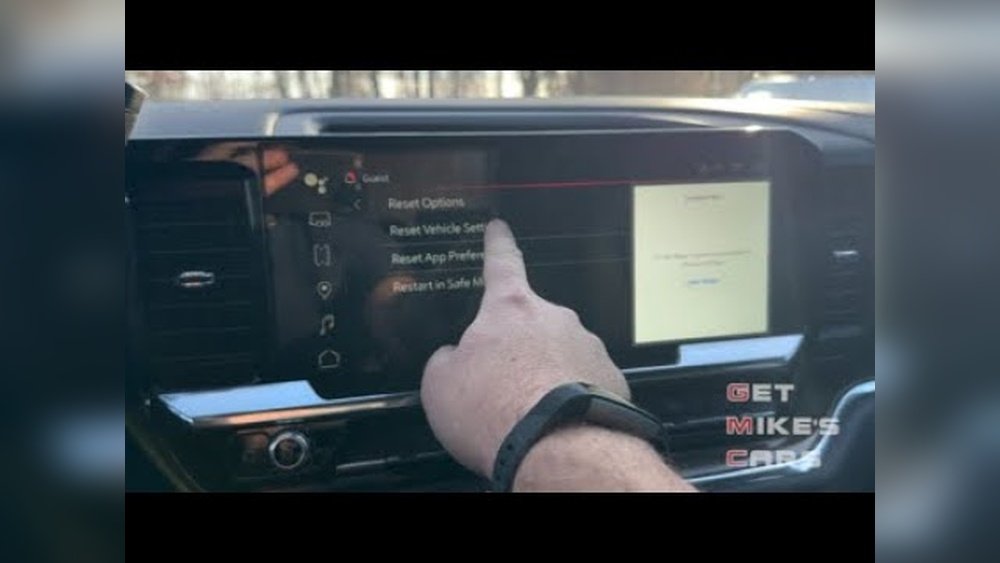
Is your GMC Sierra radio acting up, freezing, or just not working the way it should? You’re not alone, and luckily, fixing it might be simpler than you think.
Resetting your GMC Sierra radio can clear glitches, restore settings, and get your infotainment system running smoothly again. Whether you need a quick reboot or a full factory reset, this guide walks you through the exact steps to reset your radio safely and easily.
Keep reading to learn how to take control of your GMC Sierra’s radio system and enjoy uninterrupted music and navigation once more.
Soft Reset
Performing a soft reset on your GMC Sierra radio can quickly fix small issues. It refreshes the system without deleting your settings or saved data. This method is simple and safe. Use it to solve minor glitches or when the radio is slow to respond.
When To Use Soft Reset
Use a soft reset if your radio freezes or lags. It helps when audio cuts out or menus do not load. Try a soft reset before attempting more complex solutions. This reset does not erase your personal settings or saved stations.
Step-by-step Soft Reset Process
- Put your GMC Sierra in Park for safety.
- Locate the power button or volume knob on the radio.
- Press and hold the power button for about 10 seconds.
- Wait for the screen to go black and the GMC logo to appear.
- Release the button and let the system restart fully.
Tips For Smooth Soft Reset
- Keep your vehicle in Park before starting the reset.
- Do not press any other buttons during the reset process.
- Be patient as the system restarts; it may take a minute.
- If the radio still acts up, consider a hard reset next.
- Regularly update your radio’s software for better performance.

Credit: www.youtube.com
Hard Reset
The hard reset is a powerful way to restore your GMC Sierra radio. It clears all settings and data. This process returns the radio to its original factory state. Use this method only when other fixes fail. It can solve deep software glitches and unresponsive screens.
When To Choose Hard Reset
Choose a hard reset if the radio keeps freezing. Also use it when settings do not save properly. If the system won’t start or shows errors, try a hard reset. Remember, this will erase all saved data and preferences.
Navigating To Factory Settings
Turn your vehicle on and make sure it is in park. Press the “Home” button on the radio screen. Go to the “Settings” menu from the main screen. Scroll to find “System Settings” or “General Settings.” Look for the option labeled “Return to Factory Settings” or “Erase Infotainment Data.”
Executing The Hard Reset
Select the factory reset option on the screen. The system will ask you to confirm your choice. Confirm to start the reset process. Wait patiently while the system erases data and resets. This process may take several minutes to complete. Do not turn off the vehicle during this time.
What To Expect After Reset
The radio will restart automatically after the reset. All your custom settings will be gone. You will need to set up the radio again. This includes pairing Bluetooth devices and setting preferences. The system should now run smoothly without previous errors.
Reset Via Steering Wheel Controls
Resetting your GMC Sierra radio using the steering wheel controls is a quick way to fix minor glitches. This method does not erase your settings or data. It is perfect for unresponsive screens or frozen audio systems. You can perform this reset without needing to access the main display menu.
Using the steering wheel controls keeps your hands close and your eyes on the road. The process is simple and fast, making it ideal for on-the-go troubleshooting.
Locating The End Call Button
The End Call button is the key to resetting your radio via steering wheel controls. It usually looks like a phone handset facing down. On most GMC Sierra models, this button sits on the right side of the steering wheel. It is near other media controls like volume and voice commands. Finding this button is the first step to performing the reset.
Performing The Reset Sequence
Start by turning your truck’s ignition to the ON position but do not start the engine. Press and hold the End Call button for about 10 to 15 seconds. You will notice the radio screen go black during this time. Keep holding until the GMC logo appears on the display. This means the system is rebooting. Release the button and wait for the radio to fully restart.
Common Issues And Fixes
Sometimes, the reset may not work the first time. Check if your truck is properly in Park before trying again. A weak battery or low voltage can stop the reset process. Make sure your battery is charged and connections are secure. If the screen does not reboot, try a full power cycle by turning the truck off and on again. Persistent problems might need a factory reset from the settings menu.

Credit: www.reddit.com
Troubleshooting Common Problems
Troubleshooting common problems with your GMC Sierra radio can save time and frustration. Many issues have simple fixes that restore normal function quickly. This section covers typical problems and how to solve them effectively.
Frozen Screen Solutions
A frozen screen often means the system is overloaded or stuck. Start by turning your vehicle off and on again. This soft reset clears temporary glitches.
If the screen stays frozen, press and hold the power button for about 10 seconds. Wait for the GMC logo to appear, indicating a reboot.
Unplugging the vehicle battery for a few minutes can also help, but only try this if other methods fail. Always put your truck in park before attempting resets.
Audio Playback Issues
Audio problems like no sound or distorted playback are common. Check the volume level and mute settings first.
Restart the radio system with a soft reset to refresh audio components. Verify your Bluetooth or auxiliary connections if using external devices.
Clear paired devices and reconnect them if Bluetooth audio cuts out. Update your infotainment software to the latest version for stability.
Infotainment System Unresponsive
When the infotainment system does not respond to touch or buttons, try a soft reset first. This often restores control without deleting data.
If the system remains unresponsive, perform a hard reset via the Settings menu. This returns the system to factory defaults and clears errors.
To hard reset, select “Return to Factory Settings” and confirm. The process takes a few minutes and erases personal settings, so back up data if possible.
Precautions And Tips
Resetting your GMC Sierra radio can solve many issues. Before starting, take some precautions. These tips help protect your data and ensure safety. Following them makes the reset process smooth and safe.
Backing Up Your Data
Resetting the radio may erase saved settings and preferences. Save your favorite stations and Bluetooth connections first. Write down important information or take pictures of the settings. This helps you restore them after the reset. Avoid losing personal data during the process.
Ensuring Vehicle Is In Park
Always put your GMC Sierra in park before resetting the radio. This prevents accidents or interruptions during the reset. The vehicle must be stationary to allow the system to reset properly. Ignoring this step can cause errors or damage to the system.
When To Seek Professional Help
If the radio does not reset after trying basic steps, ask for expert help. Complex issues might need a technician’s tools or knowledge. Avoid forcing resets that could harm the radio or the vehicle’s electrical system. Professionals ensure safe and correct repairs.

Credit: www.reddit.com
Frequently Asked Questions
How Do I Reset My Gmc Sierra Radio?
To reset your GMC Sierra radio, put the vehicle in park and turn it on. Press the “Home” button, go to Settings, then System. Select “Return to Factory Settings” and confirm. Wait a few minutes for the reset to complete and the system to restart.
How Do You Reboot Gmc Infotainment System?
Put your GMC in Park. Press and hold the End Call button and the Home button simultaneously. Hold until the screen goes black and the GMC logo reappears. For persistent issues, go to Settings > System > Return to Factory Settings to perform a hard reset.
How To Do A Hard Reset On A Radio?
To hard reset a radio, turn on the device and access the Settings menu. Select “System” or “General Settings,” then choose “Factory Reset” or “Erase Data. ” Confirm to start the reset. This erases all user data and restores original settings.
How To Reset 2015 Gmc Sierra Screen?
To reset the 2015 GMC Sierra screen, put the vehicle in park and turn it on. Press the “Home” button, go to Settings, then System or General Settings. Select “Return to Factory Settings” and confirm. Wait a few minutes for the reset to complete.
How Do I Reset My Gmc Sierra Radio Quickly?
Press and hold the power button until the screen goes black and the GMC logo reappears.
Conclusion
Resetting your GMC Sierra radio can fix many common issues fast. Start with a soft reset to avoid losing settings. If problems continue, a hard reset restores factory defaults but erases data. Always keep your vehicle in park during the reset process.
Follow the steps carefully for smooth results. This simple fix helps your radio work like new again. Regular resets keep your system running without glitches. Easy to do and saves time at the dealer. Try these resets before seeking professional help.
Your GMC Sierra radio will thank you.