
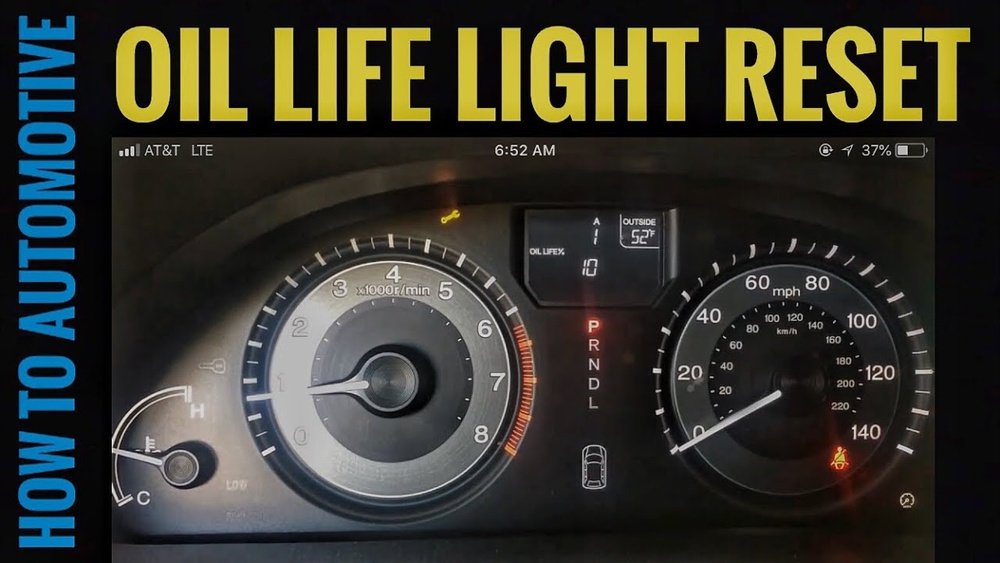
Is your Honda Odyssey’s service light still on after an oil change? That little warning can be annoying and distracting, but you don’t have to visit a mechanic just to turn it off.
You can reset the service light yourself quickly and easily. In this guide, you’ll learn step-by-step how to reset your Honda Odyssey’s service light so it accurately reflects your vehicle’s maintenance needs. Keep reading to take control of your ride’s upkeep and say goodbye to that persistent light for good!
Reset Methods
Resetting the Honda Odyssey service light is simple and can be done in a few ways. Each method lets you clear the maintenance reminder quickly. Choose the one that fits your model and comfort level. Follow the steps carefully for a successful reset.
These reset methods use different controls, such as the steering wheel, dashboard buttons, or touchpad. Understanding these options helps keep your vehicle maintenance on track.
Using Steering Wheel Controls
Turn the ignition to ON without starting the engine. Use the steering wheel arrows to find the “Settings” menu on the display. Scroll down to “Vehicle Settings,” then select “Maintenance Info.” Find “Reset Oil Life” and press the enter button. Confirm the reset by selecting “Yes.” The service light will turn off.
Via Dashboard Buttons
Turn the ignition to ON. Locate the trip meter reset button on the dashboard. Press and hold the button until the oil life indicator starts to blink. Release the button and then press it again for a few seconds. The service light will reset and stop blinking.
Touchpad Reset Steps
Turn the ignition ON without starting the engine. Use the touchpad on the left side of the steering wheel. Navigate to “Settings” and select “Vehicle.” Choose “Maintenance Info” and tap “Reset Oil Life.” Confirm by selecting “OK.” The service light resets instantly.

Credit: www.howtoautomotive.com
Step-by-step Instructions
Resetting the service light on your Honda Odyssey is simple and quick. Follow these step-by-step instructions to clear the oil life indicator. This process helps keep track of your vehicle’s maintenance and ensures accurate alerts.
Each step is easy to follow and requires no special tools. You can complete this reset in just a few minutes. Let’s start with locating the oil life indicator.
Locating Oil Life Indicator
Turn the ignition to the ON position without starting the engine. Use the steering wheel buttons to navigate the display menu. Find the “Settings” option and select it. Scroll to “Vehicle” or “Maintenance Info” on the screen. Locate the “Oil Life” or “Oil Life Indicator” display. This shows the current oil life percentage.
Performing The Reset
Press and hold the select or reset button on the steering wheel. Keep holding until the oil life percentage starts blinking. Release the button and press it again to confirm the reset. The oil life will reset to 100%. This means the system has registered the oil change.
Confirming Reset Success
Turn off the ignition and wait a few seconds. Turn the ignition back on without starting the engine. Check the oil life indicator again. It should show 100% or “Reset.” If it does, the service light reset is successful. If not, repeat the reset steps carefully.
Common Issues
Common issues can arise when resetting the Honda Odyssey service light. These problems may confuse drivers and delay maintenance. Understanding typical faults helps fix the light faster. It also ensures your vehicle stays in good condition.
Light Won’t Reset
The service light may stay on even after a reset attempt. This can happen if the reset steps were not done correctly. Sometimes, the vehicle’s battery needs to be fully charged. A weak battery can block the reset process. Another reason is a malfunctioning sensor in the car.
Incorrect Oil Life Reading
The oil life indicator may show wrong information. It might say the oil needs changing too early or too late. This can confuse the driver about the real oil condition. The cause could be a software glitch or a faulty oil sensor. Regular checks help spot this problem early.
Troubleshooting Tips
Start by turning off the engine and waiting a few minutes. Check the owner’s manual to follow the exact reset steps. Make sure the ignition is in the right position during reset. Inspect fuses related to the dashboard for damage. If the light still won’t reset, visit a mechanic for a scan. They can find hidden errors in the car’s system.

Credit: www.howtoautomotive.com
Maintenance Tips
Maintaining your Honda Odyssey properly helps keep it running smoothly. Paying attention to service lights and following simple care steps extends your vehicle’s life. These maintenance tips guide you on when and how to reset the service light effectively.
When To Reset Service Light
Reset the service light only after completing required maintenance. This includes oil changes, filter replacements, and other scheduled services. Resetting too early can cause missed alerts and reduce engine performance. Always follow the manufacturer’s recommended service intervals.
Regular Oil Change Intervals
Change your oil regularly to protect the engine. Honda suggests oil changes every 7,500 miles or as indicated by the service light. Using the correct oil type ensures optimal lubrication. Clean oil prevents wear and improves fuel efficiency.
Using Genuine Honda Parts
Use genuine Honda parts for repairs and replacements. Authentic parts fit perfectly and maintain vehicle reliability. Non-genuine parts may cause damage or fail sooner. Genuine parts help keep your Odyssey running at its best.
Additional Resources
Finding the right help to reset your Honda Odyssey service light can be easy. Various resources offer clear, step-by-step instructions. These tools guide you through the process without confusion.
Use these resources to save time and avoid mistakes. They provide practical tips and real user experiences. Choose the one that fits your learning style best.
Video Tutorials
Videos show you exactly how to reset the service light. Watching the steps in action makes it simpler to follow along. Many videos are short and to the point.
Search for recent tutorials made for your Odyssey model year. This ensures the instructions match your vehicle’s dashboard and controls.
Owner’s Manual Guidance
Your Odyssey’s owner’s manual has a dedicated section for service light resets. It explains the process with clear diagrams and simple language. The manual is a trusted source directly from Honda.
Keep your manual handy in the glove box. It helps you reset the light anytime without internet access.
Online Forums And Support
Online forums offer community advice from other Honda Odyssey owners. Members share tips, troubleshoot problems, and give detailed instructions. Forums are great for unique issues or questions.
Use forum search tools to find posts about your specific model and service light reset. Engage with the community for quick answers and support.

Credit: www.youtube.com
Frequently Asked Questions
How To Reset Service Light On 2019 Honda Odyssey?
Turn ignition to ON without starting. Use steering wheel controls to select oil life. Press and hold “Select/Reset” until light resets.
How Do I Reset The Service Light On A 2012 Honda Odyssey?
Turn the ignition to ON without starting the engine. Use steering wheel buttons to select the oil life display. Press and hold the “Select/Reset” button until the oil life resets to 100%. Turn off the ignition, then restart to confirm the reset.
How To Reset Maintenance Light On Honda Odyssey 2013?
Turn ignition on without starting engine. Use steering wheel controls to select “Oil Life” on display. Hold “Select/Reset” button until light resets.
How Do I Reset The Maintenance Light On A 2018 Honda Odyssey?
Turn the ignition on without starting the engine. Use steering wheel buttons to select Oil Life. Press and hold the reset button until the light blinks. Release the button and confirm the reset. The maintenance light will turn off.
How Do I Reset The Honda Odyssey Service Light?
Turn the ignition on without starting the engine. Hold the trip button until the light blinks and turns off.
Conclusion
Resetting the Honda Odyssey service light is simple and quick. Follow the steps carefully to clear the warning. This helps keep your vehicle’s maintenance on track. Remember to reset the light only after servicing your car. Regular resets ensure accurate reminders for future maintenance.
Stay attentive to your vehicle’s needs for safe driving. Keeping the service light off avoids confusion and unnecessary visits. Now, you can confidently manage your Honda Odyssey’s service alerts.