
If your Jeep’s Uconnect radio is acting up, freezing, or just not responding like it should, you’re probably wondering how to fix it fast. You don’t want to be stuck without your favorite tunes or navigation, especially when you’re on the road.
The good news? Resetting your Jeep’s Uconnect system is easier than you think. Whether you need a quick soft reset to reboot the system or a full factory reset to clear out glitches, this guide will walk you through the steps clearly and simply.
Keep reading, and you’ll have your radio back up and running in no time—no tech expert needed.
Soft Reset Steps
Performing a soft reset on your Jeep’s Uconnect radio can fix minor glitches quickly. This process restarts the system without deleting your saved settings or data. It is a simple and effective way to restore normal function when the radio acts slow or freezes. Follow these clear steps below to complete a soft reset safely.
Prepare Vehicle Mode
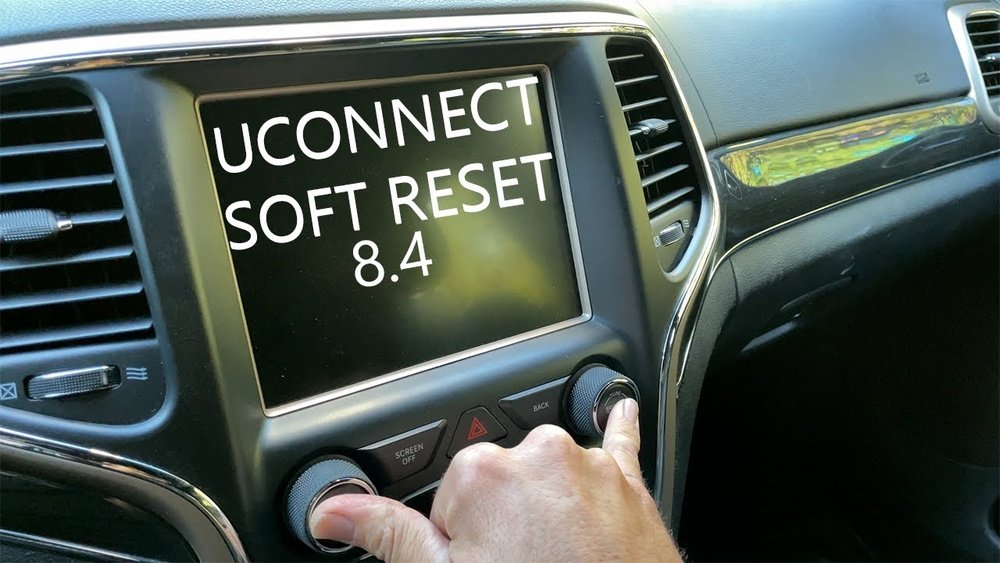
Start by turning your Jeep’s ignition to the “Run” position. Do not start the engine. This activates the electrical system and powers the Uconnect radio. Make sure the screen is on and responsive before moving to the next step.
Press Volume And Tuner Knobs
Press and hold both the volume knob and the tuner knob at the same time. Keep them held down for about 10 seconds. On some newer models, you may need to hold the power button instead of the tuner knob. Hold until the screen goes dark or the system restarts.
Release And Wait For Restart
Let go of the knobs after the screen shuts off. Wait for the Uconnect system to reboot fully. This may take up to a minute. Once the system reloads, the radio should work normally again without losing your presets or settings.
Factory Reset Process
Performing a factory reset on your Jeep’s Uconnect radio can fix many issues. This process erases all saved settings and restores the system to its original state. Follow these clear steps to complete the reset safely and quickly.
Access Uconnect Settings
Start by turning on your vehicle. Wait for the Uconnect system to load fully. Tap the “Settings” icon on the main screen. This opens the menu where you control system features.
Locate Reset Option
Scroll through the settings menu to find the “System” or “Reset” option. This may be under a sub-menu like “Factory Settings” or “System Settings.” Select the reset option to prepare for the next step.
Confirm Factory Reset
The screen will ask you to confirm the factory reset. Confirm by selecting “Yes” or “OK.” The system will then erase all data and restart automatically. Wait for the process to finish before using the radio again.
Hard Reset Method
The Hard Reset Method is a powerful way to fix a frozen or unresponsive Jeep Uconnect radio. It involves cutting power completely by disconnecting the vehicle’s battery. This forces the system to shut down and restart fresh. This method can solve deeper software glitches that soft resets cannot. Use it carefully to avoid losing any saved settings or data.
When To Use Hard Reset
Use the hard reset only if the Uconnect screen does not respond. If the radio freezes and soft reset fails, this is the next step. It helps when the system is stuck or won’t turn on. Avoid using it for minor issues. It’s best for serious system failures.
Disconnecting The Battery
First, make sure the vehicle is off and the key is removed. Open the hood and locate the battery. Use a wrench to loosen the negative terminal clamp. Remove the negative cable from the battery terminal carefully. Wait at least 15 minutes to let the system fully power down.
Reconnecting And Testing
Reconnect the negative battery cable and tighten the clamp securely. Close the hood and start the Jeep. Wait for the Uconnect system to boot up. Check if the radio and touchscreen respond normally. If it works, you have successfully completed the hard reset.

Credit: www.jeeps.net
Fixing Bluetooth Problems
Bluetooth issues can interrupt your music and calls on the Jeep Uconnect system. Fixing these problems often requires simple steps. These steps clear old data and let your devices connect fresh. Follow this guide to improve your Bluetooth connection quickly.
Delete Paired Devices
Start by removing all paired devices from the Uconnect system. This clears any old or conflicting connections. Go to the Bluetooth settings on your Uconnect screen. Select each device and choose “Delete” or “Remove.” This step prevents connection clashes.
Re-pair After Reset
After deleting devices, reset your Uconnect system to refresh it. Once it restarts, turn on Bluetooth on your phone or device. Search for the Uconnect system and select it. Follow the prompts to pair the device again. This fresh connection often solves many Bluetooth problems.
Check Software Updates
Outdated software can cause Bluetooth to fail. Check for updates in the Uconnect settings menu. Connect your Jeep to Wi-Fi or use a USB drive to update the system. Installing the latest software improves Bluetooth stability and adds new features.
Common Troubleshooting Tips
Troubles with your Jeep Uconnect radio can interrupt your driving experience. Common troubleshooting tips often solve many issues quickly. These steps help you reset or fix the system without needing expert help.
Start with simple checks before trying complex solutions. Most problems arise from minor glitches that a reset can fix. Follow these tips carefully to restore your Uconnect system’s function.
System Not Responding
If your Uconnect system does not respond, try a soft reset first. Turn the vehicle to “Run” mode without starting the engine. Press and hold the volume and tuner knobs simultaneously for about 10 seconds. Release the buttons when the screen goes black and then restarts.
This method restarts the system without deleting your settings or data. If the system remains frozen, check the vehicle’s battery or fuse related to the radio. Sometimes, a weak battery can cause responsiveness issues.
Update Uconnect Software
Outdated software may cause problems with your radio. Check your current Uconnect version in the settings menu. Visit the official Uconnect website to see if updates are available for your model.
Download the update to a USB drive and plug it into your vehicle’s USB port. Follow the on-screen instructions to install the update. Regular updates improve system stability and add new features.
Contacting Dealership Support
If resets and updates do not fix the problem, contact your Jeep dealership. Dealers have specialized tools and knowledge for Uconnect issues. They can diagnose hardware problems or perform advanced resets.
Schedule a service appointment for thorough inspection. Sometimes, internal components or wiring need repair. Professional support ensures your system works safely and correctly.

Credit: www.reddit.com

Credit: www.youtube.com
Frequently Asked Questions
How Do You Reboot The Uconnect On A Jeep?
To reboot Uconnect on a Jeep, turn the vehicle to “Run” mode. Press and hold the Volume and Tuner/Power knobs simultaneously. Release both buttons when the system restarts. This soft reset refreshes Uconnect without erasing data.
How To Reset A Jeep Stereo?
Turn the Jeep to “Run” mode without starting the engine. Hold the Volume and Tuner/Power knobs simultaneously. Release when the system restarts. For a full reset, go to Settings > System > Reset on the Uconnect screen.
How To Do A Hard Reset On A Jeep?
To hard reset a Jeep, disconnect the negative battery terminal for 10-15 minutes. Reconnect it and start the vehicle. This clears system errors and resets electronics. Use this only if soft resets fail or the system is unresponsive.
How To Fix Uconnect Not Connecting?
Delete all paired Bluetooth devices in Uconnect settings. Perform a soft reset by holding volume and tuner knobs until reboot. Check for software updates via the Uconnect app or dealership. This usually fixes connection issues without erasing data.
How Do I Reboot The Uconnect On My Jeep?
Press and hold the Volume and Tuner/Power buttons together until the screen restarts.
Conclusion
Resetting your Jeep Radio Uconnect is simple and quick. Start with a soft reset to avoid data loss. If issues remain, try a factory reset to clear all settings. For unresponsive screens, a hard reset may help. Follow the steps carefully for best results.
Regular resets keep your system running smoothly. Now, enjoy your Jeep’s audio system without interruptions.