
Is your Honda’s maintenance light on, and you’re wondering how to reset it quickly and easily? You’re in the right place.
That little light is your car’s way of reminding you it’s time for service, but once you’ve taken care of the maintenance, you want that light off—and fast. Whether you drive a Civic, CR-V, Accord, or Pilot, resetting the maintenance light is simple when you know the steps.
In this guide, you’ll learn exactly how to reset your Honda’s maintenance light without any special tools or trips to the mechanic. Keep reading, and you’ll have your dashboard looking clean and ready for the road in no time.
Maintenance Light Basics
The maintenance light on your Honda helps you keep track of important service needs. It shows up to remind you when it is time for routine care. Understanding this light helps you avoid bigger problems and keeps your car running smoothly.
This light is not a warning for urgent issues but a signal for scheduled maintenance. Knowing what it means and when it appears can save you time and money. It also helps keep your vehicle safe and reliable.
Purpose Of The Light
The maintenance light alerts you about regular service tasks. These include oil changes, tire rotations, and other checks. It helps maintain the engine’s performance and prolongs the car’s life. The light turns on based on your driving patterns and mileage.
It acts as a reminder to prevent neglecting routine care. Ignoring this light may lead to costly repairs later. The light does not indicate a breakdown but signals it is time for upkeep.
When It Appears
The maintenance light usually appears after a set number of miles. For many Honda models, this is around 7,500 miles or 12,000 kilometers. It may also turn on after a specific time period, like six months.
The light can come on during startup or while driving. It stays on until you reset it after completing the required maintenance. If the light stays on long after service, it may need a reset to turn off.
Tools Needed
Resetting the maintenance light on your Honda requires simple tools. These tools let you access the vehicle’s settings quickly. Knowing which tool to use depends on your car model and year. Each method is straightforward and requires no special skills.
Using the right tool saves time and ensures the light resets properly. Below are the common tools needed to reset the maintenance light on Honda cars.
Key Fob Or Ignition Key
The key fob or ignition key is the most basic tool. You use it to turn the car on without starting the engine. This action powers the dashboard where the maintenance light appears. With the key in the ON position, you can access reset options using dashboard buttons.
Steering Wheel Controls
Many Honda models have controls on the steering wheel. These buttons help navigate through the dashboard menus. You can find the maintenance light reset option under the settings or vehicle information menu. Steering wheel controls make the process hands-free and easy.
Infotainment System
Newer Honda models use the infotainment screen for many settings. You can reset the maintenance light through the system’s menu. Navigate to Home, then Settings, followed by Vehicle or System options. Select Maintenance and find the reset option. This tool offers a clear, visual way to reset the light.
Reset Methods By Model
Resetting the maintenance light on a Honda varies by model. Each Honda model has its own simple steps to clear this alert. Knowing the right method helps keep your dashboard clean and your car running smoothly. Below are reset methods categorized by Honda models.
Older Honda Models
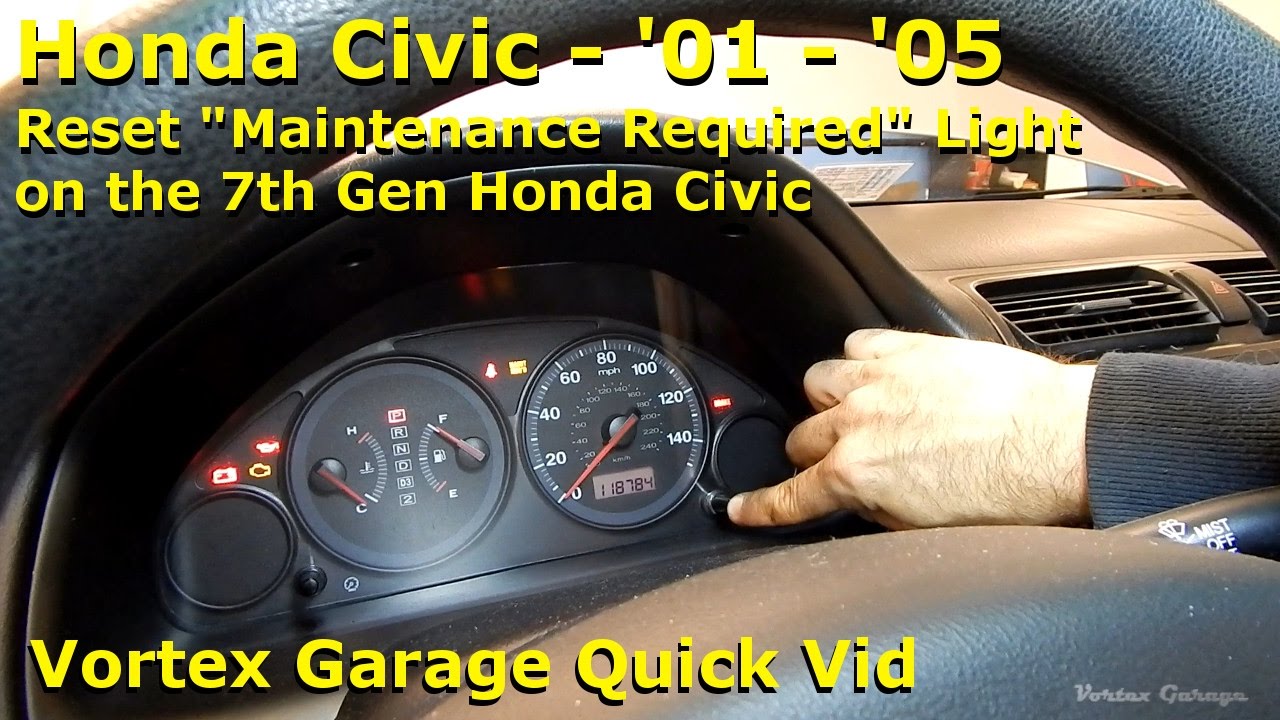
Start by turning the ignition off. Press and hold the trip reset button on the dashboard. While holding, turn the ignition to the “ON” position without starting the engine. Keep the button pressed until the maintenance light blinks and goes off. Release the button and turn the ignition off. This method works for many Hondas made before 2010.
Honda Civic And Accord
Turn the ignition off completely. Press the trip meter reset button until “Trip A” appears. Hold the button and turn the ignition to “ON” without starting the engine. Wait for the maintenance light to flash and turn off. Let go of the button and switch the ignition off. This reset suits most Civic and Accord models from 2010 to 2015.
Newer Models With Infotainment
Power on the vehicle and access the infotainment screen. Go to Home, then Settings, followed by System. Select Vehicle, then choose Maintenance. Find the option to reset the maintenance light or reset items. Confirm the reset and wait for the screen to update. This method applies to Honda models with touchscreen displays after 2016.
Using I-mid Display
Turn the ignition to the ON position without starting the engine. Use the steering wheel controls to navigate the i-MID menu. Scroll to Vehicle Settings, then select Maintenance Info. Choose the option to reset the maintenance light. Confirm the reset and wait for the message to disappear. This method fits newer Honda models equipped with the i-MID display.
Credit: www.shenangohonda.com
Step-by-step Reset Guide
Resetting the maintenance light on your Honda is simple and quick. Follow this step-by-step guide to clear the light after servicing your vehicle. This will help keep your dashboard clean and remind you only when maintenance is due.
Turn Off Ignition
Make sure the ignition is completely off. The engine should not be running.
Select Trip Meter
Press the trip meter button until the display shows “Trip A” or “Trip B.” Usually, “Trip A” is used for the reset.
Turn Ignition On Without Starting
Turn the key to the “ON” position. Do not start the engine. The dashboard lights will turn on.
Hold Reset Button
Press and hold the trip meter reset button. Keep holding for about 10 seconds until the light starts blinking.
Wait For Confirmation
Release the button once the maintenance light blinks or turns off. The reset is complete, and the light is cleared.
Using Infotainment Screen
Resetting the maintenance light on your Honda is easy using the infotainment screen. This modern feature guides you through the process without needing tools or buttons under the dash. The screen displays clear menus to help you find the right settings. Follow these steps to reset the light quickly and safely.
Access Vehicle Settings
Turn on your Honda’s ignition, but do not start the engine. Look for the home button on the infotainment screen. Tap it to open the main menu. Find and select the “Settings” icon. This section controls all vehicle-related options.
Navigate To Maintenance
Inside the settings menu, scroll down to find “System” or “Vehicle.” Tap to open this submenu. Look for the “Maintenance” option and select it. This area tracks service reminders and oil life. It shows the current status of your maintenance light.
Reset Maintenance Light
Within the Maintenance menu, find the option labeled “Reset Maintenance Light” or “Reset Items.” Tap this option. A confirmation message will appear on screen. Confirm your choice to reset the light. The maintenance reminder will now turn off.

Credit: www.crvownersclub.com
Troubleshooting Tips
When the maintenance light on your Honda does not reset as expected, some troubleshooting steps can help. These tips guide you through common issues and simple fixes. Follow each step carefully to resolve the problem and keep your vehicle’s system accurate.
Light Won’t Reset
The maintenance light may stay on if the reset procedure was not done correctly. Make sure you follow the exact steps for your Honda model. Sometimes, holding the reset button too briefly or turning the ignition too fast can stop the reset.
Try repeating the reset process slowly and carefully. Check if the light turns off after restarting the vehicle. If not, the system might need a deeper reset or service.
Check Battery Status
A weak or dead battery can cause the maintenance light to behave oddly. Low battery voltage may prevent the system from saving the reset command. Test your battery with a multimeter or visit a service center.
Replace or recharge the battery if needed. After ensuring the battery is healthy, try resetting the maintenance light again. This step often resolves reset failures linked to power issues.
Consult Owner’s Manual
Your Honda’s owner’s manual contains model-specific instructions for resetting the maintenance light. The manual may explain unique steps or precautions for your vehicle. It also provides information about warning lights and their meanings.
Locate the maintenance light section in the manual and follow the instructions carefully. If the manual does not help, contact a Honda dealership or a trusted mechanic for advice.
Maintenance Reminder Best Practices
Maintaining your Honda’s health extends beyond simply resetting the maintenance light. Following best practices helps keep the vehicle running smoothly and prolongs its life. The maintenance reminder light guides timely care but does not replace regular upkeep. Staying on top of essential tasks ensures safety and avoids costly repairs.
Regular Oil Changes
Oil lubricates engine parts and prevents wear. Change oil as recommended in your Honda’s manual. Fresh oil improves fuel efficiency and engine performance. Delaying oil changes can cause engine damage. Use the right oil type for your model. Regular oil changes keep the maintenance light accurate.
Scheduled Inspections
Honda schedules inspections for vital components. These include brakes, tires, fluids, and filters. Follow your owner’s manual for inspection intervals. Scheduled checks catch problems early. Fixing small issues prevents bigger repairs. Keep records of all inspections and services. This habit supports your vehicle’s reliability.
Using The Light As A Guide
The maintenance light signals when service is due. Treat it as a helpful reminder, not a warning. Reset the light only after completing the required maintenance. Ignoring the light can lead to system errors. Use it to plan your next oil change or inspection. Proper use keeps your Honda running at its best.
Credit: www.youtube.com
Frequently Asked Questions
How Do I Reset The Maintenance Light On A Honda?
Turn ignition off. Press the SELECT/RESET knob until “Trip A” shows. Hold knob, turn key to ON without starting. Wait for light to blink and reset. For newer models, use infotainment: go to Home > Settings > Vehicle > Maintenance, then select and confirm “Reset Maintenance Light.
“
How Do I Clear My Honda Maintenance Due Soon?
Turn off the ignition. Press the SELECT/RESET knob until “Trip A” shows. Hold the knob and turn the key to ON without starting. Wait for the light to blink and reset. For newer models, use the infotainment system’s maintenance menu to reset the maintenance light.
How To Reset Maintenance Light On 2017 Honda Accord?
Turn the ignition off. Press the SELECT/RESET knob until “Trip A” shows. Hold the knob and turn the ignition to ON without starting. Release when the maintenance light blinks and goes off.
How Do I Turn Off Maintenance Mode On My Honda?
To turn off maintenance mode on your Honda, turn ignition off. Press the SELECT/RESET knob until “Trip A” appears. Hold the knob and turn the key to “ON” without starting. Wait for the light to blink and turn off. Maintenance mode resets.
How Do I Reset The Maintenance Light On A Honda Civic?
Turn the ignition off, select Trip A, hold the reset knob, turn key to ON, and wait for the light to blink.
Conclusion
Resetting the maintenance light on your Honda keeps your car in good shape. Follow the simple steps carefully for a quick reset. This helps you track oil changes and other services easily. Staying on top of maintenance improves your car’s performance and safety.
Remember, regular care extends your Honda’s life. Try these steps next time the light comes on. Your car will thank you.