
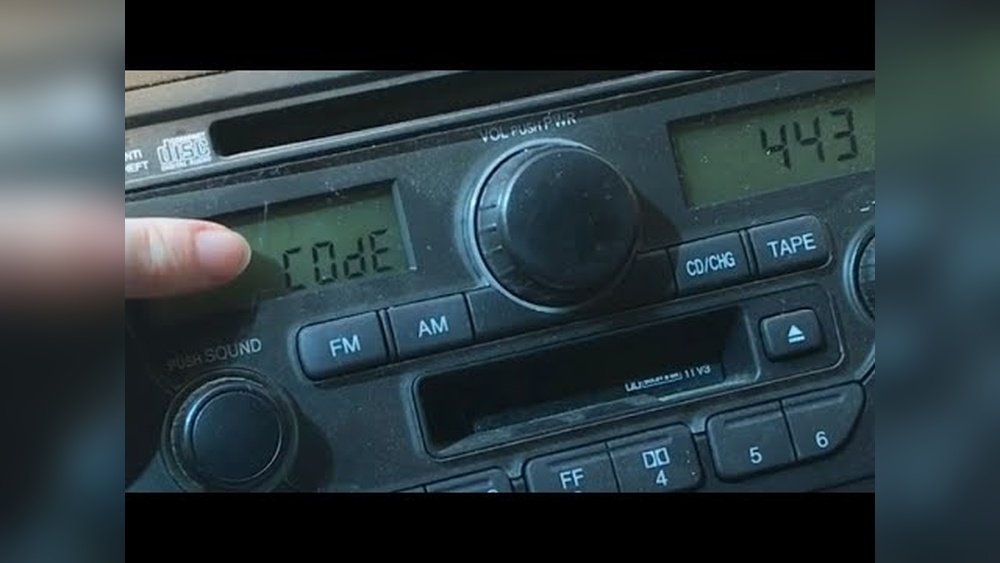
If your Honda Pilot’s radio has suddenly stopped working or is asking for a code after a battery change, you’re probably wondering how to get it back up and running quickly. You don’t have to be a car expert or spend hours searching for answers.
In this guide, you’ll learn simple, step-by-step methods to reset your Honda Pilot radio, whether it’s a quick reboot or entering the radio code. By the end, you’ll feel confident fixing this common issue yourself and getting back to enjoying your favorite music or podcasts on the road.
Keep reading to discover the easiest ways to reset your Honda Pilot’s radio and avoid frustration!

Resetting Radio After Dead Battery
After your Honda Pilot’s battery dies, the radio often locks itself. This happens for security reasons. To use the radio again, you must reset it by entering a special code. This process ensures only the owner can reactivate the radio after power loss.
Resetting the radio after a dead battery is simple if you have the code. Without it, the radio stays locked. The following steps explain how to find and enter the code correctly.
Locating The Radio Code
Check your vehicle’s owner manual first. The radio code may be printed on a card inside. Look inside the glove box or under the dashboard. Sometimes, the code is on a sticker in the trunk or near the spare tire.
If you cannot find the code, contact a Honda dealer. They can retrieve it using your vehicle identification number (VIN). Be ready to prove ownership for security.
Using Preset Buttons To Enter Code
Turn on the radio. The display will show “CODE” or “ENTER CODE.” Use the preset buttons to enter the numbers. Each button corresponds to a digit in the code.
Press button 1 for the first number, button 2 for the second, and so on. After entering the full code, press the “Enter” or “Seek” button. The radio should unlock and start working.
Troubleshooting Code Entry Errors
If the radio shows “ERROR” or resets after code entry, check your numbers. Make sure the code matches exactly. Try entering it slowly and carefully.
Too many wrong attempts may lock the radio for a time. Turn off the radio and wait 30 minutes before trying again. If problems continue, visit a Honda dealer for help.

Soft Reboot For Minor Glitches
Minor glitches in the Honda Pilot radio system can cause frustration. A soft reboot often fixes small issues like frozen screens or slow responses. This quick reset refreshes the system without erasing saved settings or data.
Performing a soft reboot is simple and safe. It helps avoid full resets that clear all personalized information. Drivers can try this method first to solve common radio problems.
Steps To Perform A Soft Reset
- Turn on your Honda Pilot’s ignition.
- Press and hold the power button on the radio for about 10 seconds.
- The screen will go black, then the Honda logo will appear.
- Release the power button once the logo shows.
- Wait for the radio to fully restart and respond.
When To Use Soft Reboot
- The touchscreen becomes unresponsive or slow.
- The radio freezes during station changes or menu navigation.
- Audio cuts out or stutters briefly.
- Bluetooth connection drops or fails to pair.
- Small delays occur after switching modes or inputs.
This method is not for serious errors like missing radio codes or hardware faults. Soft reboots address only minor software glitches to restore smooth operation quickly.
Factory Data Reset
The Factory Data Reset on a Honda Pilot radio restores the system to its original condition. This process removes all saved settings and personal data. It helps fix serious software issues and glitches. Use this reset only when other troubleshooting steps fail. Follow the steps below to perform a Factory Data Reset safely.
Accessing The Reset Menu
Start by turning on your Honda Pilot’s infotainment system. Press the MENU button on the dashboard or touchscreen. Navigate to the Settings option in the menu. Then select System settings. Look for the option labeled Factory Data Reset or something similar.
Confirming The Factory Reset
After selecting Factory Data Reset, the system will ask for confirmation. Read the warning message carefully. It explains that all data will be erased. Choose Yes or Continue to start the reset. The screen may go black briefly. Then the system restarts automatically. Wait patiently until the reset completes.
Effects On Personal Settings And Data
This reset deletes all personalized settings, including radio presets and Bluetooth connections. Saved navigation data will also be removed. You must re-enter any preferences after the reset. The system returns to the default factory state. This clears bugs caused by corrupted data. Keep this in mind before starting the reset.
Resetting Via Fuse Box
Resetting your Honda Pilot’s radio via the fuse box is a reliable way to fix serious issues. This method cuts power to the infotainment system completely. It forces a full reboot, often clearing stubborn glitches. It is more direct than a simple soft reset from the settings menu. Follow these steps carefully to avoid any electrical problems.
Locating The Infotainment Fuse
First, find the fuse box in your Honda Pilot. It is usually under the hood or inside the cabin. Check the owner’s manual for the exact location. Look for the fuse labeled “Infotainment,” “Audio,” or “Radio.” Use the fuse puller or a pair of needle-nose pliers to remove it. Handle the fuse gently to avoid damage.
Power Cycling The System
After removing the infotainment fuse, wait at least one minute. This pause allows the system to fully power down. Reinsert the fuse back into its slot firmly. Close the fuse box cover securely. Turn on your vehicle and check the radio system. It should restart and reset itself now.
When To Use Fuse Reset
Use the fuse reset if the radio won’t respond to normal resets. It helps when the screen freezes or the system does not reboot. This method clears deeper errors without erasing saved settings. Avoid using it too often to protect your vehicle’s electrical system. If problems persist, consider professional assistance.
Resetting Steering Wheel Controls
Resetting the steering wheel controls in a Honda Pilot helps fix unresponsive buttons. These controls manage audio volume, track changes, and phone calls. Resetting them restores proper function without affecting other car settings. The process is simple and can save a trip to the dealer.
Steps To Reset Controls
- Turn the ignition to the ON position without starting the engine.
- Press and hold the “Volume Up” and “Seek Up” buttons on the steering wheel simultaneously.
- Keep holding the buttons for about 10 seconds until the radio screen flashes or resets.
- Release the buttons and turn the ignition OFF.
- Start the engine and test the steering wheel controls for response.
Tips For Smooth Reset
- Ensure the vehicle is parked and the engine is off before starting.
- Do not press other buttons during the reset process.
- Be patient and hold the buttons firmly for the full 10 seconds.
- If reset fails, try restarting the car and repeat the steps.
- Consult the owner’s manual for specific button locations if unsure.

Finding Your Radio Code
Finding your radio code is essential to reset the Honda Pilot radio after a battery disconnection or power loss. The code protects the radio from theft and ensures only the owner can reactivate it. Without the correct code, the radio will stay locked and unusable.
Locating this code might seem tricky. The good news is, there are simple ways to find it. The radio code can usually be found in documents that came with your vehicle or through official Honda resources. Here are the best methods to retrieve your Honda Pilot radio code quickly and safely.
Checking The Glove Box And Owner’s Manual
The first place to check is your glove box. Honda often places a small card with the radio code inside. This card might be labeled “Radio Code” or “Security Code.”
If you do not find the card, look inside your owner’s manual. Sometimes, the code is written on a sticker attached to the manual’s cover or on a page inside. Keep this manual handy for future reference.
Using Honda’s Official Website
Honda offers an online tool to retrieve your radio code using your vehicle information. You need your Vehicle Identification Number (VIN) and sometimes the serial number of your radio.
Visit Honda’s official website and navigate to the radio code retrieval section. Enter the required details carefully. The website will provide the code after verification. This method is safe and fast.
Contacting Honda Dealers
If you cannot find the code in your car or online, contact a Honda dealer. Provide them with your car’s VIN and proof of ownership. Dealers have access to the radio code database and can retrieve your code.
Some dealers may ask for a small fee. Visiting or calling your local dealer is often the last option but guarantees you get the correct code legally.
Manual Radio Reset Options
Manual radio reset options provide simple ways to fix common radio issues in your Honda Pilot. These methods help restore normal function without professional help. Use these steps to resolve glitches like frozen screens, no sound, or system lag.
Manual resets often do not erase your saved settings. They are quick fixes for minor problems. Choose the method that fits your situation best and follow the instructions carefully.
Using Dedicated Reset Button
Some Honda Pilot radios have a small reset button on the unit. Look near the radio face or under the dashboard. Use a pointed object like a pen tip to press this button gently. Hold it for about 5 seconds and release. The radio will turn off and restart. This clears temporary errors and refreshes the system.
Navigating System Settings
The radio menu lets you reset parts of the system manually. Press the MENU button on the radio or touchscreen. Scroll to Settings and then System options. Look for a reset or reboot choice. Select it to restart the radio software. This method fixes slow response or touchscreen problems without erasing data.
Performing Factory Reset From Radio Menu
A factory reset restores the radio to original factory settings. This deletes all personal data, saved stations, and Bluetooth connections. Press MENU and go to Settings, then System. Find Factory Data Reset or similar. Confirm your choice when prompted. The radio will erase all data and reboot fresh. Use this option only if other resets fail to solve the issue.
Common Issues And Fixes
The Honda Pilot radio system can face issues like unresponsive screens and freezing. These problems affect your driving comfort and entertainment. Understanding common issues helps you fix them quickly. This section covers typical troubles and easy solutions.
Handling Unresponsive Screens
An unresponsive radio screen often results from software glitches. Try a soft reset first. Press and hold the power button for about 10 seconds. Release when the screen goes black and the Honda logo appears. This restarts the system without losing settings.
Check if the touchscreen responds after reboot. If not, clean the screen gently. Dirt or moisture can block touch sensors. Avoid using harsh chemicals. Use a soft, dry cloth instead.
Dealing With Persistent Freezing
Freezing may happen if the system software has bugs or conflicts. A factory data reset can fix this. It erases all custom settings and restores the system to default. To do this, press the MENU button on the dash or screen. Navigate to Settings > System > Factory Data Reset. Confirm the reset by following on-screen prompts.
If freezing continues, check the fuse. Locate the fuse box under the hood. Find the infotainment or audio fuse using your manual. Remove and reinstall it. This cuts power and forces a hard reset.
Preventing Future Radio Problems
Keep your Honda Pilot’s radio system updated. Check for software updates regularly through the infotainment menu. Updates fix bugs and improve performance. Avoid leaving the radio on when the engine is off. This helps prevent battery drain and system errors.
Clean the screen often to keep touch sensitivity high. Avoid exposing the system to extreme temperatures. These steps reduce the chance of future issues and keep your radio working well.
Frequently Asked Questions
How Do I Reset My Honda Pilot Entertainment System?
To reset your Honda Pilot entertainment system, press and hold the power button for 10 seconds. The screen will go black and reboot with the Honda logo. For a full factory reset, go to Menu > Settings > System > Factory Data Reset, then confirm the action.
How To Reset Radio Code Honda?
To reset your Honda radio code, visit the Honda website or contact a dealer for your unique code. Enter the code using preset buttons when “CODE” appears on the display. Avoid multiple wrong attempts to prevent lockout.
How Do I Reset My Radio Manually?
To reset your radio manually, turn off the vehicle and remove the radio fuse. Wait 10 minutes, reinstall the fuse, then restart the vehicle. Enter the radio code if prompted to restore functionality.
How To Get Radio Code On Honda Pilot?
Find your Honda Pilot’s radio code on the owner’s manual or card. Visit Honda’s official website and enter your VIN and radio serial number. Enter the code on the radio using preset buttons to unlock it. Contact a Honda dealer if you cannot locate the code.
How Do I Reset The Radio In A Honda Pilot After Battery Replacement?
Turn the ignition on, enter the radio code using preset buttons, and press the seek button to confirm.
Conclusion
Resetting the radio in your Honda Pilot is simple and quick. Follow the steps carefully to avoid errors. A soft reset solves minor glitches without losing settings. For serious issues, a factory reset restores original settings. Remember to keep your radio code handy before resetting.
This helps you get back on the road faster. Regularly checking the fuse can prevent future radio problems. Staying calm and patient during the process makes it easier. Now, you can enjoy your Honda Pilot’s radio without worries.