
If your Schlage lock isn’t working as it should, or you need to clear old codes and start fresh, knowing how to reset your Schlage lock is key. Whether it’s a simple keypad model or a smart lock connected to your home network, resetting your lock puts you back in control quickly and safely.
In this guide, you’ll learn clear, step-by-step instructions to reset your Schlage lock the right way. By the end, you’ll have the confidence to handle any reset without stress—and keep your home secure. Ready to get started? Let’s dive in.

Credit: www.wikihow.com
Reset Basics
Resetting your Schlage lock is a straightforward process. It restores the lock to its factory settings. This step is useful if you forget your codes or want to start fresh. Follow simple actions to complete the reset successfully. Each step matters to ensure your lock works perfectly again.
Remove Batteries
First, open the battery cover on the inside of the lock. Take out all batteries carefully. Removing power is necessary to begin the reset process. Keep the batteries aside for now.
Press Reset Button
Locate the reset button inside the lock. It is usually a small black button. Press and hold this button firmly. Holding the button is key to triggering the reset.
Reconnect Power
While still holding the reset button, put the batteries back. Make sure they are inserted correctly. Reconnecting power while pressing the button starts the reset cycle.
Wait For Signal
Keep holding the reset button until the lock flashes or beeps. This signal shows the reset is complete. The light and sound confirm the lock is ready for new settings.
Test Default Codes
After reset, test the default user codes. These codes are on a sticker inside the battery cover. Use them to unlock the door and check the reset success. Reprogram your lock with new codes afterward.
Reset For Smart Models
Resetting Schlage smart locks helps fix issues and clear settings fast. This process restores the lock to factory defaults. It removes all user codes and network connections. You can then set up the lock fresh. Follow the right steps for each model for best results.
Schlage Encode Steps
First, remove the battery cover on the inside of the lock. Take out the batteries. Press and hold the small black reset button near the battery slot. While holding it, insert the batteries back. Keep holding the button until the lock flashes blue and beeps. The lock is now reset. You must reconnect it to your Wi-Fi using the Schlage app.
Schlage Arrive Reset
Open the battery compartment on the lock’s interior. Remove the batteries to power down the lock. Press and hold the Schlage button on the keypad. Reinstall the batteries while still holding the button. Wait for the LED to blink green and hear a beep. Release the button. This resets the Arrive to factory settings, deleting all codes and connections.
Network Reconnection
After resetting, you must connect the lock to your home network again. Open the Schlage app on your phone. Follow the prompts to add a new device. Put the lock in pairing mode by pressing the Schlage button. Select your Wi-Fi network and enter the password. The lock will connect and update its settings. Test the lock by locking and unlocking from the app.
Programming New Codes
Programming new codes on your Schlage lock lets you control who can enter your home. After resetting, you need to set up new user codes for easy access. This process is simple and keeps your lock secure. Follow the steps below to program your lock correctly.
Use Default Codes
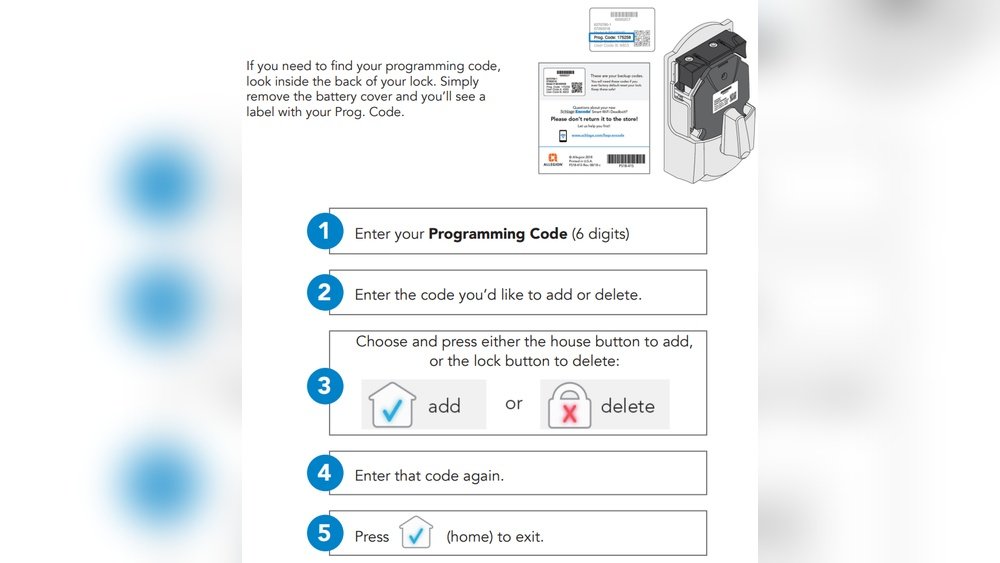
Start by using the default codes found inside the battery cover. These codes are necessary to access programming mode. Enter the default code on the keypad. The lock will beep to confirm you are in programming mode. This step allows you to add or change user codes.
Set User Codes
To add a new user code, enter the programming code first. Then press the button to add a user code. Enter the new code you want to use. Confirm the code by entering it again. The lock will beep twice, signaling success. Set codes that are easy to remember but hard to guess.
Change Programming Code
Changing the programming code improves security. Enter the current programming code. Press the button to start changing the code. Enter your new programming code. Confirm by entering the new code again. The lock will beep twice to confirm the change. Keep this code private for safety.
Credit: www.youtube.com
Troubleshooting Tips
Troubleshooting is key when resetting your Schlage lock. Some common issues might stop the reset process. Simple checks can solve most problems quickly. Follow these tips to ensure a smooth reset experience.
Check Battery Charge
Low battery power can cause reset failure. Use fresh batteries to avoid problems. Remove the battery cover and test the battery voltage. Replace batteries if they are weak or dead. A strong battery ensures the lock responds properly.
Retry Reset Process
Reset steps require careful timing and pressure. Press and hold the reset button firmly. Reconnect the battery while holding the button down. Wait for the lock to flash and beep. If it does not, repeat the process slowly. Small mistakes can block the reset.
Contact Support
If problems persist, Schlage support can help. They offer expert advice and solutions. Have your lock model and purchase details ready. Contact them through their website or phone. Professional help saves time and frustration.
Important Reminders
Resetting your Schlage lock can solve many issues and restore factory settings. Before starting, keep some key points in mind. These reminders help avoid lockouts and save time. Proper preparation makes the reset process smooth and stress-free.
Always check important details related to your lock model. Keep backup codes ready to prevent losing access. Follow these tips carefully for a safe reset experience.
Locate Sticker Codes
Look inside the battery cover of your Schlage lock. You will find a sticker with default codes. These include User Code A, User Code B, and the Programming Code.
Write down these codes or take a clear photo. You need them after the reset to reprogram your lock. Without these codes, you might not regain full access.
Backup Codes Before Reset
Save all current user codes and settings before resetting. If you forget codes, you will lose access to your lock.
Use a notebook or a secure digital file to store your codes. Confirm you have backups before removing batteries or pressing buttons.
Backing up codes saves time and prevents frustration. It ensures easy reprogramming and continued security.

Credit: www.wikihow.com
Frequently Asked Questions
How Do You Reset A Schlage Door Lock?
To reset a Schlage door lock, remove batteries, hold the Schlage button inside, reconnect batteries while holding it. Wait for flashing light and beep. Use default codes from the battery cover sticker to reprogram the lock.
How Do I Change The 4 Digit Code On A Schlage Door Lock?
To change the 4-digit code on a Schlage door lock, first remove the battery cover and batteries. Press and hold the Schlage or reset button inside. Reinsert batteries while holding the button until the lock flashes and beeps. Then, use the default code to program your new 4-digit code.
How Do You Change The 4 Digit Code On A Schlage Lock Fe595?
To change the 4-digit code on a Schlage FE595 lock, enter the current programming code. Press the Schlage button, then press 1 to add a new user code. Enter the new 4-digit code twice to confirm. The lock will beep to confirm the change.
How Do I Reprogram My Keypad Lock?
To reprogram your keypad lock, remove batteries, press and hold the reset button, reconnect batteries, and wait for flashing lights and beeps. Use default codes inside the battery cover to test, then set new codes through the keypad or app.
How Do You Reset A Schlage Door Lock?
Remove the batteries, press and hold the Schlage button, reconnect batteries while holding it, wait for flashing light and beep.
Conclusion
Resetting your Schlage lock is simple and quick. Removing the batteries and holding the reset button starts the process. Wait for the light and beep signals to confirm success. Use the default code found inside the lock to test it.
Then, create new codes to secure your home. Following these steps helps keep your lock working well. Always refer to your model’s instructions for best results. This ensures your Schlage lock stays safe and easy to use.