
Have you ever stood in front of your lock, heart pounding, because you forgot the combination? It’s frustrating, right?
Whether it’s your gym locker, a luggage lock, or a bike lock, not knowing how to reset the combination can leave you feeling stuck and helpless. But what if you could take back control in just a few simple steps?
This guide will walk you through exactly how to reset the combination on your lock, so you can regain access quickly and easily. Keep reading, because once you learn these straightforward techniques, you’ll never have to worry about being locked out again.
Types Of Combination Locks
Combination locks come in various types. Each type has a unique way to set and reset the code. Knowing the type helps in managing the lock better. Here are the main types of combination locks commonly used.
Dial Combination Locks
Dial combination locks have a round dial on the front. You turn the dial left and right to enter the code. These locks often have three or four numbers in the combination. Resetting the code can be tricky and may require special tools or instructions from the manufacturer.
Push Button Locks
Push button locks use a series of buttons instead of a dial. You press the buttons in a specific order to open the lock. These locks are easy to use and reset. Resetting usually involves pressing a reset button or using a reset tool to change the code.
Electronic Combination Locks
Electronic combination locks use a keypad and sometimes a screen. You enter the code digitally to unlock it. These locks often have more features like time delay or multiple user codes. Resetting the code is simple and done through the keypad or a connected app.
Tools Needed For Resetting
Resetting a lock’s combination needs specific tools. Having the right tools makes the process easier and faster. These tools vary depending on the lock type and brand. Knowing which tools to use helps avoid damage and frustration. Below are the key tools needed for resetting a combination lock.
Lock Manufacturer Instructions
Most locks come with a user manual or guide. These instructions show the exact resetting steps. Following them reduces mistakes and saves time. Manufacturer guides often list necessary tools. They may include diagrams and safety tips. Always check the manual before starting.
Reset Tools Or Pins
Some locks need special pins or reset tools. These small items fit into hidden holes or slots. They unlock the mechanism to change the code. You can buy reset tools online or at hardware stores. Using the right pins protects the lock’s parts. Avoid using sharp objects that can cause damage.
Tensioning Devices
Tension tools keep the lock steady during resetting. They apply gentle pressure to the lock’s shackle or dials. This pressure allows smooth rotation and setting of new numbers. Tensioning devices come in different shapes and sizes. Using one helps avoid slipping or jamming. Some locks have built-in tension features, but others need external tools.
Steps To Reset Combination Locks
Resetting the combination on a lock is simple with clear steps. Follow these instructions carefully to change your code safely. Each step ensures your new combination works properly. Stay patient and precise for the best results.
Open The Lock First
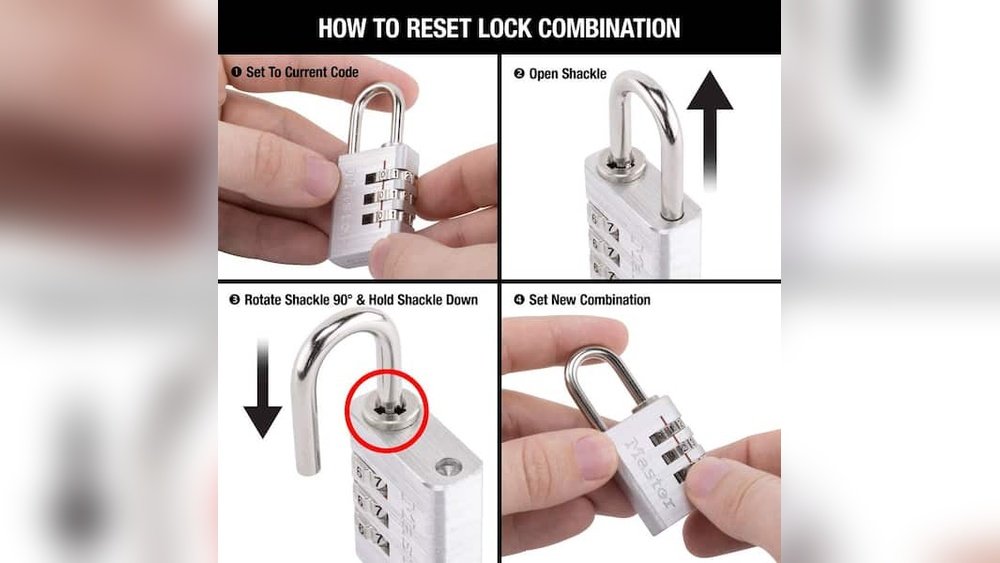
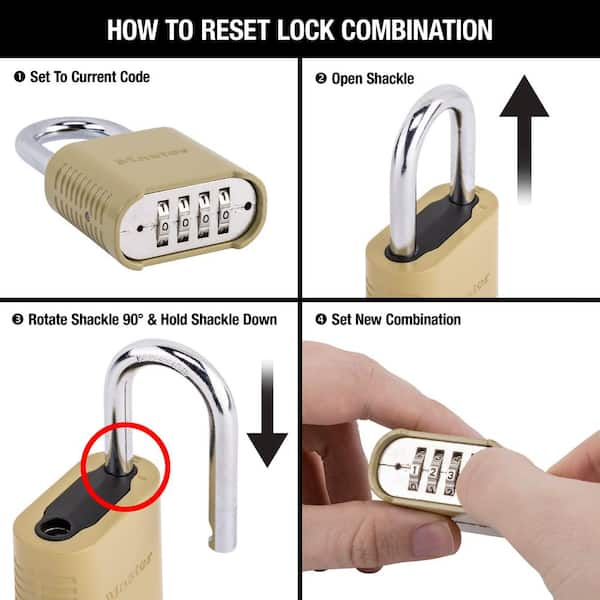
Start by opening the lock using the current combination. Without this, you cannot reset the code. If the lock is closed, try the known combination or default code. Make sure the shackle is fully open before moving on.
Locate The Reset Mechanism
Look for a small lever or button inside the lock. This reset mechanism varies by lock brand and model. Sometimes it is a pinhole or a switch near the dials. Check the lock’s instructions if unsure where to find it.
Set Your New Combination
Hold the reset mechanism in the active position. While holding it, turn the dials to your new desired code. Choose a number sequence that is easy to remember but hard to guess. Release the reset mechanism to lock in your new code.
Test The New Combination
Close the shackle and scramble the dials. Then, enter your new combination carefully. Open the lock to confirm the reset was successful. Repeat this step a few times to ensure reliability.
Resetting Without The Current Combination
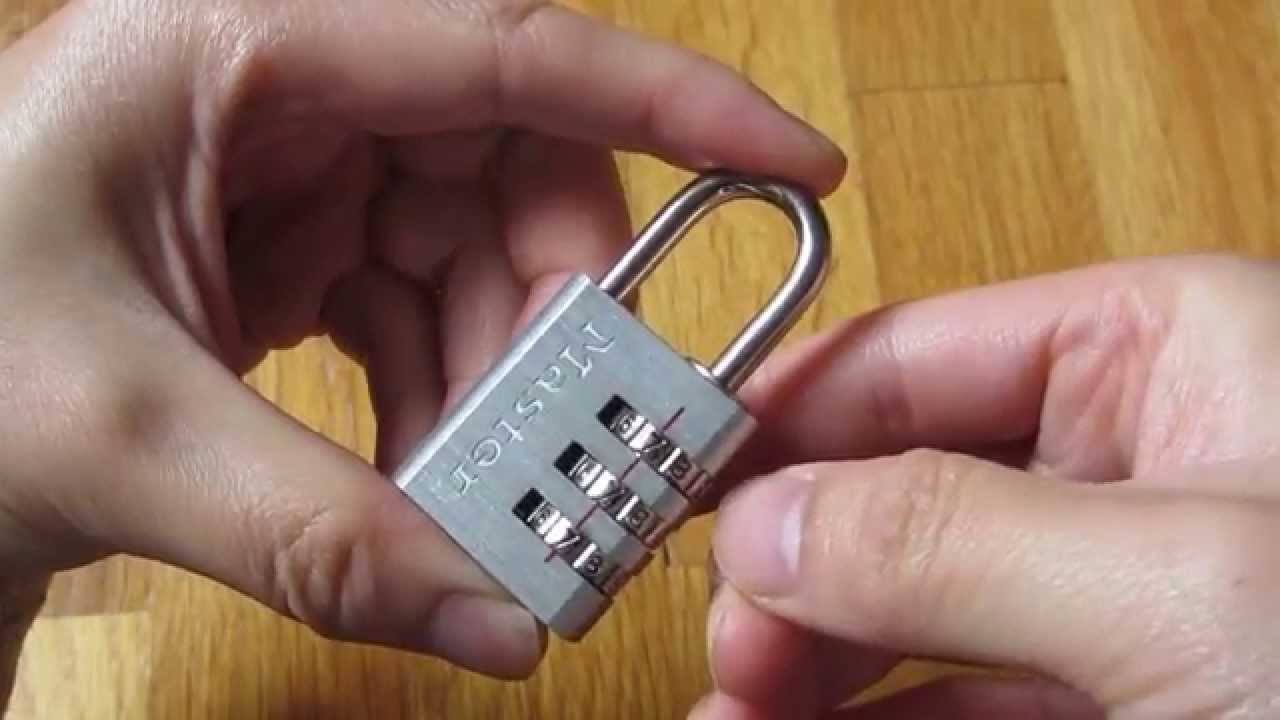
Resetting a combination lock without the current code can be tricky. It requires patience and careful steps. Some locks allow recovery without knowing the combination. Others might need professional help. Below are methods to reset or recover your lock code safely and effectively.
Decoding By Feeling Binding Wheels
Apply gentle tension to the shackle. Slowly rotate each dial one by one. Look for the dial that feels stiff or sticky. This dial is called the binding wheel. Turn the binding wheel back and forth carefully. Listen and feel for a slight click. This click shows the correct number for that dial. Repeat for all dials. This method works best on simple combination locks.
Using Manufacturer Recovery Options
Check if the lock brand offers recovery methods. Many brands provide owner manuals with reset instructions. Some require proof of purchase to verify ownership. The manufacturer may have tools or apps to help reset the code. Follow their guidelines precisely to avoid damage. This is a reliable way to reset without the current combination.
Calling A Locksmith
When other methods fail, a locksmith can help. Locksmiths have special tools and knowledge for locks. They can reset or open the lock without damage. This option works well for high-security locks or safes. It may cost more but saves time and effort. Always choose a licensed and trusted locksmith in your area.
Tips For Creating A Secure Combination
Choosing a strong combination makes your lock more secure. A good combination stops others from guessing your code easily. Use simple tips to create a code that protects your belongings well.
Avoid Common Patterns
Do not use simple sequences like 1234 or 0000. Avoid repeating numbers such as 1111 or 2222. These codes are easy to guess. Stay away from dates like birthdays or anniversaries. Mix numbers to make your code unpredictable. Random combinations increase your lock’s security.
Use Memorable Numbers
Pick numbers you can remember without writing down. Use parts of phone numbers or addresses that only you know. Avoid sharing these numbers with others. This helps you recall the code quickly. A memorable code reduces the chance of forgetting it.
Record Your Combination Safely
Write your combination down and keep it in a safe place. Avoid storing it on your phone or computer where hackers can access it. Use a small notebook or a secure password manager. This way, you can find the code if you forget it. Protect your combination like you protect your keys.
When To Replace Or Destroy Locks
Knowing when to replace or destroy a lock is important for maintaining security. Locks can wear out or get damaged. Sometimes, a lock no longer protects your belongings. Other times, a lock may be compromised by forced entry. Understanding the signs helps you decide the next step. This section explains when to act and how to choose new locks.
Signs Of Lock Damage
Look for visible wear on the lock body and shackle. Rust or corrosion weakens metal parts. Difficulty turning the dial or key shows internal damage. Loose parts or wobbling can mean the lock is broken. If the lock jams or does not open smoothly, it may fail soon. Cracks or dents on the lock case reduce its strength.
Destructive Entry Methods
Forced entry can damage a lock beyond repair. Bolt cutters can cut through shackles quickly. Hammers or crowbars leave dents and cracks. Picking tools may harm internal mechanisms. Drilling the lock cylinder destroys its function. Signs of forced entry mean the lock must be replaced immediately.
Choosing New Locks
Pick locks that fit your security needs and budget. Choose weather-resistant materials for outdoor use. Look for locks with strong shackles made from hardened steel. Combination locks should have easy reset options. Consider high-security locks if you need extra protection. Always buy locks from trusted brands for reliability.

Frequently Asked Questions
How To Reset A Combination Lock When You Forgot The Code?
Apply light tension on the shackle and slowly rotate each dial to find binding wheels. Identify true gates by slight clicks or shackle movement. Repeat for all dials to decode the combination. Alternatively, contact the manufacturer with proof of ownership or hire a locksmith for assistance.
How Do I Change The Combination On A Combination Lock?
To change a combination lock, first open it using the current code. Locate the reset lever or button. Move the lever or press the button, set your new combination, then return the lever or release the button. Always follow the lock manufacturer’s specific instructions for best results.
How To Reset Door Combination Lock?
To reset a combination lock, open it first using the current code. Locate the reset lever or button. Move or press it as instructed. Enter your new combination. Release the lever or button to save. Test the new code before locking.
Refer to the manufacturer’s guide for specific steps.
How To Unlock A 3 Dial Combination Lock?
To unlock a 3-dial combination lock, pull the shackle lightly. Rotate each dial slowly to find the binding number. Feel for clicks or resistance on each dial. Note these numbers as your combination. Enter the combination and pull the shackle to open the lock.
How Do I Reset The Combination On A Lock?
To reset, open the lock with the current code, locate the reset lever or button, set a new code, then lock it.
Conclusion
Resetting a lock’s combination is simple with the right steps. Start by following the manufacturer’s instructions carefully. Apply gentle tension to the shackle and feel for binding wheels. Turn dials slowly to find the true gate numbers. Test your new code to ensure it works smoothly.
Keep your combination written down in a safe place. This process helps keep your belongings secure and gives you control over your lock. Practice patience and take your time to avoid mistakes. With these tips, you can reset your lock confidently and easily.