
Is your Uconnect 5.0 radio acting up or freezing at the worst possible moment? You’re not alone—and the good news is, resetting it might be all you need to get back on track.
Whether you want a quick soft reset to fix minor glitches or a full factory reset to start fresh, this guide will walk you through every step clearly and simply. Keep reading, and you’ll learn exactly how to reset your Uconnect 5.
0 radio without any hassle, so you can enjoy your drives again with confidence.
Soft Reset Steps
Performing a soft reset on your Uconnect 5.0 radio can fix minor glitches quickly. This process restarts the system without deleting your settings or data. Follow the simple steps below to reset your radio safely and effectively.
Preparing The Vehicle
Start by parking your vehicle in a safe place. Make sure the engine is either running or in accessory mode. This step ensures the Uconnect system has enough power during the reset. Keep the vehicle steady and avoid turning it off during the process.
Performing The Reset
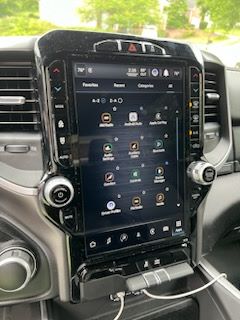
Press and hold the volume and tuner knobs at the same time. Keep holding them for about 10 seconds. The screen will go dark and then show the vehicle logo. This means the system is rebooting. Wait a few moments until the radio fully restarts and is ready to use again.
What Soft Reset Does
A soft reset clears minor software bugs in the Uconnect system. It does not erase your saved settings, contacts, or preferences. This reset helps restore normal function without the hassle of reprogramming. Use it when the radio freezes, lags, or fails to respond properly.

Credit: www.youtube.com
Factory Reset Process
The factory reset process restores your Uconnect 5.0 radio to its original settings. This action clears all saved data and preferences. It is useful when the system behaves abnormally or after troubleshooting steps fail. Follow the steps carefully to avoid unwanted data loss. The process is simple and can be done directly from the radio menu.
Accessing Reset Settings
Start your vehicle and keep it in the “Run” mode. Tap the “Settings” icon on the Uconnect touchscreen. Scroll to find the “System” or “Vehicle” option. Select it to open system-related settings. Look for “Reset Options” or “Factory Reset” in this menu. This section holds the commands to reset the radio.
Executing Factory Reset
Once you find the factory reset option, select it carefully. The system will ask for confirmation before proceeding. Confirm the reset to start the process. The radio screen may go dark and reboot automatically. Wait for the system to restart fully. After reboot, the radio will be as new.
Data Loss Considerations
Factory reset deletes all user data. This includes saved radio stations, paired devices, and preferences. Back up any important information before resetting. Resetting also clears navigation history and app data. Prepare for reconfiguring the system after reset. Consider this step only when necessary to fix issues.
Hard Reset Options
Hard reset options for the Uconnect 5.0 radio help fix serious issues quickly. This process forces the system to restart and clear minor glitches. Choose the right method based on the problem you face. Below are the two main ways to perform a hard reset on your Uconnect 5.0 system.
Button Combination Method
Press and hold the volume and tuning buttons at the same time. Keep holding for about 10 seconds. The screen will go black and restart automatically. This method does not erase your saved data or settings. It just forces a reboot to fix freezes or unresponsive screens.
System Menu Method
Turn on the vehicle and access the Uconnect home screen. Go to “Settings” and then select “System.” Scroll to “Reset Options” or “System Reset.” Choose the hard reset or reboot option. Confirm the action when prompted. This method restarts the system without deleting personal data.
Differences Between Hard And Factory Reset
A hard reset restarts the system but keeps your settings and data. It solves minor software glitches and freezes. A factory reset erases all your saved data and restores original settings. Use factory reset only if the hard reset does not fix the problem. Know which reset fits your needs before starting.
Troubleshooting Tips
Troubleshooting your Uconnect 5.0 radio can solve many common problems. Knowing how and when to reset your system saves time and frustration. Different reset types serve different purposes. Follow the right steps for the best results.
When To Use Each Reset Type
Use a soft reset for minor glitches. This keeps your settings and data. It helps if the screen freezes or the radio lags. A soft reset reboots the system without wiping information.
Choose a factory reset to fix serious issues. This wipes all personal data and settings. Use it if the system crashes often or fails to start. Remember, a factory reset returns the radio to default.
Hard reset can mean either soft or factory reset. Check your vehicle’s manual for exact instructions. Use hard reset only if recommended by support.
Common Issues Solved By Reset
Soft resets fix frozen screens and unresponsive controls. They also clear minor bugs after software updates. Factory resets solve persistent errors that do not go away. These include constant reboot loops or missing features. Resets can restore Bluetooth and Wi-Fi connections too.
Precautions Before Resetting
Always park your vehicle before starting a reset. Ensure the engine is in “Run” or accessory mode. Save any important data or settings first. A factory reset deletes all stored information. Disconnect any connected devices before resetting. Follow the correct reset steps carefully to avoid errors.
Model-specific Instructions
Resetting the Uconnect 5.0 radio can vary depending on your vehicle model and the specific system version. Different automakers use unique steps for their Uconnect systems. This section provides clear instructions tailored for various models. Follow these simple guides for a successful reset.
Resetting Older Uconnect Versions
Older Uconnect systems often need a manual reset using physical buttons. Press and hold the volume and tuner knobs at the same time. Keep holding for about 10 seconds. The screen will go blank and then restart. This process clears minor glitches without deleting your settings.
Some older models may require pressing the temperature up and down buttons simultaneously. Hold these for five seconds until the screen resets. This method works well for systems installed before 2015.
Resetting Ram And Jeep Systems
Ram and Jeep vehicles use a similar reset method for Uconnect 5.0 radios. First, park the vehicle and turn the ignition to the “Run” position. Do not start the engine. Press and hold the power button on the radio for about 10 seconds. Release the button when the screen turns off and restarts.
If this does not work, try a factory reset from the settings menu. Go to Settings, then System, and look for Reset Options. Confirm the factory reset to restore default settings, but note this will erase saved data.
Resetting Chrysler And Dodge Radios
Chrysler and Dodge Uconnect radios often require a soft reset to fix minor issues. Turn the vehicle on to “Run” mode. Press and hold both the volume and tune/scroll knobs simultaneously for about 10 seconds. The screen will go dark and reboot automatically.
For a full factory reset, navigate through Settings to System or Vehicle app settings. Find the Reset or Factory Reset option and select it. Confirm the reset to clear all data and restore the radio to its original state.

Credit: www.ramforum.com
Video Guides And Resources
Video guides and resources help simplify the process of resetting your Uconnect 5.0 radio. Watching a video can make the steps clearer and easier to follow. Visual aids show exactly what to press and when. This support is useful for beginners and those who prefer to see the process in action.
Recommended Youtube Tutorials
YouTube hosts many helpful tutorials on resetting Uconnect 5.0 radios. Channels like “Carl’s Car Corner” and “Mopar Mike” offer quick and clear videos. They cover both soft resets and factory resets. These tutorials show the button presses and menu navigation in detail. Many videos last under two minutes, saving time while providing useful info.
Step-by-step Visual Walkthroughs
Step-by-step videos walk you through the reset process visually. These guides break down each action into simple steps. Viewers can pause and replay any part of the video. This makes it easier to avoid mistakes. Some walkthroughs also explain the difference between soft and factory resets. They help you choose the right reset method for your needs.
Manufacturer Support Links
Official manufacturer websites provide reliable support resources. These pages include user manuals, FAQs, and reset instructions. They often have video tutorials embedded or linked directly. Visiting the Dodge, Jeep, or Chrysler official sites can offer the latest updates. Manufacturer resources ensure you get accurate and safe reset directions.
Credit: www.gm-navigation.com
Frequently Asked Questions
How To Do A Hard Reset On Uconnect Radio?
To hard reset Uconnect radio, turn the vehicle to “Run” mode. Press and hold the volume and tuner knobs together for 10 seconds until the screen restarts. This clears minor glitches without deleting data. For a factory reset, go to Settings > System > Reset and confirm to erase all data.
What Does A Uconnect Soft Reset Do?
A Uconnect soft reset reboots the system without deleting personal settings. It fixes minor glitches and restores normal function quickly.
How To Hard Reset Sync Radio?
To hard reset your SYNC radio, go to Settings > General > Master Reset. Confirm to restore factory defaults.
How To Do A Hard Reset On A Radio?
To hard reset a radio, turn on the vehicle, press and hold volume and tuner knobs together for 5 seconds. The system will reboot. For a factory reset, go to Settings > System > Reset, then confirm factory reset. This erases all data.
How Do I Perform A Soft Reset On Uconnect 5.0 Radio?
Turn the vehicle to “Run” mode. Hold the volume and tuner knobs together for 10 seconds. The screen will reboot.
Conclusion
Resetting your Uconnect 5. 0 radio can solve many common issues quickly. A soft reset keeps your settings but refreshes the system. A factory reset clears all data and restores default settings. Always make sure your vehicle is in the “Run” mode before starting.
Follow the steps carefully to avoid losing important information. Regular resets help maintain smooth radio performance. Stay patient and take your time during the process. With these simple steps, your Uconnect system should work like new again.