
Power outages can catch you off guard, especially when they disrupt your water supply. If you’ve just experienced a blackout and now your water pump won’t start, you’re not alone—and the good news is, you don’t have to wait for a professional to fix it.
Resetting your water pump after a power outage is often a simple task that you can handle yourself. In this guide, you’ll learn clear, step-by-step instructions to get your water pressure back quickly and safely. Whether you have a well pump or an electronic sump pump, understanding how to reset the system will save you time, frustration, and possibly costly repairs.
Keep reading to regain control of your water system and restore the flow to your home.

Credit: www.reddit.com
Power Off Safety
Turning off power before resetting a water pump is essential for safety. It prevents electrical shocks and protects the pump from damage. Always ensure the power is completely off before touching any pump components. This step keeps you safe and helps avoid costly repairs.
Follow these simple steps to safely power off your water pump after an outage.
Locate Pump Breaker
Find the breaker panel in your home or near the pump system. Look for a label or switch named “Water Pump” or similar. This breaker controls the power supply to your pump. Identifying the correct breaker is crucial for a safe reset.
Turn Off Power Supply
Flip the pump breaker switch to the OFF position. This stops all electricity going to the pump. Confirm the power is off by checking if the pump is silent or using a voltage tester. Never work on the pump while it is powered on.

Credit: www.reddit.com
Reset Pressure Switch
Resetting the pressure switch is a key step after a power outage affects your water pump. The pressure switch controls when the pump turns on and off. Resetting it helps restore normal water flow and pressure in your system. This process is simple and can often be done without special tools.
Find Pressure Tank Switch
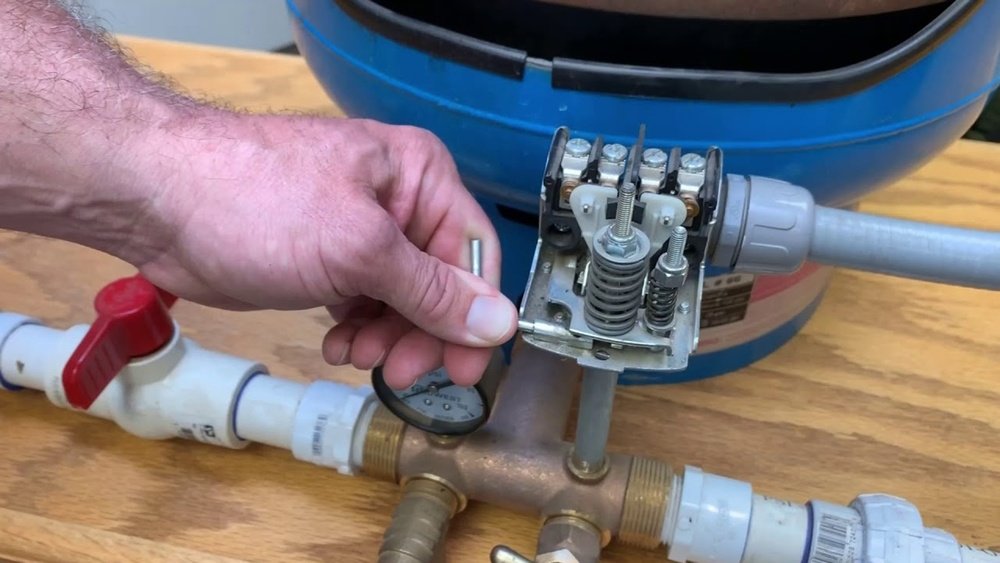
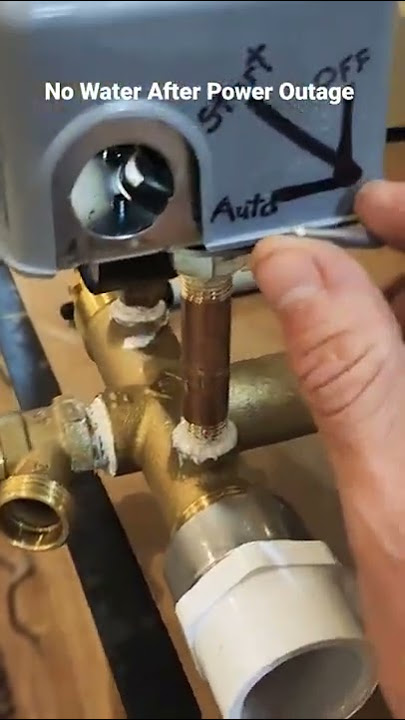
First, locate the pressure tank in your system. It usually has a grey box attached. This box contains the pressure switch. Look for a small silver lever on the side of the box. The pressure gauge will be nearby, showing the current water pressure.
Lift And Hold Lever
Next, lift the silver lever on the pressure switch. Hold it up firmly. This action manually resets the switch. Keep holding the lever for a few seconds. Then, release it slowly. The pump should start running again if the reset is successful.
Monitor Pressure Gauge
Watch the pressure gauge closely as you reset the switch. The gauge shows pressure in pounds per square inch (PSI). The pump should turn on when pressure drops below the cut-in point. It will turn off when pressure reaches the cut-out point. This cycle means the switch works correctly.
Troubleshoot Repeated Trips
Sometimes, the pressure switch trips repeatedly. This can mean the pump is losing prime or sucking in air. Check for leaks in pipes and fittings. Make sure the pressure tank is not empty. If problems continue, you may need to prime the pump by adding water or call a professional for help.
Reset Electronic Pumps
Resetting electronic water pumps after a power outage is often necessary to restore normal function. These pumps have a built-in reset feature that clears faults triggered by sudden power loss. The reset process is straightforward and requires only a few simple steps. Following the correct procedure ensures the pump resumes operation safely and efficiently.
Identify Reset Hole
Locate the reset hole on the pump body. It is usually near the power cord or control panel. The hole is small and round, often labeled as “reset” or marked with a symbol. Use a flashlight if needed to see it clearly.
Use Paperclip To Press Button
Take a straightened paperclip or a similar thin object. Gently insert it into the reset hole. Press until you feel a slight click or resistance. This action triggers the internal reset button inside the pump.
Wait For Pump Reboot
After pressing the reset button, wait for about 10 to 15 seconds. The pump will reboot and clear any error states. During this time, avoid touching or moving the pump. Once restarted, the pump should work normally again.
Credit: www.youtube.com
Prime The Pump
Priming the pump is a key step after a power outage. It helps the water pump regain its normal function. Without priming, the pump may run dry or fail to move water properly. This can cause damage or reduce water pressure.
Priming means filling the pump and pipes with water. This removes air pockets that block water flow. Follow these simple steps to prime the pump correctly.
Add Water To System
Start by adding water directly into the pump or well. Use a garden hose or bucket. Fill until the pump housing is full. This ensures the pump is ready to push water. Avoid running the pump dry, as it can cause damage.
Open Water Taps
Next, open several water taps in your home. This lets trapped air escape from the pipes. Keep the taps open until water flows steadily and without sputtering. This shows the air has cleared and water is moving freely.
Check For Air Leaks
Air leaks can stop the pump from priming properly. Inspect all pipe connections and seals near the pump. Tighten loose fittings and replace damaged parts. Even small leaks can let air in and reduce pump performance.
Clear Filters And Blockages
Clearing filters and blockages is a vital step after a power outage. Dirt and debris often clog the water pump system. This reduces water flow and can cause the pump to malfunction. Removing these blockages helps the pump work efficiently again. Clean filters prevent damage and extend pump life.
Inspect Filters
Start by locating the pump’s filters. These are usually near the water intake or inside the pump casing. Carefully remove the filters. Look for dirt, sediment, or any particles blocking the filter mesh. Hold the filter up to the light to spot small debris. Inspect both the filter screen and surrounding areas.
Check for tears or damage on the filters. Damaged filters must be replaced to keep the system safe. Rinse the filter under running water. Use a soft brush to gently scrub away stubborn dirt. Do not use harsh chemicals that might harm the filter material.
Remove Obstructions
After cleaning filters, check the water lines and pump parts for blockages. Look inside pipes, valves, and pump intakes. Remove any leaves, mud, or debris stuck inside. Use a small brush or cloth to clean tight spaces. Make sure water can flow freely through all parts.
Flush the system with clean water to push out hidden dirt. Clear any buildup in the pump housing or pressure tank. Blockages can cause pressure drops and pump failure. Ensuring clear paths helps restore normal water pressure quickly.
When To Call A Professional
Resetting a water pump after a power outage can often be a simple task. Still, some problems need expert help. Knowing when to call a professional saves time and prevents damage. It also ensures your water system works safely and properly. Below are key signs that mean you should contact a specialist.
Repeated Breaker Trips
If the circuit breaker trips repeatedly when you reset the pump, do not ignore it. This can mean an electrical fault or overload in the pump. A professional can find the root cause and fix it safely. Avoid trying to reset the breaker multiple times yourself.
Faulty Pressure Switch
The pressure switch controls when the pump turns on and off. If it fails, the pump may run too long or not start at all. Signs include strange noises or no water flow after resetting. A technician can test and replace a faulty switch correctly.
Pump Malfunction Signs
Listen for unusual sounds like grinding or humming. Check if water flow is weak or stops suddenly. These may indicate motor or impeller problems. Also, watch for leaks or overheating. Call a professional if you notice any of these symptoms. Early repair prevents costly damage.
Frequently Asked Questions
How Do I Reset My Water Pump?
Turn off the pump breaker for safety. Locate the pressure switch or reset button. Lift the lever or press the reset hole with a paperclip. Wait a few seconds. If it trips again, check for air leaks or prime the pump.
Call a professional if it still fails.
How Do I Get The Pressure Back In My Water Pipes?
Turn off the pump’s power at the breaker. Locate the pressure switch and lift its lever to reset. Check for leaks or low water and prime the pump if needed. Clean filters and clear blockages. Call a professional if pressure doesn’t return or the pump repeatedly trips.
Does Power Outage Affect The Water Pump?
Yes, a power outage stops the water pump from running, causing water flow to stop. Resetting or priming may be needed to restore function.
How To Prime A Water Pump?
To prime a water pump, turn off power, open the priming port, and fill the pump with water until full. Close the port, then restart the pump. This removes air and allows proper water flow. Check for leaks if the pump loses prime again.
How Do I Reset A Water Pump After A Power Outage?
Turn off the pump’s breaker, lift the pressure switch lever, then restore power to reset the pump.
Conclusion
Resetting your water pump after a power outage is simple and quick. Always start by turning off the power for safety. Then, follow the steps to reset the pressure switch or use the reset button on electronic pumps. Watch the pressure gauge closely to ensure the pump runs smoothly.
If the pump trips again, check for air leaks or blockages. Regular maintenance helps prevent issues. Seek professional help if problems persist. Taking these easy steps restores your water flow fast and keeps your system healthy.