
To reset AirPods from a previous owner, put both earbuds in their case, open the lid, and hold the setup button on the back for 15 seconds until the light flashes amber, then white. This clears old Bluetooth pairings so you can connect them to your phone right away.
The previous owner must remove the earbuds from their Apple ID’s Find My network, because a button reset only clears local Bluetooth data. If they don’t unlink them from their account, the case stays locked to their name, and you’ll keep seeing an “AirPods Mismatch” or tracking warning.
Starting without charging the case is the most common mistake. If the battery is dead, the internal memory won’t clear, and pressing the button won’t do anything.
Factory Reset Steps

- Put both AirPods inside the charging case and close the lid for 30 seconds to let them restart.
- Open the lid next to your phone, then look at the status light on the front or inside the case to ensure it turns on.
- Open your phone’s Bluetooth settings and tap “Forget This Device” next to the earbuds if they appear on your list.
- Press and hold the physical setup button on the back of the case for about 15 seconds with the lid open. Tip: Keep holding through the first light change; don’t release your finger until the light flashes amber several times and then flashes steady white.
- Bring the open case within 2 inches of your unlocked iPhone or iPad and follow the on-screen setup prompt.
- Ask the original owner to open their Find My app, select the earbuds, swipe up, and tap “Remove This Device” if you see an Activation Lock prompt. According to Apple Support’s guide to removing devices, you can’t bypass this lock yourself without the owner’s account credentials.
How Long It Takes
Resetting the hardware takes under a minute, but removing the cloud account depends on the seller.
| Situation | How long | What changes it | What to watch for |
|---|---|---|---|
| Seller already unlinked account | 1 to 2 minutes | Your Bluetooth connection speed | White setup light shows right away |
| Seller unlinks account remotely | 5 to 15 minutes | How fast the seller responds | Find My app updates on their end |
| Case battery is completely dead | 20 to 30 minutes | Charger speed (needs 15 min charge) | Orange light stays solid, won’t blink |
| Used replacement bud in case | 30 to 40 minutes | Firmware sync time inside the case | Mismatch alert on your phone screen |
If the light doesn’t flash amber after 30 seconds of holding the button, plug the case into power for 20 minutes and try again.
How to Tell When It’s Done
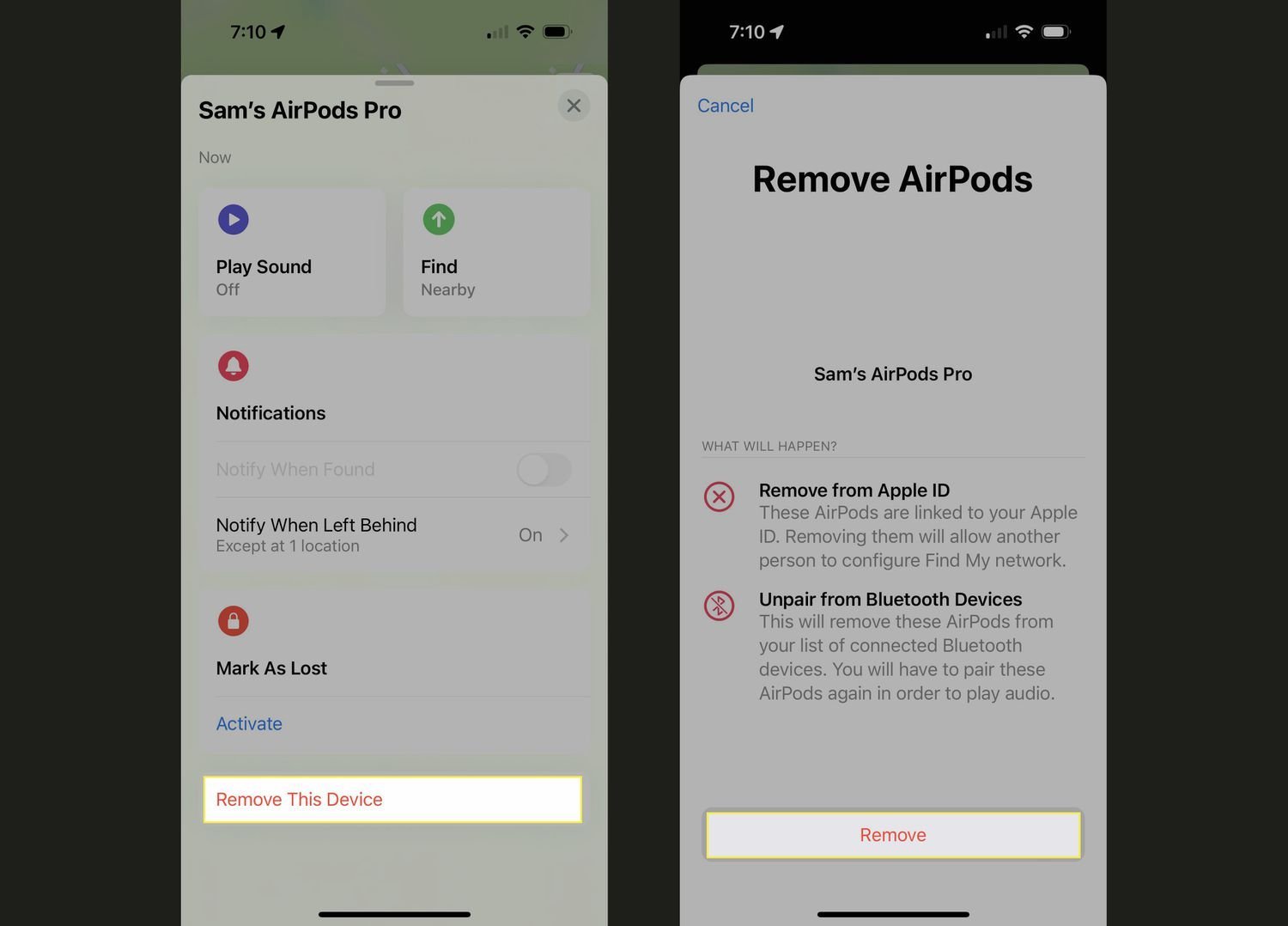
The process is finished when the status light pulses steady white with the lid open, and your iPhone shows a setup pop-up with a “Connect” button. The one test that settles it’s opening the Find My app on your device: if the earbuds show up under your “Items” or “Devices” tab without an “AirPods Mismatch” alert, they belong completely to you. If you still see the previous owner’s email masked with asterisks, the hardware reset worked, but the Apple ID lock remains active.
Mistakes That Ruin It

- Releasing the setup button too early: The light blinks white first, making people let go before the reset actually triggers. Keep pressing until you see the amber light flash three or four times, then wait for the white light to return.
- Skipping the cloud removal: Resetting the buttons clears Bluetooth, but it doesn’t touch the original owner’s Find My lock. You’ll get an alert saying the owner can see your location unless they delete the accessory from their Apple ID.
- Pairing mismatched generations together: Mixing an AirPods 1 bud with an AirPods 2 bud won’t work, even if they fit in the same case. The light flashes amber continuously and won’t finish a reset until both earbuds share the exact same model number.
Frequently Asked Questions
Can I Reset Airpods If the Seller Blocked Me?
No, you can’t remove their Find My lock without their account. You can reset the Bluetooth connection to listen to music, but the seller will still see the device location, and Apple support won’t unlock it for you.
Why Is the Light Flashing Amber After a Reset?
An amber light means the earbuds have a pairing error or don’t share the same firmware version. Put both buds in the case, connect the case to a charger, keep the lid closed for 30 minutes, and run the reset button step again.
How Long Does an Owner Have to Unlink Them?
The owner can remove them in 30 seconds from anywhere using their Find My app or the iCloud website. They don’t need to be near the earbuds; the change updates through the cloud immediately once their phone has internet access.
Is It Safe to Use Second-Hand Airpods Before a Reset?
Yes, it’s physically safe, but the previous owner might track your geographic location through the Find My network. Resetting them immediately and confirming the old account is gone protects your personal privacy.
What Happens If I Reset Without the Original Case?
You can use any official charging case made for your specific AirPods model. The reset button is on the case itself, so as long as the case matches your earbuds, holding the back button works exactly the same way.

1 thought on “How to Reset Airpods from Previous Owner: Fix Pairing Issues”