
Resetting a pro thermostat system takes about 5 minutes using the device menu to restore default factory numbers. This basic procedure resets your heating and cooling schedules back to 70°F for comfort settings. It suits homeowners who want to clear old schedules, fix unresponsive screens, or remove a former resident’s custom program.
Tools to Reset Your Thermostat
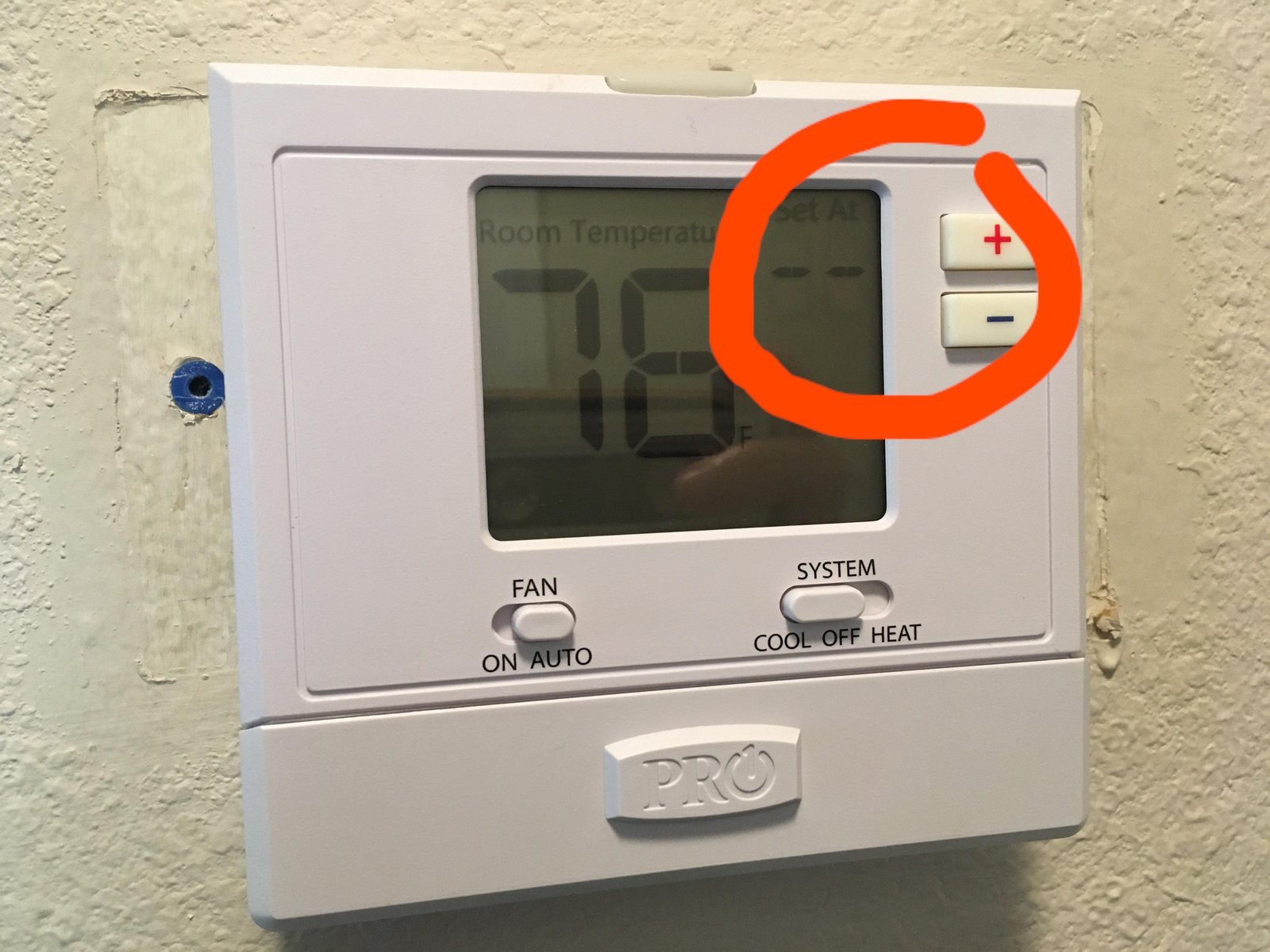
- Two fresh AA alkaline batteries (if your specific wall unit uses battery backup power instead of pure system power).
- The model number printed on the back of the faceplate (for example, Honeywell Home T6 Pro or PRO 1000).
- A small coin or flat tool to gently pop the plastic faceplate off the wall bracket.
- Your home Wi-Fi network name and password (if your unit connects to an app).
A clean pencil eraser works well to wipe dusty contact pins on the baseplate, but using chemical spray cleaners will ruin the electronic contacts. If your system controls a commercial multi-stage boiler or complex heat pump with auxiliary heat strips, an HVAC technician should handle the installer setup menu instead.
Step-by-Step
- Press the Menu button on your thermostat screen for 5 seconds until the advanced options screen appears.
- Scroll through the numbered options using the left or right arrows until you find the reset menu, often labeled RESET or parameter 100.
- Select Factory or option 1 to clear all custom heating programs, Wi-Fi details, and user preferences.
- Press Select or Done to confirm your choice; the display screen will turn dark for 3 to 5 seconds while it reboots.
- Pop the faceplate off the wall baseplate if the digital screen stays frozen or refuses to respond to menu taps.
Careful: Pull straight forward with steady pressure; twisting the plastic frame sideways can bend or snap the fragile gold connector pins inside. 6. Remove both AA batteries from the rear compartment, wait exactly 60 seconds to drain lingering residual power from the internal capacitors, and insert fresh ones.
Tip: If you see white powdery corrosion on the battery terminals, clean it off with a dry cotton swab before snapping the unit back in place. 7. Snap the thermostat faceplate back onto its wall bracket firmly until both plastic latches click into place. 8. Set the system mode switch to Heat or Cool and adjust the target temperature 3 degrees away from room temperature to test the relay click.
Don’t remove the wall plate itself or touch the low-voltage colored wires inside; call a licensed HVAC technician if the baseplate requires rewiring or voltage testing.
Reset Methods Across Common Models

A standard software reset takes minutes, while addressing hardware problems takes slightly longer.
If you need to change system settings, adjust values one step at a time rather than changing multiple numbers at once, which makes troubleshooting heating faults much harder.
How to Tell You Did It Right
A successful reset shows standard factory defaults: the clock starts at 12:00 AM, the target comfort setting reads 70°F, and custom program schedules disappear. When you set the target temperature 3 degrees above room temperature in heating mode, you should hear a soft mechanical click from the wall unit within 5 minutes, followed by warm air from the vents.
A poor result leaves the display completely blank, shows a flashing “Wait” alert, or the blower fan runs endlessly while air temperature stays unchanged. This delay often happens because modern digital thermostats feature a built-in five-minute compressor protection timer that prevents short-cycling your outdoor condenser unit. Giving the system 5 full minutes of run time will let the circuit safely energize your cooling compressor.
Industry Standards and Next Steps
The ENERGY STAR heating and cooling guidelines recommend using standard temperature setbacks—such as 68°F during winter days and lower at night—to reduce household energy waste. After your reset finishes, reprogram your weekly schedule, reset the internal clock, and verify your heating or cooling system switches on properly.
This reset lasts indefinitely until you change programs manually, clear memory, or cut main power. This procedure is NOT for high-voltage baseboard units carrying 120V to 240V electricity. An honest limit: menu options and setup numbers vary by model—check the label behind your device faceplate to find your exact manual before editing equipment codes.
Alternative Reset Options

Breaker Box Power Cycle
Flip the dedicated HVAC circuit breaker to OFF, wait 5 minutes, and flip it back on. This clears transient voltage spikes and forces the main control board to reboot without losing your custom program settings.
Wi-Fi Network Reset
Open the wireless settings screen to clear only your network credentials without touching your temperature schedule. This fixes broken mobile app links while keeping your heating programs completely intact.
Battery Reversal Trick
This completely drains backup memory on older, non-connected hardware models when basic menu buttons stop responding.
Frequently Asked Questions
Can Resetting a Thermostat Damage the Furnace?
No, resetting the thermostat only clears software instructions and temporary memory inside the wall control. It doesn’t harm furnace components, but you must wait 5 minutes between test cycles so the compressor protection circuit doesn’t trip your outdoor air conditioner breaker.
Will a Reset Delete My Custom Heating Schedules?
Yes, a full factory reset wipes all user-entered morning, day, evening, and sleep temperature programs. The unit restores standard factory defaults, meaning you must set your daily comfort schedule again once the display reboots.
Why Won’t My Screen Turn on After a Reset?
Your unit isn’t receiving power from its backup batteries or the furnace transformer. Inspect the battery orientation, ensure the faceplate sits flush against the wall base, and make sure your furnace cabinet door is closed tightly to engage its safety switch.
What Is the Trade-Off of a Full Factory Reset?
You get a clean system free of software bugs, but you lose every custom schedule and Wi-Fi link. Setting those custom schedules and connecting your mobile devices back to the network requires extra setup time.
What Happens If I Choose the Wrong Equipment Type in the Menu?
Choosing the wrong equipment code can stop your system from activating your heat strips or air conditioner. The biggest mistake is setting a heat pump system as a standard gas furnace; this error blows cold air during winter and can increase your monthly utility bill.

1 thought on “How to Reset Pro Thermostat: Honeywell T6 Pro & Pro 1000”