Yes, a factory reset wipes personal files, accounts, and downloaded apps, so whether it deletes everything depends on where your data lives. It erases the device’s internal drive, but it won’t touch cloud backups, external SD cards, or your SIM card. System software remains intact.
What a Factory Reset Actually Deletes

- A reset deletes all photos, downloaded apps, local messages, and accounts stored on the internal memory.
- Cloud backups like iCloud or Google One stay safe online and won’t be erased.
- Removable media like physical micro-SD cards and SIM cards keep their stored files unless formatted manually.
- The base operating system stays on the phone, returning to its clean, out-of-the-box software state.
- Modern devices running Android 10 or iOS 8 and later automatically destroy the hardware encryption keys during the wipe.
Why Data Disappears from Storage
A reset removes your access by deleting file pointers and cryptographic keys. Modern smartphones and solid-state drives use full-disk hardware encryption by default. When you save a photo, your phone scrambles the bits using a unique master key stored inside a dedicated security chip.
According to Apple’s platform security guide, modern devices use a dedicated Secure Enclave to manage these hardware keys. During a factory wipe, the system doesn’t overwrite every single gigabyte with zeros, because writing that much data takes hours and wears out flash storage. Instead, the system executes a cryptographic wipe. It destroys the hardware key that unscrambles your files. Without that key, the files left behind turn into unreadable digital noise immediately. If you have an older mechanical hard drive on a Windows computer, this cryptographic safeguard doesn’t apply; the operating system simply unlinks the files, meaning someone using free recovery software can rebuild them until new data overwrites the empty sectors. The trade-off for this fast mobile erase is permanence: once you trigger the reset, you can’t undo it or recover the missing keys.
When the Answer Is Different

Certain files and hardware components survive a standard wipe under specific conditions.
| Situation | What changes | What to do instead |
|---|---|---|
| Micro-SD card inserted | Card files stay untouched | Remove card or format card separately |
| SIM card with contacts | Mobile provider data stays | Remove the physical SIM card |
| Active Google account lock | Phone locks after reset | Log out before resetting phone |
| iCloud Activation Lock on | Device requests original password | Turn off Find My first |
| Secondary internal PC drive | Only Windows drive wipes | Format extra drives in disk manager |
| Firmware-level virus installed | Malicious code reinfects system | Flash operating system via USB |
How to Do It Properly
- Check your cloud backup date in your phone settings to confirm the last sync finished within the past 24 hours.
- If your device has a micro-SD tray, push a SIM tool into the pinhole, pull the tray out, and take out the card.
- Open your account settings and manually remove your Google Account or Apple ID so the phone doesn’t trigger a security lock.
- Plug the phone into its wall charger so the battery level stays above 50 percent during the wipe process.
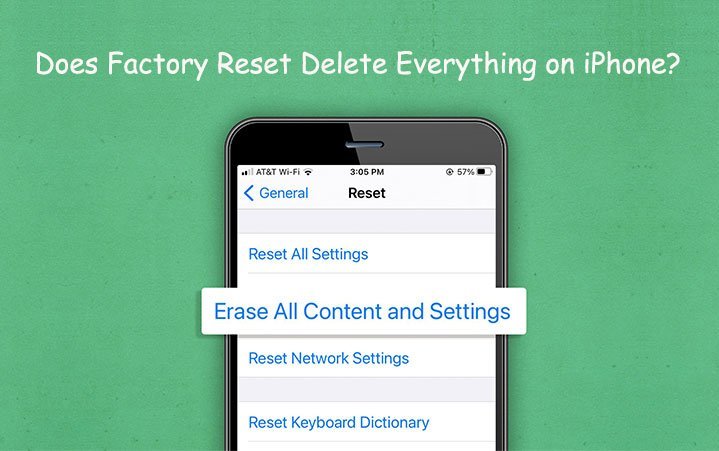
- Open the system settings, choose Erase All Content and Settings or Factory Data Reset, and confirm your lock screen passcode.
- Wait 5 to 15 minutes while the screen goes black, restarts, and finishes clearing the internal flash storage chips.
- Confirm the reset worked by checking that the screen shows the original language welcome screen from initial purchase.
The Mistakes That Ruin It
- Leaving an account signed in before resetting an Android or iPhone triggers Factory Reset Protection, which prevents a new buyer from activating the phone without your personal password.
- Forgetting to unpair hardware authenticators or two-factor apps locks you out of your banking accounts permanently once the old device wipes them.
- Assuming external memory gets erased leaves photos and documents sitting on the inserted micro-SD card for the next user to browse.
- Starting the reset on a low battery can cause the phone to shut down mid-wipe, corrupting the firmware and turning the device into an unusable brick.
Frequently Asked Questions
Can Deleted Files Be Recovered After a Reset?
No, you can’t recover files from a modern encrypted phone after a factory wipe. The phone deletes the hardware encryption keys during the reset process. This varies by model — check the label on older Android versions or older PCs, where unencrypted drives might still allow file recovery tools to rebuild data.
Does a Reset Delete Things from My Sd Card?
No, a factory reset ignores removable memory cards. The operating system limits its wipe to the built-in storage chips. If you plan to sell or trade the device, pop the tray open and take the card out, or format the storage card directly through your storage settings menu.
Will a Factory Reset Remove Viruses?
Yes, a wipe clears almost all standard malware, trojans, and adware apps. The reset deletes everything outside the protected read-only system partition. In rare cases where sophisticated rootkits compromise the device’s firmware, the reset won’t remove the infection, requiring a clean operating system reinstallation from an external computer.
How Long Does a Factory Reset Take?
About 10 minutes for modern phones and tablets with solid-state memory. The process takes between 5 and 20 minutes depending on your storage size and processor speed. A desktop computer with a mechanical hard drive takes up to two hours if you choose the full drive-cleaning option.
What Happens If the Phone Dies During Reset?
Your phone might refuse to turn on, showing a frozen boot logo. If power cuts out while the system writes core files, the operating system corrupts. You’ll need to connect the device to a computer and flash the factory software manually to bring it back to life.
Does a Factory Reset Remove Your Google Account?
Yes, it removes the saved account login from the phone’s local memory. However, it doesn’t delete your actual online Google account or your cloud files. If you don’t manually log out before resetting, the phone triggers Factory Reset Protection and demands your password on startup.
Before you wipe your device, take a few minutes to check your cloud accounts. Make sure your precious photos and contacts are actually synced and safe online. Once you’ve confirmed that, you can clear your phone with total peace of mind. It’s always better to be safe first.