To wipe your feed clean, clear your search history and reset suggested content in your settings, which takes about two minutes. Resetting your Instagram algorithm works best for active accounts where unwanted videos keep taking over the Explore grid or Reels tab. This quick process clears the topics the app thinks you like right now.
What You’ll Need
- The Instagram app updated to version 300.0 or newer on your phone.
- Your Instagram username and password if the app asks you to log back in.
- A stable Wi-Fi or cellular internet connection to save changes across servers.
- Two to three active minutes to open menus and confirm prompt screens.
Using the official mobile app works properly here, but using a mobile browser doesn’t give you the full content preference menu.
Step-by-Step
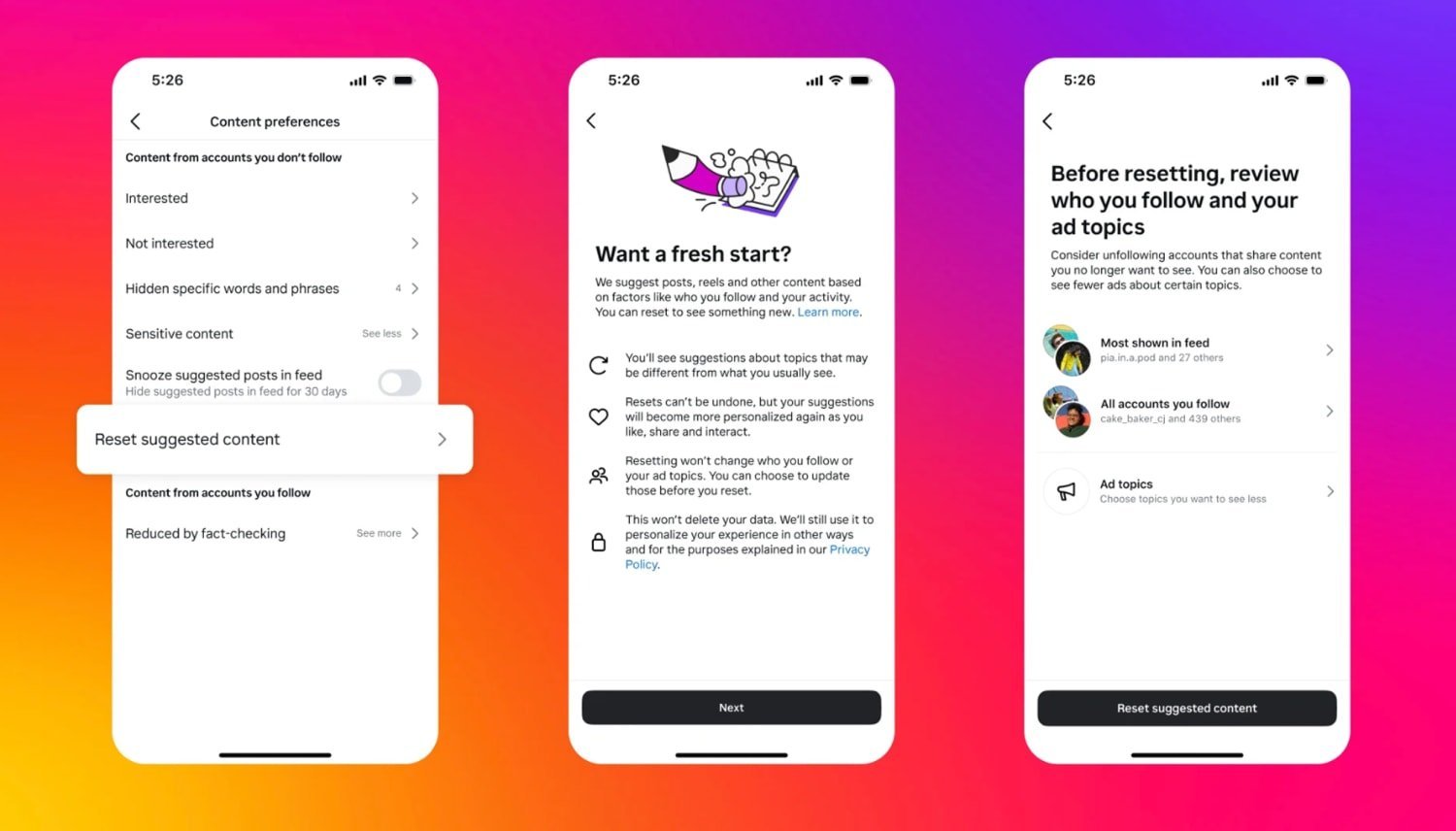
- Open your Instagram profile tab by tapping your photo icon in the bottom-right corner.
- Tap the three horizontal lines in the top-right corner to open Settings and Activity.
- Scroll down to the “What you see” section and tap Content Preferences.
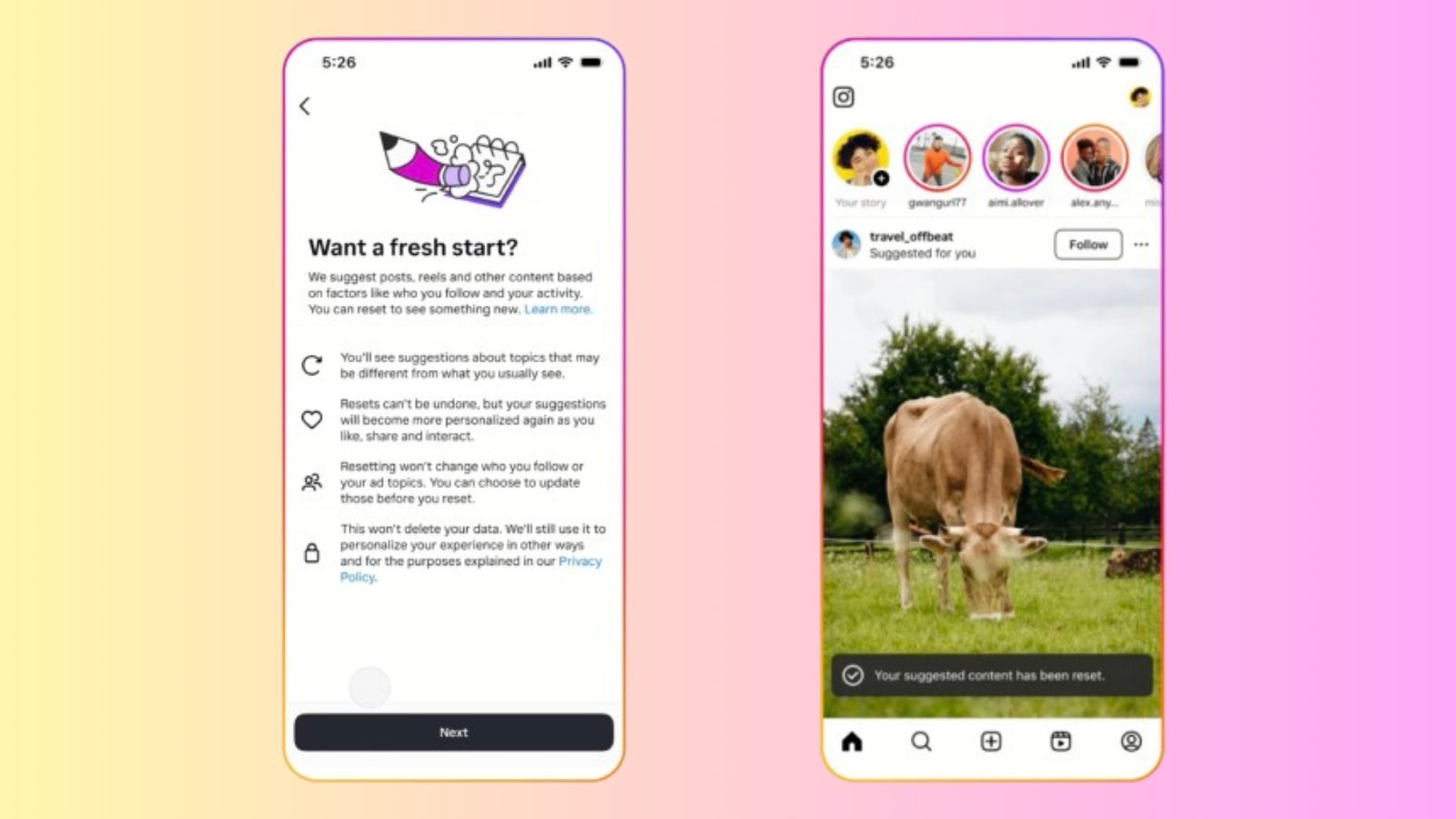
- Select “Reset suggested content” to start the refresh wizard. Careful: This action can’t be undone once confirmed, and it will remove all your current interest tags.
- Tap the blue “Continue” button on the information screen.
- Review the list of accounts you follow to unfollow profiles whose topics you no longer enjoy. Tip: Unfollowing 5 to 10 accounts you never interact with helps the new feed stabilize faster.
- Tap the final “Reset suggested content” confirmation button to clear your recommendation history.
- Go back to Settings and Activity, select “Your activity”, tap “Recent searches”, and tap “Clear all” at the top right.
Refresh Times Across Different Feeds
Here is how long it takes to clear each area of the app and what changes during the process.
| Feed area | Time required | What changes | What to watch |
|---|---|---|---|
| Explore Grid | 2 to 3 minutes | Replaces old interests with broad viral topics | First 20 posts after reloading |
| Reels Tab | 1 to 2 days | Needs new manual skips and likes to realign | Audio trends and repeated clips |
| Home Main Feed | 5 minutes | Only changes suggested posts between followed users | Suggested posts labeled for you |
| Search Suggestions | 1 minute | Wipes auto-fill user accounts and tags | Saved keywords in search bar |
It’s safer to clear topics gradually and train one feed at a time than to wipe everything instantly and lose your favorite creator recommendations.
How to Tell You Did It Right
A successful reset shows generic, trending posts in your Explore tab instead of your previous niche topics. A poor result keeps showing the exact same clips you wanted gone. This issue happens because the system also reads how many seconds you pause on a video without tapping any buttons. If you pause on angry or shocking posts, the platform immediately assumes you want more of them. You can stop this by scrolling past unwanted videos in less than one second, tapping the three dots on the post, and choosing “Not interested.”
Platform Standards and Maintaining Feeds
Meta explains how their ranking systems predict what you want to see in the Instagram Help Center recommendations guide. After resetting, you must train your account again by liking 10 to 15 posts from topics you actually care about. This reset lasts until your daily habits build a new profile, which usually takes about three to four weeks.
If you manage a business page that handles sensitive brand safety or commercial advertising, hand this task to your company marketing manager instead of altering device settings yourself.
Other Ways to Do It

Hide Specific Keywords
Go to Content Preferences and tap “Specific words and phrases” to block bad posts. Type in five to ten trigger words or hashtags you dislike. This cuts out unwanted subjects within seconds without wiping your entire recommendation profile.
Use the Following Feed View
Tap the Instagram logo in the top left of your home screen and select “Following.” This removes all suggested posts completely. It costs no extra effort, though you’ll need to select this view manually every time you open the app.
Clear Device Application Cache
Open your phone’s system settings, select Apps, find Instagram, and clear the local storage cache. This process takes two minutes and removes temporary preview media. It forces the mobile interface to download fresh grid tiles next time you connect to the internet.
Frequently Asked Questions
Does Resetting Delete My Saved Posts?
No. Resetting only clears the internal tags used for content suggestions. Your saved collections, saved audio clips, drafts, direct messages, and uploaded photos remain completely untouched in your account library.
Why Do Old Topics Still Appear After a Reset?
Your following list still feeds the ranking system. If you still follow accounts that post about your old topics, the app assumes you want similar suggested posts nearby. Unfollowing those specific accounts stops this completely.
How Long Does It Take for Changes to Show?
About ten minutes for the Explore tab after restarting the app. The Reels tab takes roughly 24 hours because it needs several viewing sessions to record which new formats you watch to the end.
Can I Undo a Suggestion Reset?
No. Once you tap the final confirmation button, your past recommendation history is erased from Meta servers. You’ll need to rebuild your preferences manually by searching for your favorite topics again.
What Happens If I Hide Suggested Posts on Home?
Tapping the “X” on a suggested home post lets you snooze all suggested posts for 30 consecutive days. Your home screen will then show posts exclusively from accounts you actively follow until that month expires.