To reset your Animal Crossing island, delete your save data directly through the Nintendo Switch System Settings, which takes less than two minutes. Open your console’s settings, scroll to Data Management, choose Delete Save Data, and confirm the deletion for Animal Crossing: New Horizons to wipe your island completely.
This action wipes everything: your villagers, your catalog, your bells, and every house on the system. If you share the console with family, this isn’t for you, because wiping the file deletes their characters too.
The single biggest mistake happens when players archive the software instead of deleting the save file. Archiving removes the game program to clear storage space, but it keeps your island completely intact on the console.
Steps to Reset Your Animal Crossing Island
- Press the Home button on your controller, highlight the Animal Crossing: New Horizons game icon, and press the X button to close the software.
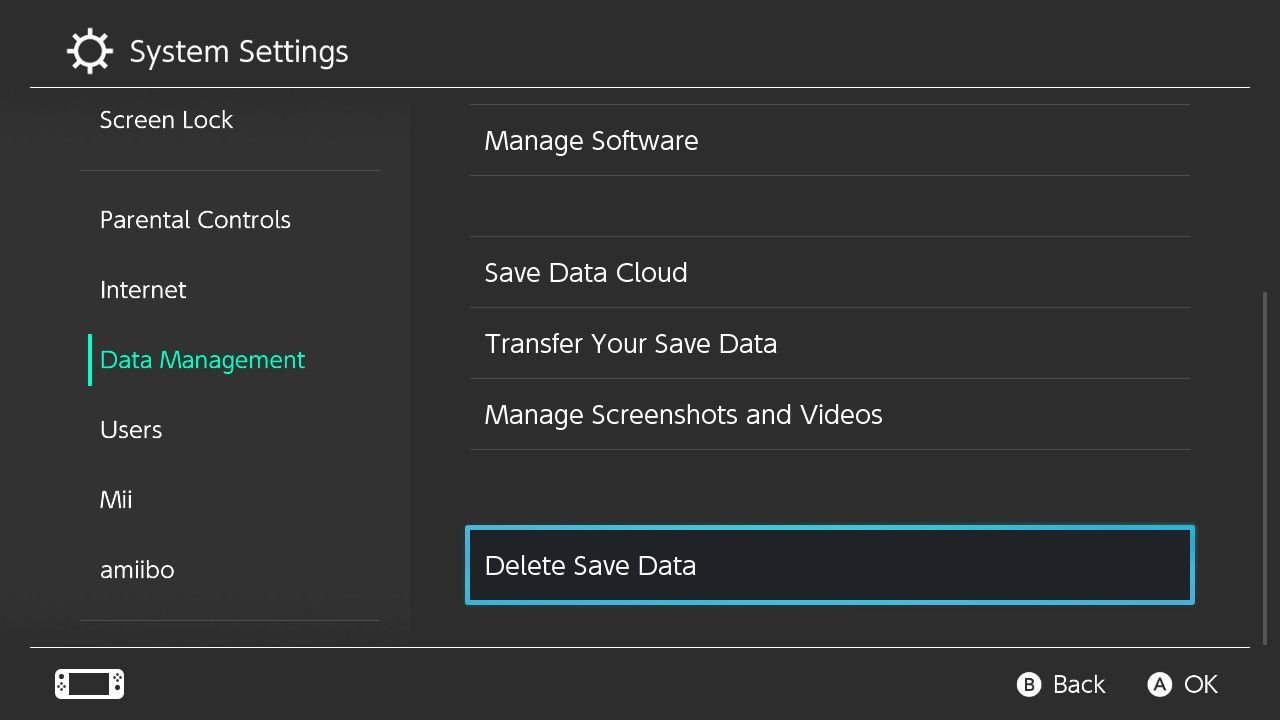
- Select the gear icon on the home menu to open System Settings, then scroll down the left menu and select Data Management.
- Scroll to the bottom of the right-hand menu and select Delete Save Data.
- Select Animal Crossing: New Horizons from the list of software titles displayed on your screen.
- Select “Delete All Save Data for This Software” and wait five seconds for the red button to become active. Tip: If you only delete your own profile data instead of choosing the all-data option, the island itself stays on the console.
- Press the red “Delete Save Data” button to permanently wipe the island from your system. Tip: This trade-off means losing unpurchasable event items forever, so drop valuable gear on a friend’s island first if you want to keep it.
For issues with cloud backups, consult the Nintendo Support save data guide to check your settings before wiping your system.
How Long It Takes
Resetting your island data takes only a minute or two, but setting up your new layout takes much longer.
| Situation | How long | What changes it | What to watch for |
|---|---|---|---|
| Deleting save file | Under 2 minutes | Finding the menu | Selecting Archive instead of Delete |
| Rerolling starting maps | 10 to 45 minutes | How picky you’re with river mouths | Resetting before completing the airport intro |
| Reaching terraforming again | 40 to 60 hours | Daily tasks and inviting villagers | Waiting for building upgrades in real time |
If deleting your data takes longer than two minutes, your console may be frozen, so hold the physical power button for 12 seconds to force a restart.
How to Tell When It’s Done
Launch the game from your Switch home menu. When the screen loads, you won’t see your old town plaza or your previous character sleeping in their bed. Instead, the screen cuts directly to Timmy and Tommy standing behind an airport check-in desk asking for your name. If you see the original title screen with your old villager walking around town, the delete command failed. The one test that settles it’s the check-in desk sequence: if the Nooklings hand you an application form, your old island is gone and the new game has officially begun.
Mistakes That Ruin It
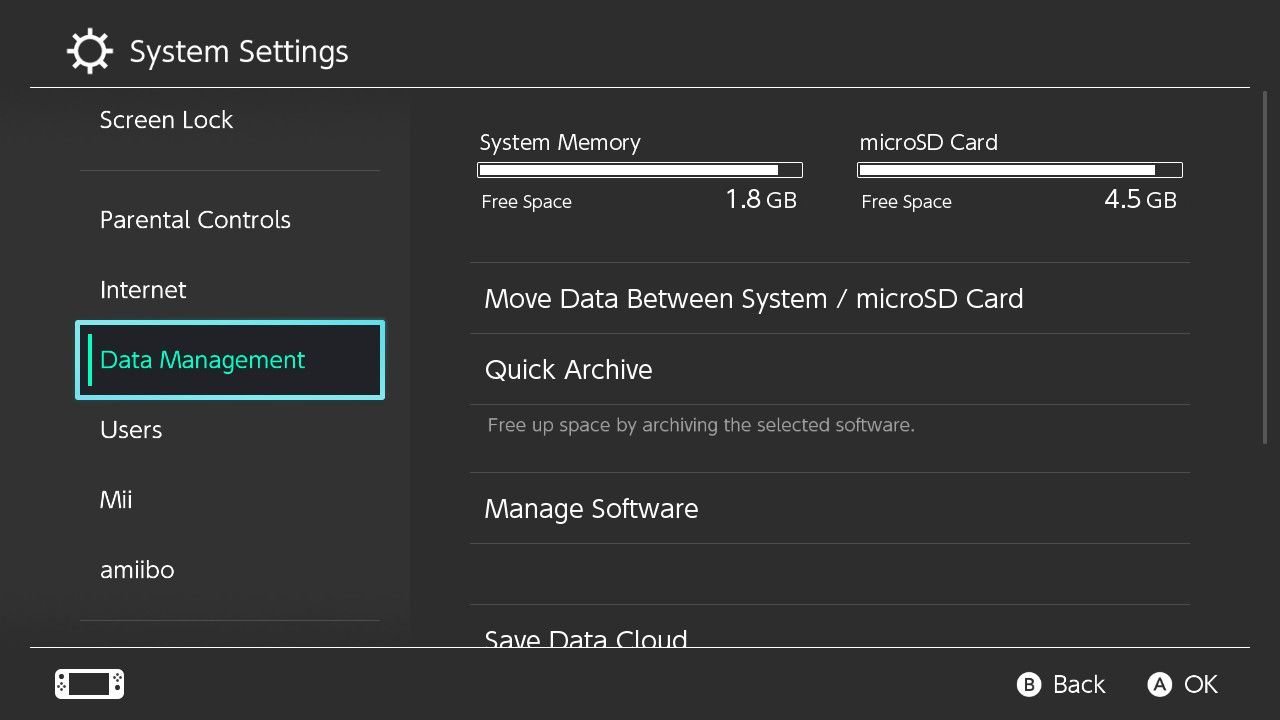
- Archiving the game instead of clearing saves: This only frees up microSD card space and leaves your save file untouched. Select “Delete Save Data” at the very bottom of the Data Management tab instead.
- Forgetting to trade away rare items first: Deleting the file erases limited seasonal items and bells permanently. If you want to keep rare items, drop them on a friend’s island; if you don’t care about gear, wipe the file immediately.
- Ignoring the airport layout: You can terraform cliffs later, but river mouths and resident services never move. Keep restarting at the airport screen until your river exits match what you want.
- Overlooking shared family profiles: Every account on one Switch shares the exact same island. Deleting the island destroys the houses and progress of every other player on your console.
Frequently Asked Questions
Can You Reset Your Island Without Losing Your Items?
No, deleting the save data wipes every inventory and storage slot on the console. If you want to keep specific items or bells, you must visit a friend’s island via online play and drop your gear on their ground before you delete your save file.
What Happens If You Restart During the Intro Flight?
Closing the software during the flight lets you roll new starting villagers, native fruits, and island layouts. If Tommy shows you four map layouts you dislike, press Home, close the game with X, and open it again to see four new options.
Is It Safe to Delete the Island If I Have Dlc?
Yes, your purchase of the Happy Home Paradise DLC is tied to your Nintendo Account, not your local save. You won’t have to buy the expansion again, though your DLC resort progress resets alongside your main island data.
Why Is My Old Island Still There After Deleting?
You chose “Manage Software” and deleted the game download rather than the user data. You must scroll down to “Delete Save Data” inside the Switch settings menu, which varies by model—check the label on your settings menu to confirm the path.
How Long Does It Take to Unlock Terraforming Again?
Unlocking the Island Designer app takes about two to three weeks of regular play without time travel. You need to upgrade Resident Services to a building, recruit three villagers, reach a three-star island evaluation, and host the K.K. Slider concert.
When you launch the game again, you’ll meet Timmy and Tommy at the airport counter just like day one. Take your time choosing your new map layout, because you can’t change river mouths later. It’s a wonderful chance to build the cozy paradise you’ve always wanted. Have fun on your fresh adventure!