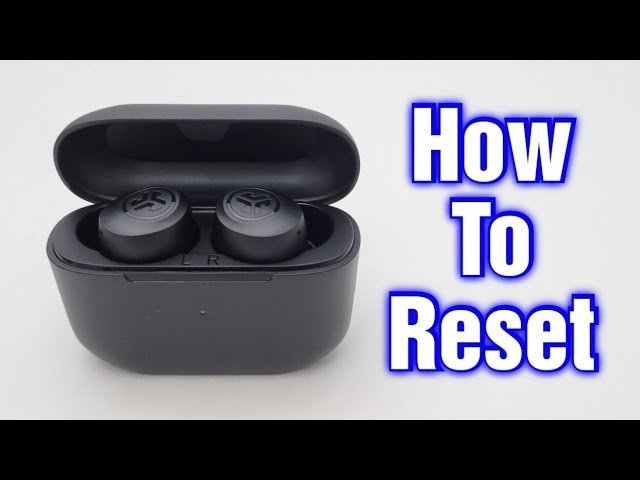
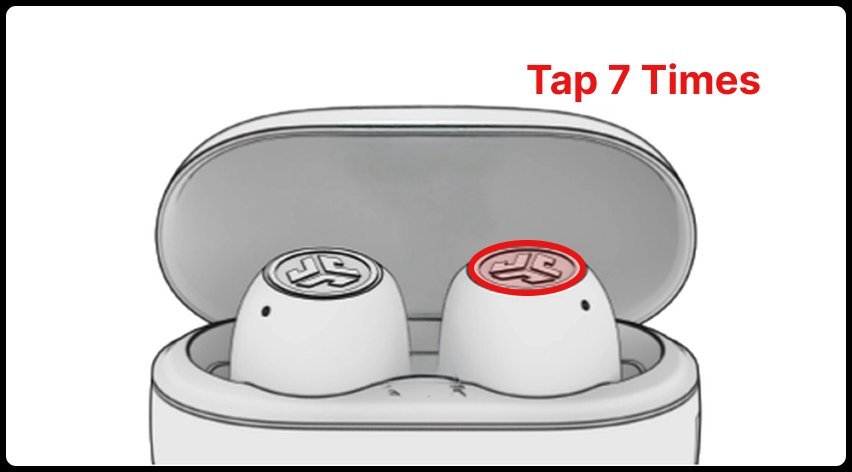
How to reset JLab earbuds: place both buds in their charging case, tap one earbud’s touch sensor 7 times until it blinks blue 4 times, then repeat the 7 taps on the other bud. This clears old Bluetooth pairings and reconnects both sides in under two minutes.
This process works because it erases the hardware cache inside each bud and forces them to find each other again. The single most common mistake happens before tapping: leaving your phone’s Bluetooth switched on. If your phone grabs the signal while you tap, the reset will fail immediately.
Steps to Reset Your Jlab Earbuds
- Open your phone’s Bluetooth settings and tap “Forget” or “Remove” on your JLab device.
- Turn off Bluetooth entirely on your phone, tablet, and laptop so nearby devices don’t interrupt.
- Put both earbuds securely inside their charging case and keep the lid wide open.
- Tap the touch sensor on the left earbud 7 times quickly. Tip: Look for the earbud light to blink blue 4 times to confirm it registered the taps.
- Tap the touch sensor on the right earbud 7 times quickly, waiting for that same 4-blink blue signal.
- Take both earbuds out of the charging case together and hold them within 2 inches of each other. Tip: If one bud pulses solid white while the other alternates blue and white, they’re linked and ready.
This method covers most true wireless models like the Go Air and JBuds Air lines. However, this varies by model — check the label or packaging if your buds use a physical push-button instead of a touch sensor. If you own an older neckband headset, this guide isn’t for you, since those models rely on holding down power and volume buttons simultaneously. For model-specific manuals or older gear, visit JLab customer support directly.
How Long It Takes
Resetting your earbuds takes between one and three minutes depending on your model’s sensor responsiveness.
| Situation | How long | What changes it | What to watch for |
|---|---|---|---|
| Standard Go Air Pop reset | 60 to 90 seconds | Touch sensor sensitivity | 4 quick blue blinks on each bud |
| Dual-bud sync delay | 15 to 30 extra seconds | Distance between earbuds | One bud turns solid white |
| Push-button models (Epic Air) | 2 to 3 minutes | Physical button press speed | Fast flashing yellow or blue LEDs |
| Dirty charging contact pins | 4 to 5 minutes | Needing to clean metal points | Red case light turning solid blue |
If the process takes longer than five minutes, pull the buds out, wipe the gold charging pins with a dry cloth, and start over from step one.
How to Tell When It’s Done
You can confirm the reset worked by watching the small LED lights on the plastic shell. When you pull both buds from the case, the left earbud glows solid white. The right earbud will blink blue and white back and forth. This pattern means the two buds successfully paired to each other first and are now broadcasting for your phone. If both buds blink blue and white separately, they haven’t synced together yet; place them back in the case for 10 seconds to let them handshake.
Mistakes That Ruin It
- Tapping too slowly: The internal board expects a rapid cadence, so slow taps won’t trigger the memory wipe. Tap seven times in about three seconds.
- Skipping the “Forget Device” step: Leaving the old profile saved on your phone costs you time because the phone will auto-reconnect before the buds pair with each other. Always unpair the old connection before touching the earbuds.
- Resetting with an empty case: Earbuds need continuous battery power while rewriting their firmware memory. Plug the case into a USB wall adapter if the battery status light is red.
Frequently Asked Questions
Why Won’t My Jlab Earbuds Connect Together?
One earbud lost its pairing link to the other. If one side stays quiet, do a full case reset; if sound plays from both, leave the settings alone. A hard reset forces both buds to search for each other before searching for an audio source.
Can I Reset Jlab Earbuds Without the Case?
No, you can’t reset modern true wireless JLab earbuds without their charging case. The charging pins inside the case act as a grounding switch that tells the earbuds to accept reset commands. Without the case, tapping the sensor only changes track volume or voice controls.
Why Is One Jlab Earbud Blinking Blue and Red?
That earbud is in pairing mode and searching for a Bluetooth source. When only one bud blinks these colors, it means it lost connection to its twin. Running the 7-tap reset inside the case will link them back into a single stereo pair.
What Should I Do If the 7 Taps Don’t Work?
Clean the metal charging contacts inside the case with a dry cotton swab. Dust and skin oils stop the buds from sitting flat, which blocks the reset trigger. If cleaning fails, plug the charging case into power for 30 minutes before trying again.
Is It Safe to Factory Reset Jlab Earbuds Frequently?
Yes, it’s completely safe to reset the earbuds whenever audio drops or balance fails. Resetting only clears temporary pairing cache files stored on the flash chip. It won’t hurt battery health, shorten hardware life, or delete permanent factory firmware.
How Do I Reset Jlab Earbuds with Physical Buttons?
Press and hold the physical button on both earbuds for 10 seconds while they sit inside the case. The trade-off with buttons is that they require firm pressure, which can hurt your fingers, but they misfire far less often than touch sensors.