
How to reset a Schlage door code: it takes about two minutes using your lock’s default six-digit Programming Code located on the back of the keypad housing. This simple fix resets your keypad lock back to factory defaults when you lose your codes or move into a new house.
What You’ll Need
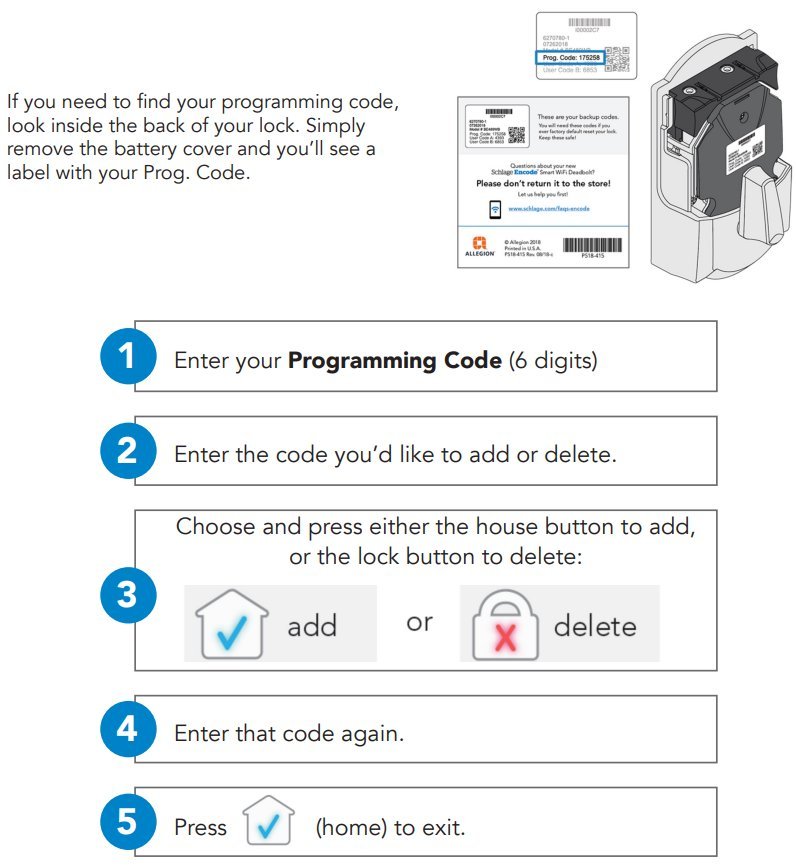
- The original white sticker with the default six-digit Programming Code and two default four-digit User Codes, found on the back of the keypad assembly or inside the user manual.
- A standard Phillips-head screwdriver (size #2) to take off the indoor cover plate; power drills will strip the screws.
- One fresh 9-volt alkaline battery or four fresh AA batteries, matching your specific lock model.
- A paperclip, needed only if your model has a tiny pinhole reset button.
A quality alkaline brand works for the battery swap, but never use rechargeable cells because they drop voltage too fast. If your lock’s housing screws are frozen or stripped, a licensed locksmith will need to extract them safely.
Step-by-Step
- Unscrew the two mounting screws on the inside housing using your #2 Phillips screwdriver, then lift the cover off the door.
- Disconnect the 9-volt battery snap connector from the terminal.
- Reconnect the 9-volt battery to the terminal while holding down the outside Schlage button firmly.
- Press the Schlage button again until it lights green, then enter one of your default four-digit User Codes to test the lock cylinder.
Careful: If you don’t reconnect the battery while pressing the button, the lock will simply power back up without wiping the old memory.
Tip: Check the sticker on the back of the keypad assembly right now to copy your original factory numbers onto a card before you screw the lock back onto the door.
Careful: If your internal lock wires look frayed or pinched against the deadbolt hole, stop working immediately and call an experienced locksmith so you don’t cause an electrical short.
Resetting by Lock Model
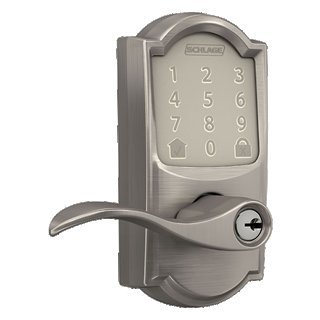
Different hardware setups require varying steps and tools depending on the generation of your keypad.
| Lock Style | Average Time | Hardware Differences | What to Monitor |
|---|---|---|---|
| Standard Keypad Deadbolt (BE365) | 2 to 3 minutes | Uses one 9V battery and the front logo button | Green light confirmation flash |
| Electronic Keypad Lever (FE595) | 3 to 5 minutes | Uses one 9V battery inside interior lever base | Motor beep tone after reconnection |
| Touchscreen Deadbolt (BE469) | 5 minutes | Requires four AA batteries and pinhole button | Long green checkmark on front screen |
| Smart WiFi Deadbolt (Encode) | 3 minutes | Features an interior reset button under battery tray | Red-amber flash cycle before solid green |
It’s safer to test one default code while the door stays open than to shut the door immediately and risk an accidental lockout.
How to Tell You Did It Right
A proper reset gives you two green light flashes and two beeps whenever you press the front button and type a default four-digit code. The deadbolt turns smoothly by hand right after you enter that code. A bad reset usually shows three red flashes with a buzzing sound, meaning the lock rejected the command.
This lockout failure happens when an old custom code remains stored in active memory because the power cycle wasn’t held long enough. To prevent it, always hold the outside button down during battery reconnection, use fresh alkaline batteries, and type your numbers within ten seconds of touching the keypad.
Official Factory Security Standards
The Builders Hardware Manufacturers Association sets the ANSI/BHMA operational standards for residential keypad deadbolts to ensure door security. After resetting, write down your six-digit Programming Code on a private sheet, store it far away from the door, and screw the interior plate back on firmly.
A factory reset lasts permanently until someone clears the memory again. If your lock mechanism sticks or refuses to turn despite good codes, the internal motor might be broken. This task requires a professional locksmith or hardware replacement, so don’t attempt to force the mechanical drive components yourself.
Other Ways to Do It
Using the Programming Code
Enter your six-digit Programming Code, press the Schlage button, press number 3, and re-enter your Programming Code. This deletes every existing User Code without removing the unit from the door, taking under thirty seconds.
Interior Reset Button Method
For models with an interior reset switch, remove the battery cover, press and hold the small button until the indicator flashes. This takes under two minutes and avoids taking the entire lock assembly off the door.
Schlage Home Mobile App
Smart locks paired via wireless networks let you clear memory directly from the settings tab on your mobile device. This takes about one minute without using any tools, but it only works if your device stays actively connected to the network.
Frequently Asked Questions
Can You Reset a Schlage Lock Without the Original Code?
No, you can’t reprogram the unit without either the factory Programming Code or a manual reset. If you don’t know the custom code, taking the lock off the door to read the factory sticker is the only way to regain control.
Why Is My Schlage Lock Blinking Red After a Reset?
Three red flashes mean the lock encountered an error, such as a mistyped code or low battery power. It also happens when the door bolt encounters physical friction inside the strike plate while attempting to extend or retract.
How Long Does a Schlage Lock Remember Codes Without a Battery?
The internal non-volatile memory keeps your stored codes indefinitely even without battery power. Taking the battery out for an hour or a week won’t erase your User Codes until you run the manual button reset sequence.
Is It Safe to Leave Default Codes Active on Your Lock?
No, you should never keep the default four-digit codes running for regular household use. Anyone who takes off the interior cover or finds the manual can read those default numbers and gain immediate entry into your home.
What Happens If You Type the Wrong Code Too Many Times?
Entering an invalid code four consecutive times temporarily shuts down the outer keypad for thirty seconds to block break-in attempts. The keypad lights flash red during this lockout window and refuse to accept any button presses.


