Resetting your myQ takes about 60 seconds by pressing the settings button until the blue LED blinks. This clear wipe restores factory network defaults immediately without erasing your physical remote controls. It suits homeowners best who changed their home Wi-Fi password or bought a used smart garage hub.
What You’ll Need

- A sturdy step ladder tall enough to reach your garage opener comfortably.
- A small pin, paperclip, or pen tip for recessed buttons on standalone hubs.
- Your home Wi-Fi network name and password written down nearby.
- A smartphone running the official mobile app with Bluetooth turned on.
- A 2.4 GHz wireless network band; 5 GHz bands won’t work with these devices.
A small screwdriver works fine to press the recessed button, but a sharp knife doesn’t because it cuts the plastic switch inside. If your unit is mounted too high or near exposed wiring, a licensed garage technician should handle overhead service.
Step-by-Step
- Place your ladder safely beneath the garage door opener or hub on flat, solid ground.
- Locate the physical settings button, marked with a gear icon or labeled “Settings” on the unit.
- Press and hold this gear button down continuously for 6 seconds until the indicator LED flashes blue. Tip: If you see an amber light instead of blue, you held the button too long; release it and wait 10 seconds to try again.
- Press and hold the same button a second time for 6 seconds until the unit beeps and the light flashes again. Careful: A second press clears all saved Wi-Fi details and disconnects the unit from your mobile account entirely.
- Open the mobile app on your smartphone within 3 feet of the garage opener unit.
- Select the option to add a new device, choosing the smart garage control when prompted on your screen.
- Connect your phone to the opener’s temporary Wi-Fi signal broadcasted during setup, then select your home network.
- Enter your 2.4 GHz network password into the app prompt and wait 45 seconds for the solid green light.
If the main opener motor unit requires rewiring to clear persistent hardware faults, stop here. High-voltage connections carry real shock hazards, so hire a licensed electrician or door professional.
Adjusting for Different Hardware Models

Different setups need different button holds, and the table below shows how the reset process changes across hardware versions.
| Hardware Type | Time Required | Key Difference | What to Watch |
|---|---|---|---|
| Smart Garage Hub | 60 seconds | Uses a small recessed button on the side | Blue LED blinks before connection |
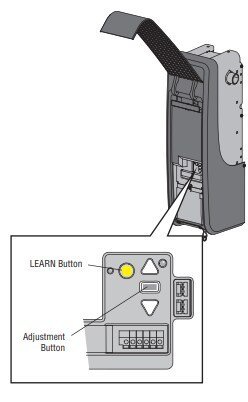
| Wi-Fi Garage Opener | 90 seconds | Uses the yellow Learn button | Main overhead light blinks once |
| Wall Control Panel | 45 seconds | Uses menu buttons inside the push bar | LCD screen prompts network reset |
| Video Keypad | 60 seconds | Requires removing the battery casing first | Red light turns off after wiping |
Starting with a basic Wi-Fi reset is safer than doing a full factory wipe because factory wipes force you to reprogram every physical car remote.
How to Tell You Did It Right
A successful reset ends with a blinking blue light ready for pairing, followed by a solid green light once connected to your router. A failed reset shows a continuous blinking green light or a solid amber light, meaning the unit can’t reach the internet. This quality problem usually happens because dual-band routers push the device toward an incompatible 5 GHz band. Setting your router temporarily to a dedicated 2.4 GHz channel prevents this issue, keeping your connection steady during setup.
Rules and Final Cleanup
Once your device connects, put your step ladder away and make sure the garage door path remains completely clear. Check that your wall console still operates the door manually before walking away. This network reset lasts indefinitely and doesn’t need to be repeated unless you change your internet service provider or replace your router.
Alternative Setup Paths
In-App Network Change
Tap the device settings menu inside your mobile app to update Wi-Fi without climbing a ladder. This route saves 10 minutes and keeps all door schedules intact.
Full Factory Learn Wipe
Hold the colored Learn button on the motor head for 10 full seconds. This removes every handheld remote control along with your internet connection, costing about 15 minutes of extra reprogramming time.
Wall Console Menu
Open the maintenance menu directly on newer LCD wall stations to clear network data. This approach avoids touching the overhead unit entirely, keeping your hands off ladders while clearing network settings safely.
Frequently Asked Questions
Will Resetting Myq Erase My Handheld Remotes?
No, a standard network reset only clears your Wi-Fi name and app connection. Your physical visor remotes and outdoor keypads stay paired to the motor unless you hold the colored Learn button for more than 10 seconds.
Why Is the LED Light Flashing Blue and Green?
This means the device is trying to connect to your home Wi-Fi network but can’t find the internet signal. Check if your router is online and ensure your home password was entered without typos.
Can I Reset the Device Without the App?
Yes, pressing the physical gear button on the unit for 6 seconds wipes the network settings directly. However, you’ll still need the mobile app later to reconnect the opener to your home internet.
What Happens If the Light Stays Solid Amber?
A solid amber light typically indicates the unit can’t connect to the internet or router. Unplug the main power cord for 30 seconds, plug it back in, and start the reset steps again.
Is It Safe to Reset While the Door Is Open?
Yes, it’s completely safe, but the door won’t move during the reset process. Keep children and pets away from the doorway tracks until you finish testing the opener.