Disarming the panel with your 4-digit master code twice within 5 seconds is the standard way how to reset alarm system hardware after a false trigger. A full power cycle takes about 3 minutes when clearing persistent trouble beeps. This simple reboot method suits homeowners dealing with dead backup batteries or glitchy keypads after a neighborhood outage.
Tools to Reset Your Alarm System

- The original 4-digit master code or installer code (found in your user manual or written inside the control box door).
- A small flathead screwdriver or the physical control box key to open the metal cabinet door.
- A clean cloth to wipe away dust inside the panel.
- Access to your main electrical service panel to find the alarm’s dedicated transformer breaker.
Entering a standard user code will work to silence sirens, but it won’t clear hard system trouble flags. If your system runs through an active commercial monitoring contract, call the dispatch center first so you don’t trigger a police response.
Step-by-Step
- Call your monitoring company’s dispatch desk and ask them to place your account on test status for 60 minutes.
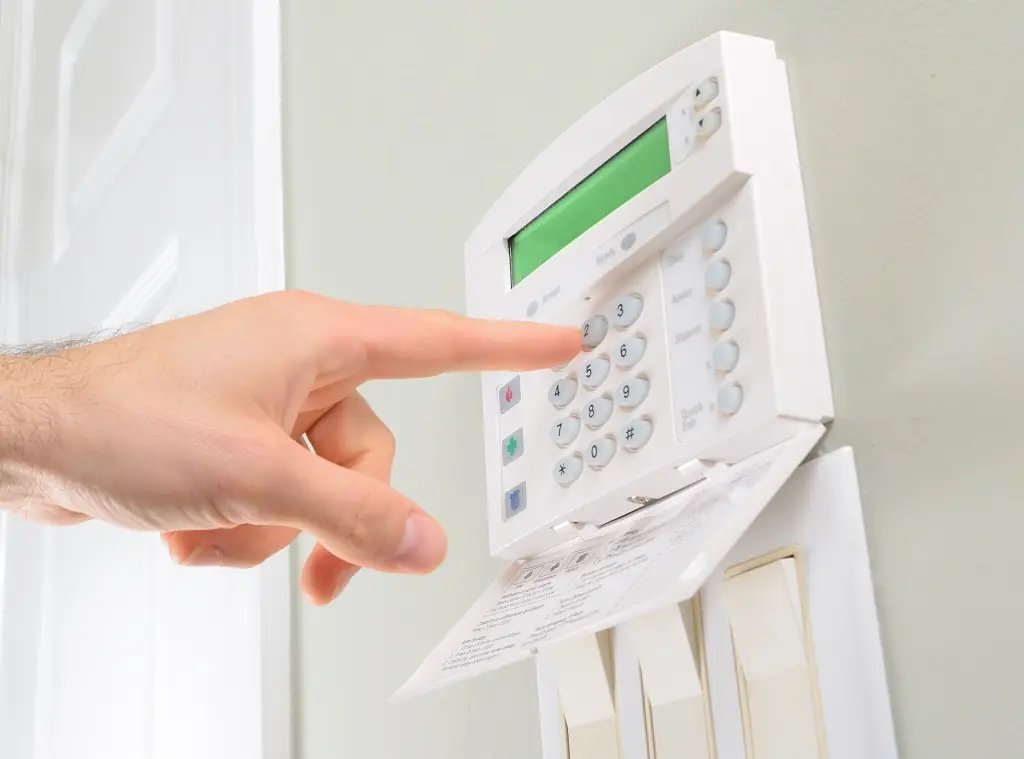
- Enter your 4-digit master code on the keypad, press the “Off” or “Disarm” key (often the number 1 key), and repeat this sequence a second time within 5 seconds.
- Locate the beige or gray metal panel cabinet, which usually sits inside a hallway closet, utility room, or basement.
- Unlock the cabinet with the small metal key, or remove the two side screws using your flathead screwdriver.
- Unplug the low-voltage AC transformer from the wall outlet, or switch off the dedicated circuit breaker if the transformer is hardwired.
- Disconnect the red lead wire from the positive 12-volt backup battery terminal inside the cabinet to cut all electrical power.
- Wait exactly 60 seconds while the internal circuit board capacitors drain completely.
- Reconnect the red wire firmly to the positive battery terminal, then plug the wall transformer back into its electrical outlet.
- Walk to the primary keypad and enter your 4-digit master code followed immediately by the “Off” key to clear the reboot chime.
Careful: If you pull the black battery wire first instead of the red one, you risk shorting the terminal against the metal box frame.
Tip: A completely dead backup battery will block the reboot; if the low battery light stays on after 10 minutes, the battery needs replacement.
Resetting Panels Across Different Conditions
Your equipment type changes the time and steps needed to restore normal monitoring.
| Panel Condition | Time and Cost Impact | What Changes | What to Watch During Reset |
|---|---|---|---|
| Normal false alarm | 10 seconds; free | Disarm code entered twice clears the memory | Keypad screen returns to “Ready to Arm” status |
| Dead backup battery | 24 hours to recharge; cost of battery | Siren stops immediately, but trouble light lingers | Battery icon blinks until voltage reaches normal level |
| Post-lightning surge | 5 to 10 minutes; free reboot | Hard power cycle required at the circuit board | Burnt smell or blown glass fuses on circuit board |
| Locked installer memory | 15 minutes; service fee if locked | Requires jumping board terminals or phone support | Display asking for an unknown 4-digit dealer code |
If your panel won’t clear, it’s safer to leave the battery disconnected than to guess random codes and lock the motherboard.
How to Tell You Did It Right
A correct reset leaves the keypad showing a solid green checkmark or a “Ready to Arm” prompt. A poor result leaves an illuminated yellow triangle, an open trouble zone number, or an alert chime every 30 seconds. System memory errors often linger because modern panels store tamper alerts in flash memory until a double disarm clears the register. You can prevent recurring trouble alerts by closing every protected window completely, replacing wireless sensor coin cells regularly, and tightening loose wire terminals inside the main box.
Device Standards and Panel Maintenance
Under standards maintained by the National Fire Protection Association through NFPA 72, household warning systems require functional backup power that runs the system during blackouts. After clearing errors, close the cabinet door, secure the latch screw, and safely dispose of any swollen lead-acid batteries at an approved recycling drop-off. Sealed lead-acid backup batteries generally last between 3 to 5 years before degrading; this varies by model — check the label on your battery casing. If your keypad displays an unyielding communication failure or phone line cut message, this stops being a homeowner fix; call a licensed security technician to test the cellular communicator.
Alternative Reset Methods

Calling Your Alarm Provider
Call your provider’s technical support line to request an over-the-air signal reboot. The representative pushes an update through the cellular link, which takes about 5 minutes and saves you from opening the cabinet. This won’t fix severed sensor wires or dead lead-acid batteries.
Keypad Factory Sequence
Hold down the asterisk (*) and pound (#) keys simultaneously within 30 seconds of plugging in the panel. This drops modern boards into programming mode where you can reset parameters, but entering wrong values here will erase all programmed sensor zones completely.
Smartphone App Reboot
Open your security provider’s mobile app, open device settings, and select the remote panel restart button. This remote reboot takes roughly two minutes and keeps your hands off the electrical wiring. You can’t use this route if your home Wi-Fi or cellular unit is offline.
Frequently Asked Questions
Can I Reset an Alarm Without the Master Code?
No. You can’t clear the memory without the master code or installer code. If you lost the code, you must execute a hard board reset by cutting power, holding specific keypad buttons down during power-up, or calling the monitoring company to push a new default master code.
Why Does My Alarm Keep Beeping After a Reset?
Your backup battery is likely weak or an exterior sensor cover is off. The keypad beeps once every minute to tell you that hardware trouble remains. Press the status or star key to see which zone is causing the trouble, then fix that door or window sensor.
How Long Does a Security Battery Take to Recharge?
About 24 hours under steady household power. When you reconnect a depleted lead-acid battery, the keypad’s yellow warning light will stay lit until the internal charger restores sufficient voltage. If the warning stays past 48 hours, replace the heavy 12-volt battery block inside the main panel.
Is It Safe to Unplug the Main Alarm Transformer?
Yes. The transformer reduces standard 120-volt wall power down to safe, low-voltage power, which a technician can test if needed. You can safely unscrew the outlet bracket and unplug the small transformer box without any shock risk, provided the plastic casing isn’t cracked, wet, or visibly damaged.
What Happens If I Disconnect the Panel Battery?
Nothing dangerous happens to your stored zone settings. The system will continue running off household wall current, but the keypad will flag a missing battery trouble light. If your home loses mains electricity while the battery is unplugged, the entire alarm shuts down instantly.