To reset a Philips Hue bulb quickly, delete the light directly from your official mobile app or hold a Hue Dimmer Switch within 6 inches of the powered bulb while pressing the “On” and “Off” buttons together for 10 seconds until it blinks.
A factory reset wipes the bulb’s Zigbee network memory so a new hub can detect it. If you cut wall power before starting, the device can’t receive the radio command and nothing happens.
Leaving the bulb linked to an old bridge before selling it causes headaches for the next owner. This process isn’t for broken hardware that won’t turn on at all, since dead LEDs can’t run the internal wipe cycle.
Resetting Through the Hue Bridge App
- Turn on the physical wall switch that powers your light socket so the bulb receives electricity.
- Open the Philips Hue app on your mobile device and tap the Settings tab in the bottom right corner.
- Select Lights from the menu, then tap the specific bulb you need to wipe.
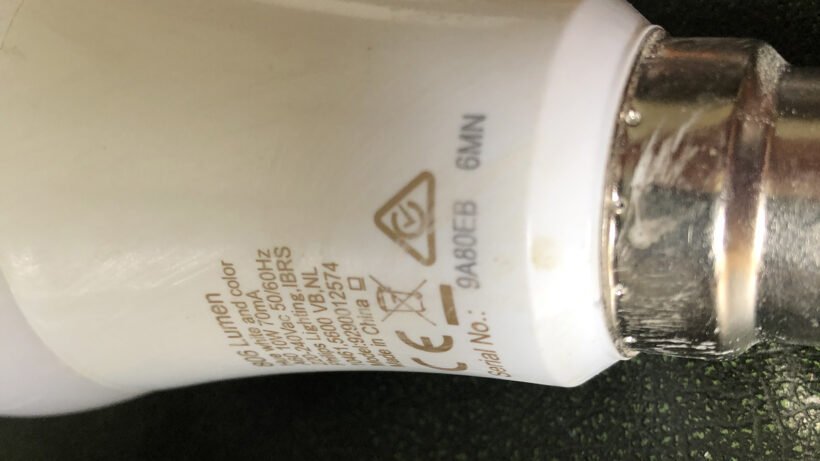
- Scroll to the bottom of the screen and tap the red Delete button. Tip: If the app can’t reach the lamp, write down the 6-character serial code printed on the bulb base before proceeding.
- Confirm the action when prompted, which forces the lamp to blink once and return to its default warm white state.
If the app fails to locate the unit, you can review the official Philips Hue support documentation to troubleshoot bridge connectivity issues.
How Long It Takes
Resetting a smart bulb takes less than a minute when network signals are strong.
| Situation | How long | What changes it | What to watch for |
|---|---|---|---|
| Mobile app deletion | 5 to 15 seconds | Distance between hub and bulb | Lamp blinks and turns bright warm white |
| Hue Dimmer Switch hold | 10 to 12 seconds | Hand movement and switch angle | Bulb flashes, then switch LED turns green |
| Manual serial code search | 30 to 60 seconds | Typo mistakes during manual entry | App pairing circle finishes spinning |
If your device takes over 2 minutes without responding, toggle your wall switch off for 10 seconds, turn it back on, and try the dimmer method instead.
How to Tell When It’s Done
A successful reset gives an immediate visual signal. The bulb flashes briefly, turns off for a fraction of a second, and settles into a default, full-brightness warm white glow.
If you aren’t sure whether the reset worked, test it by opening your Hue app’s search screen. If X happens (the light appears under “New lights”), your wipe succeeded; if Y happens (the light remains unresponsive), power cycle the lamp socket and re-enter the serial number. This varies by model — check the label on older generations, as non-Bluetooth models only respond to Zigbee hubs.
Mistakes That Ruin It
- Cutting the wall power switch: The bulb needs active electricity to wipe its internal flash memory, so flipping off the wall switch stops the radio signal instantly. Leave the wall switch on throughout the whole process.
- Holding the Dimmer Switch too far away: Radio range for factory commands is extremely short to prevent wiping your neighbor’s lights by mistake. Keep the switch within 4 to 6 inches of the bulb surface.
- Throwing away the serial number: Installing a bulb in a tall ceiling before noting the 6-character code costs you extra ladder trips if auto-detection fails. Write down the serial printed on the ceramic base before screwing it into hard-to-reach sockets.
Frequently Asked Questions
Can I Reset a Hue Bulb with a Normal Wall Switch?
No, Philips Hue bulbs don’t use a standard power flick sequence like some smart brands do. Toggling the wall switch only cycles power modes. You must wipe the unit using the Hue app, an official Dimmer Switch, or a compatible voice assistant hub.
Why Is My Bulb Not Blinking During the Reset?
The dimmer switch is likely held too far from the bulb glass. Hold the remote buttons down firmly within 6 inches of the lamp for the entire 10 seconds. If the dimmer LED flashes red, its own battery is too low to complete the radio handshake.
How Long Does a Hue Bulb Stay in Pairing Mode?
About 30 minutes after completing a factory wipe. Once the light resets to warm white, it continuously broadcasts its setup beacon. If you don’t pair it within this window, turn the wall switch off and on again to restart the pairing beacon.
Is It Safe to Reset a Hot Bulb?
Yes, but you shouldn’t touch the hot glass with your bare skin. Wait 5 minutes after cutting power if you must unscrew the casing to read the 6-character serial code. The internal reset command itself doesn’t damage the LED components or overheat the base.
What Happens If I Reset a Bulb Without Deleting It from the App?
The app will display an “unreachable” warning next to the old light profile. The bulb itself will act as a brand-new device, but your old bridge can’t control it until you manually delete that ghost profile and add the lamp back into your room settings.