
Resetting an Aura frame takes about two minutes using the Aura app or the pinhole button on the back of older units. You can wipe network credentials or erase all frame data by pressing the pinhole for 20 seconds. This process suits owners preparing a gift or fixing a stuck Wi-Fi connection.
What You’ll Need

- Your Aura digital frame plugged into its official power adapter.
- A smartphone or tablet with the Aura app installed (iOS 14 or later, or Android 7.0 or later).
- The login email and password for the Aura account that manages the frame.
- A paperclip or SIM ejector tool (only required for older models like Mason Luxe, Sawyer, or Smith).
- An active home Wi-Fi network running on the 2.4 GHz frequency band.
A standard sewing pin works if you don’t have a paperclip, but a toothpick doesn’t work because it’s too thick to fit into the pinhole.
Step-by-Step
- Open the Aura app on your mobile device while standing within 10 feet of your powered frame.
- Tap the gear icon in the top right corner of the screen to open Frame Settings.
- Scroll to the bottom of the menu and select “Remove Frame” to disconnect your account completely. Careful: Removing the frame through the app deletes cloud sync settings, but your uploaded photos remain safe inside your cloud albums.
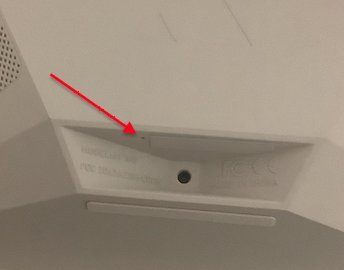
- Locate the small reset hole on the back panel if you use an older legacy model (newer models like Carver don’t have this hole).
- Insert your straightened paperclip straight into the opening until you feel a soft physical click.
- Hold the button down firmly for 20 seconds while the unit stays connected to wall power. Tip: Keep continuous pressure on the switch; releasing it at 15 seconds aborts the memory clear.
- Release the pin once the screen flashes dark and displays the four-digit setup code.
- Unplug the power cord for 10 seconds to finish cycling the internal hardware memory.
- Plug the power adapter back into the wall outlet and wait 30 seconds for the welcome screen.
Frame Reset Methods by Model
This breakdown shows how resetting changes depending on the hardware edition you own.
| Frame Model | Time Required | Physical Reset Method | What to Watch |
|---|---|---|---|
| Aura Carver | 2 minutes | Aura app menu only | Screen displays new 4-digit Bluetooth code |
| Aura Mason | 3 minutes | 20-second paperclip hold | Backlight turns off then shows startup logo |
| Aura Smith | 3 minutes | 20-second paperclip hold | Pinhole click sensation near the base edge |
| Aura Walden | 2 minutes | Aura app menu only | Wi-Fi icon flashes on display glass |
It’s safer to clear network settings first through the app before attempting a physical wipe, so you don’t accidentally erase custom album schedules.
How to Tell You Did It Right
A successful reset displays a bright four-digit pairing code on the panel screen. If the reset failed, the screen keeps looping old family photos or displays a persistent “Unable to Connect” error banner. Wi-Fi failure happens when home dual-band routers combine 2.4 GHz and 5 GHz signals under one network name, which prevents the frame’s single-band radio from shaking hands. You can prevent this failure by splitting your home router bands into two separate names. Another common mistake people make is pulling the power plug while holding the button, which costs them 15 minutes of reboot lag on frozen firmware.
Device Data Handling Rules
Aura frame hardware follows safety standards set by the Federal Communications Commission (FCC Part 15) for home digital devices. Before handing the device to a new owner, clear your private home Wi-Fi network keys from the local flash memory. A complete factory wipe lasts permanently until a phone pairs with the screen’s Bluetooth beacon again.
Alternative Setup Adjustment Methods

Network-Only Reset
Change only your router credentials through the app menu. This takes two minutes and keeps all invited members, custom album playlists, and display timers fully intact without touching the hardware.
Member Account Transfer
Transfer ownership directly through the frame settings tab. The process takes under one minute and shifts management billing and invite rights to another email address without deleting a single photo.
Soft Power Cycle
Unplug the power barrel jack from the frame base for 60 seconds. This simple step clears temporary software memory in one minute without wiping account links or home network credentials.
Frequently Asked Questions
Will Resetting Delete My Uploaded Photos?
No. Your uploaded photos stay stored in your secure cloud account. You only wipe local Wi-Fi credentials and account links from the physical frame memory.
How Long Do You Hold the Pinhole Reset Button?
Hold the button for 20 seconds. If you release the paperclip earlier, the internal microprocessor ignores the reset signal and boots normally into picture slideshow mode.
Why Is My Aura Frame Not Resetting?
Your frame lacks continuous power or your paperclip missed the internal microswitch. If your model lacks a pinhole, perform the reset using the mobile app instead.
Can You Set Up a Reset Frame Without Wi-Fi?
No. Aura frames lack internal photo storage and require an active 2.4 GHz internet connection to stream pictures from the cloud servers to your display.
What Happens If I Remove the Frame from My App?
The frame drops its internet link and displays a pairing code. If you want to use it again, add it as a new device.


