
Holding down the Learn button for six seconds clears the motor memory, which is the core method for how to reset chamberlain garage door opener units when remotes stop working. This process removes all paired handheld controllers and keyless entry pads immediately. It suits homeowners who lost a remote, moved into a new home, or need to fix a broken radio link.
Tools to Reset Your Chamberlain Garage Door Opener
- A sturdy step ladder tall enough to reach the motor unit safely.
- All handheld remotes you plan to use with the door.
- The wireless keypad mounted outside your garage, if you have one.
- A small stepladder or screwdriver to remove the light lens cover, depending on your casing.
- Fresh coin-cell batteries (usually CR2032) for each remote to ensure strong signals.
A standard stepladder works well here, but an unstable chair doesn’t because sudden motor vibrations can knock you off balance. If your garage ceiling is over ten feet high, or if your door tracks look bent, stop and call a professional garage door technician who has the proper staging gear.
Step-by-Step
- Place your ladder firmly beneath the motor head hanging from the garage ceiling.
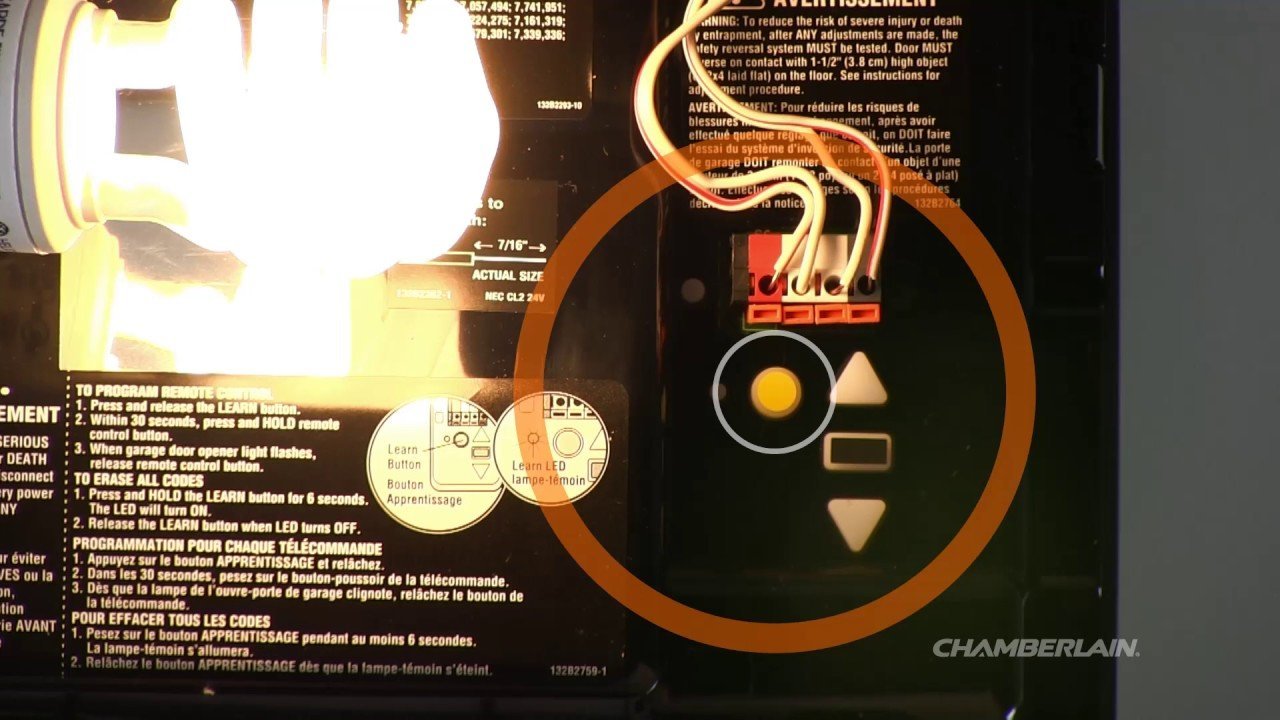
- Open the plastic light cover to locate the square or round Learn button beside the indicator LED.
- Press and hold the Learn button continuously for six seconds until the small indicator light turns off.
- Release the button immediately once that light darkens, which erases all saved codes.
- Press the Learn button once for one second; the indicator LED will turn on solid for thirty seconds.
- Push the button on your handheld remote within those thirty seconds to link it again.
- Tap the remote button once more to confirm the motor responds and moves the trolley.
Careful: Don’t touch the exposed wiring terminals on the back panel while pressing buttons, as those carry low-voltage current for wall consoles and sensors.
Tip: If you have an older unit with a yellow Learn button, hold it until the light goes out, but repeat steps five and six right away because the learn window closes quickly.
If the door refuses to move or makes a loud buzzing sound without traveling along the rail, the main drive gear or torsion spring might be broken; stop working and call a certified door technician.
Resetting by Hardware Type
Different Chamberlain openers use varied logic boards and button setups that alter your working time.
| Hardware Setup | Typical Time | What Is Different | What to Watch For |
|---|---|---|---|
| Yellow Learn Button (Security+ 2.0) | 2 to 3 minutes | Uses circular antenna wire and fast pairing | LED shuts off after 6 seconds |
| Purple Learn Button (315 MHz) | 3 to 5 minutes | Older radio frequency prone to LED bulb noise | Work light blinks twice on success |
| Red or Orange Button (390 MHz) | 3 to 5 minutes | Requires direct line of sight during setup | Indicator flashes when code clears |
| Smart myQ Wi-Fi Motor | 5 to 8 minutes | Requires clearing both radio and network chips | Wi-Fi LED shifts from blue to green |
Starting with a basic six-second remote wipe is safer than wiping your Wi-Fi settings right away, because reconfiguring home network credentials takes far more effort if you only had a broken remote.
How to Tell You Did It Right
A successful reset leaves your motor silent until you program a new device. When you press an old remote that wasn’t relearned, nothing happens, and the overhead light stays dark. Once you pair a remote correctly, the main garage light flashes twice, or you’ll hear two loud clicks from the casing.
The most common quality issue is a remote working only when held an inch from the motor head. This happens because home LED light bulbs often emit radio frequency interference that drowns out the opener receiver. You can prevent this by installing shielded bulbs or keeping standard bulbs below 40 watts. Note that range limits vary by model — check the label on your opener chassis to confirm its exact radio frequency.
Safety Rules and Setup Limits
Federal safety standards enforced by the U.S. Consumer Product Safety Commission require automatic reversing mechanisms on every overhead opener sold in the United States. After resetting your electronics, place an ordinary two-by-four board flat on the floor directly under the door path. Run the door down; it must reverse automatically the instant it strikes the wood.
Wipe down the safety eye lenses near the floor with a clean cloth, and test that their small amber and green lights stay steady. This basic memory reset lasts indefinitely until you choose to clear it again. If the door fails the wood block test, the internal force settings must be serviced before you park inside.
Other Ways to Clear Settings
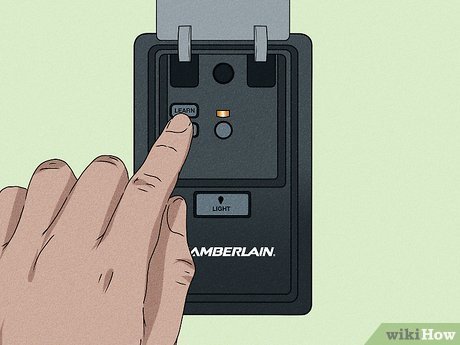
Wall Console Reset
It trades full memory clearing for quick security when you go on vacation.
Myq App System Wipe
Open the myQ mobile application on your smartphone, select your garage hub, and delete the device from your account. This removes all digital keys and phone access in under a minute without requiring a ladder, though handheld remotes stay paired.
Full Factory Hardware Wipe
Frequently Asked Questions
Will Resetting the Opener Erase My Outside Keypad?
Yes. Holding down the Learn button for six seconds clears every remote, vehicle link, and exterior wireless keypad saved in the memory. You’ll need to take your ladder back outside and punch in your chosen PIN to program the keypad again once the motor clears.
Why Won’t My Chamberlain Opener Accept a New Remote?
Your opener might have reached its memory limit. Most logic boards store only up to eight remotes or keypads total. If the memory is full, the light won’t blink when pairing. Clearing the board with a six-second hold solves this and frees up memory slots for new devices.
How Do I Know Which Learn Button Color I Have?
Look at the end panel of the motor unit hanging from your ceiling. Take off the plastic light cover using a flat screwdriver if needed. You’ll find a distinct square or round button colored red, orange, yellow, green, or purple right beside the small diagnostic light.
Can I Reset the Opener Without a Ladder?
Yes, if your garage features a smart wall control panel with an LCD screen or a dedicated menu button. You can open the settings menu on that wall station, scroll to the remote setup section, and clear the memory without climbing up to the motor head.
What Should I Do If the Door Reverses Immediately After Resetting?
Check the travel limit adjustments on the side of the housing. If the door touches the floor and springs back up, the travel limits tell the motor the floor is an obstruction. Turn the down-travel screw slightly counter-clockwise to reduce downward distance before trying to pair more remotes.


