
Resetting a Lenovo IdeaPad laptop takes about 30 to 60 minutes using Windows Recovery or the built-in Novo button. Plug the laptop into its AC power adapter, open Settings, and select Reset this PC to wipe your software. This method suits anyone fixing frozen software or wiping personal data before selling the device.
Things You Need Before Resetting Your Lenovo Laptop
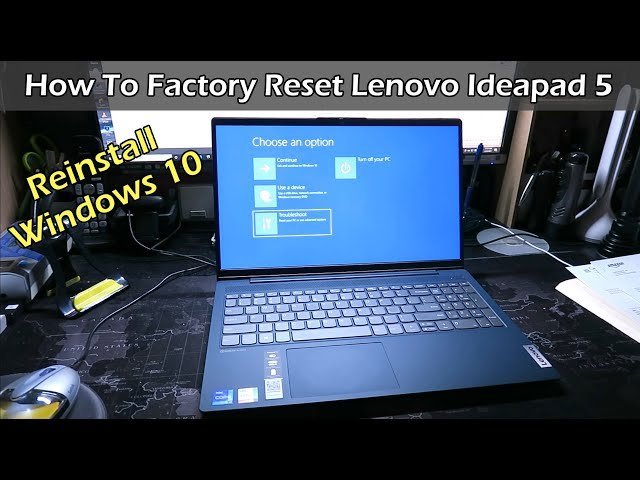
- The official Lenovo AC power adapter rated for your IdeaPad model.
- An active Wi-Fi connection if you choose the cloud download method.
- An external USB hard drive or flash drive with at least 32 GB of space for file backups.
- A small paperclip or SIM ejector tool to press the Novo button on models that have one.
- Your Microsoft account username and password if your drive uses BitLocker protection.
- A USB mouse, because the touchpad driver might not respond until Windows completes setup.
Using OneDrive or Google Drive works well instead of a physical USB drive to save your files. Plugging your laptop into a low-wattage phone charger won’t work, as it can’t supply enough continuous power during a system reinstall.
Step-by-Step
- Plug the charger into your IdeaPad and verify that the charging light turns on.
- Back up your important files to an external drive or cloud storage before touching any recovery settings.
- Click the Start button, open Settings, select System, and click on Recovery.
- Click the Reset PC button next to the recovery option labeled Reset this PC.
- Select Remove everything if you’re selling the laptop, or choose Keep my files if you only want to fix system errors.
- Pick Local reinstall to restore Windows from your internal recovery partition in about 20 minutes.
- Confirm the final reset prompt and let the laptop reboot through the automated installation process.
Careful: Never shut the screen lid or unplug the power cable while the reinstall screen displays percentage numbers, or the boot partition might corrupt.
Tip: If you choose the full wipe to sell the machine, select the “Clean the drive” option, which takes roughly two hours longer but prevents future owners from recovering deleted files.
If Windows fails to start at all, turn off the computer and press the tiny Novo button on the side using your paperclip. If your drive shows a locked BitLocker screen and you have no key, contact an authorized computer repair shop to reinstall Windows from scratch.
Choosing the Best Reset Approach
How long your IdeaPad takes to reset depends directly on drive speed, drive size, and the method you pick.
| Reset Scenario | Time Needed | What Changes | Watch For |
|---|---|---|---|
| Keep Files (Local) | 20 to 40 minutes | Retains user documents | Free disk space warnings |
| Full Wipe (Quick) | 30 to 60 minutes | Removes all personal data | Setup screen after restart |
| Full Wipe (Clean Drive) | 2 to 4 hours | Overwrites storage bits | Battery drain without AC power |
| Cloud Download Reset | 45 to 90 minutes | Downloads fresh Windows copy | Network disconnects |
Starting with a basic reset that keeps your personal files is safer than doing a full drive wipe right away.
How to Tell You Did It Right
A successful reset presents you with the clean Windows setup screen asking for your region and keyboard layout. The fans run quiet, and the machine reboots without displaying any blue recovery screens. A failed reset usually results in a continuous restart loop or an error stating that changes couldn’t be applied.
This error happens when corrupted system files inside the local recovery partition prevent Windows from writing the fresh system image. To prevent this, run a disk check before resetting, keep your charger connected, and remove all flash drives, SD cards, and printers from the ports before you begin.
Factory Restore Guidelines and Maintenance
Microsoft sets specific operating system requirements for local image restorations. Official Lenovo PC Support guidelines state that a laptop must stay connected to uninterrupted AC power during the entire recovery cycle to avoid firmware lockups.
Once your laptop reaches the desktop, open Windows Update to download the newest hardware drivers. Check the Lenovo Vantage app to ensure your battery charge thresholds and audio software function normally. Reinstall your everyday work applications one by one rather than all at once. An operating system reset generally keeps an IdeaPad running smoothly for one to two years before junk files slow it down again.
Other Ways to Do It
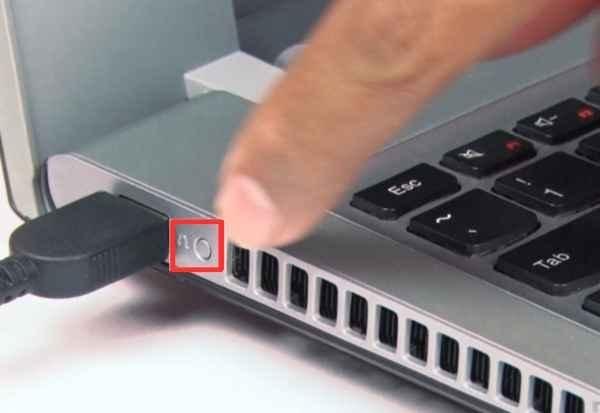
Novo Button Recovery
Turn off the machine completely, then push the small pinhole button on the side chassis using a paperclip. The Novo Button Menu appears on the screen without loading Windows. Select System Recovery to start the factory reset process even if Windows can’t boot normally.
Windows Advanced Startup
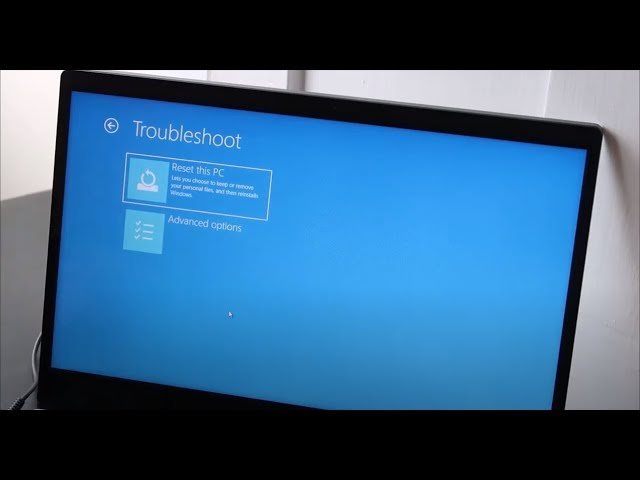
Hold down the Shift key on your keyboard while clicking Restart inside the Windows Start menu. The laptop reboots into a blue menu full of maintenance tools. Click Troubleshoot and then choose Reset this PC to bypass any software errors on your desktop.
Clean Install from USB
Download the official Windows Media Creation Tool onto an empty 8 GB USB flash drive using another working computer. Boot your IdeaPad from that flash drive to format the internal drive completely. This method removes all factory trial software but requires reinstalling all drivers manually later.
Frequently Asked Questions
Will Resetting My Ideapad Delete All My Photos and Documents?
No, not if you click the Keep my files option during the setup steps. Windows will remove your downloaded applications and reset system settings, but it leaves your personal folders intact.
How Long Does a Factory Reset Take on an Ideapad?
About 30 to 45 minutes for a standard reset using local files. If you select the secure drive-cleaning option to erase everything permanently, the process can take upwards of three hours.
Can I Reset My Ideapad If I Forgot My Login Password?
Yes. Hold down the Shift key while you click Restart on the lock screen, then navigate to Troubleshoot and select Reset this PC to clear the account.
What Happens If My Laptop Turns Off During the Reset?
Your operating system can corrupt, leaving the machine unable to boot up. You’ll likely need to build a recovery USB drive on another PC to repair the broken installation.
Does a Reset Remove Computer Viruses and Malware?
Yes, choosing the Remove everything option clears the drive and deletes malicious software. Keep in mind that reinfecting the machine is possible if you restore unsorted backup files immediately afterward.
Why Is My Ideapad Stuck on a Black Screen During the Reset?
Hard drives occasionally take several minutes to process large file deletions without updating the screen. Wait at least one hour before attempting a hard power-down.
Related guides


