To reset a Wemo smart plug, hold the physical power button down for 10 to 15 seconds while you push the plug into a live wall socket. This clears your old Wi-Fi settings and puts the device into setup mode immediately. This method suits anyone whose plug keeps disconnecting from their home network or anyone moving an existing unit to a new house.
What You’ll Need
- A Wemo Smart Plug (such as model WSP080 or WSP090).
- A working 120-volt AC wall outlet.
- Your home Wi-Fi network name and password for the 2.4 GHz band (5 GHz networks won’t work).
- A smartphone running the Apple Home app (for HomeKit plugs) or the Wemo app (for older legacy models).
- The eight-digit HomeKit setup code printed on the plug’s back sticker or user manual card.
If you lost the paper card, using the printed code on the plastic shell works, but guessing random numbers will not. This guide isn’t for people with damaged, melted, or water-damaged hardware; contact Belkin support for replacements if the casing has cracked.
Step-by-Step
- Unplug the smart plug from the wall outlet and wait 5 seconds so its internal memory loses any residual charge.
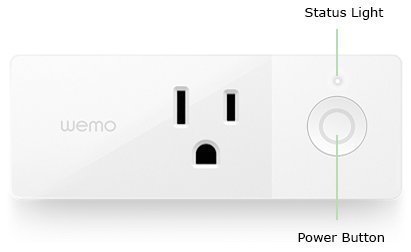
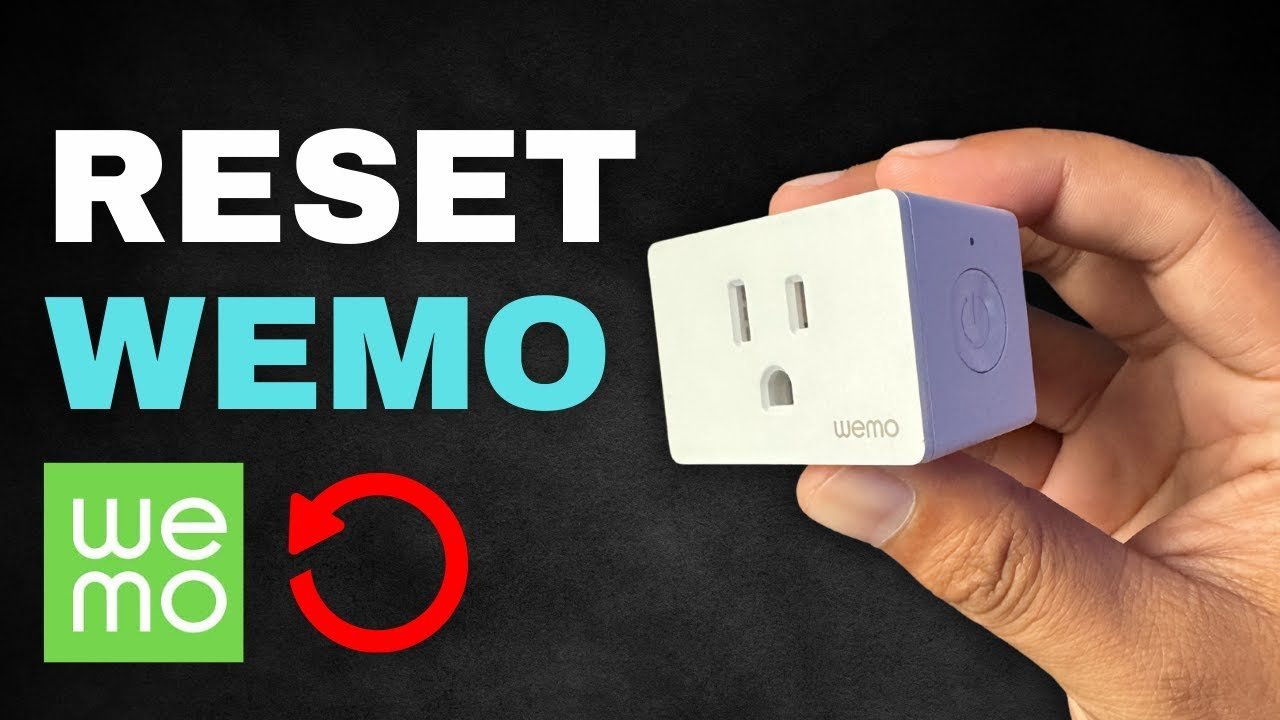
- Locate the physical power button on the top or side edge of your plug.
- Press and hold that physical button down firmly before placing the unit near the wall.
- Plug the unit back into the powered wall outlet while continuing to hold the power button down without slipping. Careful: Releasing your finger before the plug enters the socket cancels the process and simply powers the unit on normally.
- Keep your finger on the button for 10 to 12 seconds until the status light blinks alternately white and amber. Tip: If the light turns solid white, you let go too soon; pull the plug out and repeat the press-and-hold sequence again.
- Release the physical button once the alternating flashing pattern begins.
- Wait 60 to 90 seconds while the unit completes its internal reboot and clears old data.
- Open the Apple Home app or Wemo app on your phone once the indicator light flashes white steadily.
- Tap the add accessory icon to scan the eight-digit setup code and link the plug back onto your 2.4 GHz Wi-Fi router.
If the wall socket sparks or the plug feels hot to your hand, stop immediately. Don’t attempt internal electrical repairs; hire a licensed electrician to inspect the home wiring.
Reconnecting in Different Conditions
Network setups, wall locations, and ownership changes alter how your plug responds after wiping its memory.
| Operating condition | Time required | Unique setting requirement | Metric to monitor |
|---|---|---|---|
| Same home, new router | 2 to 3 minutes | 2.4 GHz band separated from 5 GHz | Status LED color pulses |
| Transferring to new owner | 5 minutes | Remove accessory inside original Home app | Setup prompt on new phone |
| Weak Wi-Fi signal area | 4 to 6 minutes | Distance under 25 feet from router | App pairing timeout screens |
| Thread-enabled Wemo plug | 1 to 2 minutes | Active Apple Home Hub powered on | Bluetooth pairing range |
Starting with the plug right beside your router prevents pairing failures, whereas fixing a dropped signal across the entire house later wastes far more time.
How to Tell You Did It Right
A correct reset produces a steady, pulsing white light that signals the hardware is broadcasting its pairing beacon. A failed attempt shows a steady amber light or no light at all, which means the device still clings to its old Wi-Fi credentials or lacks mains power. Setup drops happen most often when dual-band home routers try forcing the smart plug onto a 5 GHz channel. Smart plugs lack 5 GHz antennas entirely, so they can’t talk to the network. If your router combines both frequencies under one name, separate them into distinct 2.4 GHz and 5 GHz networks in your router admin panel. You can also temporarily turn off the 5 GHz band while you link the plug.
Network Rules and Cleanup Tasks
The Federal Communications Commission requires low-power Wi-Fi accessories to avoid harmful signal interference under FCC Part 15 rules, which is why these smart switches operate within strict, narrow transmission limits. After the reset finishes, delete the old accessory profile from your phone so duplicate ghosts don’t clutter your room screens. Write down the eight-digit HomeKit pairing PIN in a notebook or password manager because the tiny ink numbers on the plug fade over time. A clean setup lasts indefinitely until your router’s name changes, the security protocol updates, or you sell the device.
Alternative Reset Methods
In-App Software Restore
Open your Wemo smartphone application, tap into the device settings menu, and select the factory restore option. This wipes the plug in about 60 seconds without pulling it from the wall, but this trade-off only works if the app can still communicate with the plug over your local Wi-Fi.
Quick Network Toggle
If the unit is merely unresponsive rather than disconnected, turn your wall socket switch off or pull the plug out for 10 seconds without holding any buttons. This forces a soft system reboot without wiping your saved schedules or network passwords, saving you the hassle of pairing again.
Apple Home App Deletion
If your hardware is a pure HomeKit model, tap the plug inside the Apple Home app, scroll down to the bottom, and tap remove accessory. This tells the device to unbind from your Home Hub, forcing it back into pairing mode within two minutes without manual button pressing.
Frequently Asked Questions
Can I Set Up the Smart Plug Without the Eight-Digit Code?
No. Wemo devices running on Apple HomeKit require the unique eight-digit number printed on the back label. If the sticker has completely worn off and you threw away the original quick-start card, the Apple Home app can’t pair with the hardware securely.
Why Is My Status Light Flashing Amber Continuously?
An amber light means the device can’t connect to your Wi-Fi network. If this happens after a reset, your router is blocking the 2.4 GHz channel, your Wi-Fi password was entered with a typo, or the plug sits too far from your wireless access point.
How Long Does a Factory Reset Take from Start to Finish?
The physical reset process takes roughly 15 seconds to trigger, followed by 90 seconds for the internal microprocessor to wipe its memory and reboot. Full re-pairing into your smart home system takes an additional 2 to 3 minutes depending on your network connection speed.
What Happens If I Release the Button Before 10 Seconds Pass?
The smart plug will simply turn on its relay switch and resume operating with its old settings. If your goal is to clear out previous network information, you must keep pressing the button until the status light flashes alternating colors before letting go.
Is It Safe to Reset the Plug with an Appliance Attached?
No. Always unplug space heaters, lamps, fans, or coffee makers from the front of the smart plug before starting a factory reset. The rapid power toggling during the reset sequence can send irregular electrical spikes directly into connected electronic appliances.