
Resetting a Sonos Playbar requires disconnecting the power cord, holding the Play/Pause button, and plugging the cord back in until the light flashes amber and then green. The entire process takes under two minutes. This reset suits owners who want to sell their soundbar, change Wi-Fi networks, or clear stubborn registration bugs.
What You’ll Need
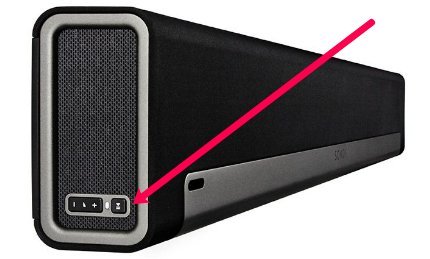
- Your Sonos Playbar soundbar.
- The original two-prong figure-8 AC power cord (non-polarized).
- Easy physical access to the rear power port and the side control panel.
- A nearby, live wall outlet that you can reach easily while holding the speaker.
- The Sonos app (S1 or S2) on a phone or tablet connected to your home Wi-Fi network.
You can swap the power cable with another standard C7 cord, but using a damaged cable or third-party power adapter strips won’t deliver steady power during boot. If your Playbar is mounted high on a wall, dismount it first.
Step-by-Step
- Unplug the AC power cord directly from the back of the Playbar or from the electrical wall outlet.
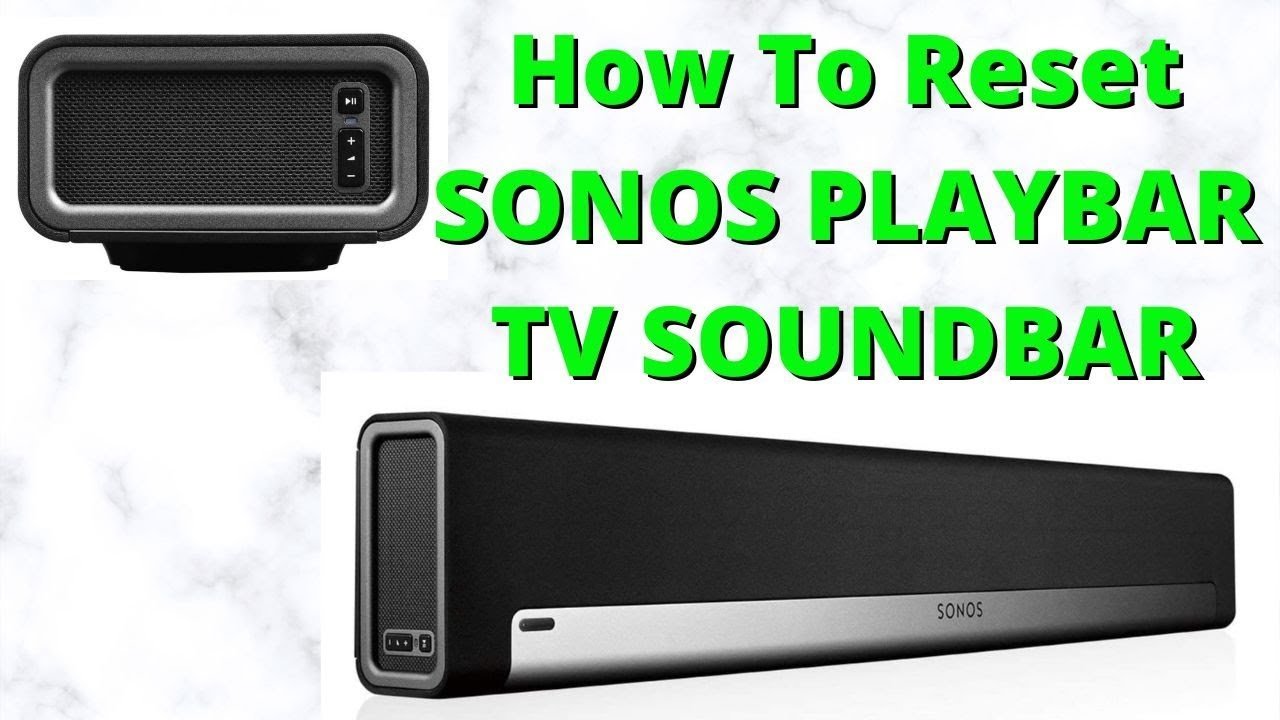
- Locate the Play/Pause button on the side panel of the Playbar, right next to the volume buttons.
- Press and hold down the Play/Pause button firmly with one hand while the unit has zero power.
- Plug the AC power cord back into the unit or wall while continuing to hold that button down.
- Keep holding the button down for about 10 to 15 seconds without letting go.
- Watch the indicator light on the side panel until it flashes amber and white.
- Release the Play/Pause button as soon as you see the amber light begin to flash.
- Wait another 30 to 60 seconds until the status indicator light flashes green continuously.
Careful: Don’t let go of the button before the amber light shows up, or the soundbar will just perform a basic reboot instead of wiping data.
Tip: If you wall-mounted the bar, get a second person to hold the speaker body so you don’t drop it while reaching behind the frame. If the mounting bracket is locked tight, stop pulling and use the proper socket driver to release the hardware safely.
Restoring Settings Across Different Setups
Here is how the reset effort changes depending on how you use your soundbar.
| Setup Situation | Time Needed | What is Different | What to Watch |
|---|---|---|---|
| Standalone TV setup | 2 minutes | Uses standard optical audio connection | Green LED light on side panel |
| Bonded 5.1 surround sound | 10 to 15 minutes | Sub and rear surround speakers lose their link | Bonded pairs dropping offline |
| Moving to a new owner | 2 minutes | Erases personal registration completely | Solid white light shifting to green |
| Upgrading home Wi-Fi router | 5 to 8 minutes | Requires re-entering local network passwords | Device discovery screen in app |
It’s safer to configure the Playbar by itself first and bond rear surround speakers later than to try connecting every piece of equipment at once.
How to Tell You Did It Right
A successful reset shows a steadily flashing green light on the side panel, which means the unit is unlinked and ready for setup. A failed reset leaves the light solid white or blinking white, meaning the Playbar simply rebooted with all your old accounts, room names, and network credentials intact. This failure happens when you release the Play/Pause button a few seconds too early before the system triggers its storage-clearing sequence. If X shows a green flashing light, proceed to the mobile app; if Y shows a solid white light, pull the cord and start over. To avoid repeating the work, keep firm thumb pressure on the button the entire time power returns.
Reset Policies and Post-Setup Care
Factory clearing removes all user data, stored tokens, and Trueplay tuning profiles according to the Sonos hardware reset procedure. This clean state lasts indefinitely until someone registers the unit again. After the light turns green, unplug the unit if you plan to box it, or launch the Sonos app to add it as a new product. If you keep the soundbar, you’ll need to re-run your room’s Trueplay acoustic tuning with your phone’s microphone. Keep in mind that older hardware limits can cause setup hiccups; this varies by model, so check the label on your casing for the exact hardware revision before diagnosing internal board problems.
Other Ways to Clear the Speaker
Standard Power Cycle
Pull the power cord from the wall, leave it unplugged for 15 seconds, and plug it back in without touching any buttons. This preserves your Wi-Fi details, room groupings, and EQ settings while clearing minor audio lag or frozen feeds.
Rebooting Through the Home Router
Log into your router’s admin panel and restart the local network. This refreshes IP address assignments across your audio gear without touching physical buttons on the Playbar, saving you from dismounting wall hardware.
Removing the Speaker via Software
Open the system settings inside your Sonos app and select the option to remove the Playbar from your home. This detaches the soundbar from your Sonos account while keeping the hardware intact, though it won’t resolve deep operating system glitches.
Frequently Asked Questions
Will Resetting Delete My Sonos Music Playlists?
No. Your personal playlists, favorites, and music service links live on your Sonos cloud account, not inside the physical Playbar memory. Once you add the soundbar back to your system, all your saved music returns automatically.
Can I Reset the Playbar Using the Sonos App?
No. Sonos doesn’t offer an in-app software button to trigger a full factory wipe on a Playbar. You must use the physical Play/Pause button on the speaker casing while plugging in the electrical cord.
Why Won’t My Playbar Turn Green After Resetting?
A faulty wall outlet, a loose power cord, or releasing the button too soon prevents the green light. If the light blinks red and white instead, the hardware failed its internal self-test and requires direct manufacturer support.
Who Is This Reset Process Not For?
This process isn’t for people experiencing simple app disconnects or minor TV audio delays. A basic restart resolves those problems without forcing you to set up your room tuning, remote control, and music services again.
What Is the Biggest Mistake People Make During a Reset?
Releasing the Play/Pause button the second the cord enters the outlet is the most frequent error. It costs you extra time because the speaker boots up normally, forcing you to wait out the cycle and start over.
Does a Factory Reset Clear My TV Remote Pairing?
Yes. The Playbar’s infrared sensor forgets your television remote control codes during a wipe. You must take thirty seconds in the Sonos app settings to point your remote and pair the volume keys again.


